
Plugin
Updated
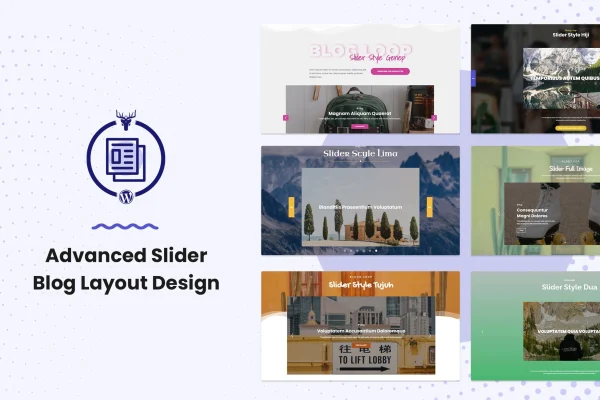
Advanced Slider Blog Layout Design
Advanced Slider Blog Layout Design is a WordPress plugin that displays your blog posts in a rectangular slider with a distinctive hover animation. It works as an extension to the Blog Layout Awesome plugin and adds filters, flexible pagination, category labels and an image lightbox to your post listings.
- Version
- 1.0.0
- Released
- May 2, 2023
- Type
- WordPress plugin
- Licence
- GPL
- Included in
- Every plan, or $3.99 on its own
What’s new in Advanced Slider Blog Layout Design 1.0.0
Version 1.0.0 · May 2, 2023
Latest
What it does
A plain list of posts can make it hard for readers to spot what interests them. This plugin presents posts as slides in a responsive slider layout. When a visitor hovers over a slide, the post information rises and the image shifts position, which gives each entry a bit of motion. Visitors can filter posts by category or tag, and category labels help them see how your content is organized.
Because it extends Blog Layout Awesome, it fits sites already using that plugin for their post layouts. It works with the Elementor page builder, so you can build and adjust sliders without writing code. It supports custom post types as well as regular posts, and you can set pagination to load more or infinite scroll, choose its alignment and match its colors and hover states to your branding. That makes it a practical choice for personal blogs, online magazines and company sites.
Best for
- Bloggers who want posts shown in an animated slider
- Online magazines with many categories and tags
- Sites already using the Blog Layout Awesome plugin
Features
Rising hover animation
On hover, the blog information slides upward and the image moves to a new position, adding a moving effect to each slide in the layout.
Category and tag filters
Visitors can filter the posts in a slider by category or tag, so they can narrow the list to the topics they care about.
Load more and infinite scroll
Choose between a load more button or infinite scroll pagination, letting readers keep browsing posts without a full page reload.
Custom pagination styling
Align pagination to the center, left or right, and set the load more text, background colors and hover states to suit your design.
Custom post type support
Display regular blog posts or content from custom post types inside the slider, which is useful for portfolios, news items and similar content.
Image lightbox
Post images open in a lightbox overlay, so readers can view visuals in more detail without leaving the page they are on.
Elementor compatible
Design and customize your sliders inside the Elementor page builder, with no coding needed to set up or adjust the layout.
Responsive looping slider
The slider adapts to desktops, tablets and phones, and the loop builder lets slides cycle continuously through your posts.
Questions about Advanced Slider Blog Layout Design
Does this work on its own or does it need another plugin?
It is built as an extension to the Blog Layout Awesome plugin, so it is meant to be used alongside that plugin. It adds the rectangular slider style, the hover animation and the related filter and pagination options to your blog layouts.
Can I use it with Elementor?
Yes. The plugin works with the Elementor page builder, so you can place and customize blog sliders visually without writing code. You can adjust pagination, filters and styling from within your page design.
Can I show content other than regular blog posts?
Yes. Advanced Slider Blog Layout Design supports custom post types, so you can feed the slider with posts or other content types your site uses. Filters by category or tag and category labels help visitors sort through that content.
Is Advanced Slider Blog Layout Design free?
The code of Advanced Slider Blog Layout Design is licensed under the GPL, so anyone may use, change and share it. GPL Feast is a paid service: a plan or a single purchase gives you the download and automatic updates. The developer's own support, licence key and online services are not included.
Which version of Advanced Slider Blog Layout Design is this?
Version 1.0.0, released May 2, 2023. New versions appear here when the developer publishes them, and members get them as automatic updates.
How do I update Advanced Slider Blog Layout Design?
Install the free GPL Feast Updater on your site and connect it with your API key. It installs new versions of Advanced Slider Blog Layout Design automatically and keeps a backup, so you can roll back.
You might also like






