
Plugin
Updated
Advanced Themer for Bricks Theme
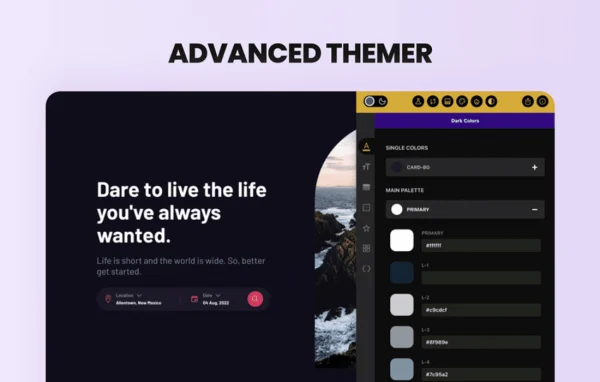
Advanced Themer for Bricks is a WordPress plugin by Maxime Beguin that adds a large set of productivity features to the Bricks builder. It focuses on styling, class management, color control and code generation, so designers and developers can build and manage Bricks sites with less manual work.
- Version
- 3.5
- Released
- Sep 30, 2026
- Developer
- Maxime Beguin
- Type
- WordPress plugin
- Licence
- GPL
- Included in
- Every plan, or $3.99 a year on its own
What’s new in Advanced Themer for Bricks Theme 3.5
Version 3.5 · Sep 30, 2026
Latest
- ImprovedAT's CSS editors support Bricks 2.4's CSS sync
- ImprovedAT colors are displayed and editable in Bricks' Style Manager
- ImprovedColors stay in sync between both color managers
- ImprovedBricks colors and their shades display correctly in AT
- ImprovedAT and Bricks dark mode toggles now drive each other
- ImprovedThe builder's dark mode preview covers Bricks colors too
- FixedThe builder no longer opens with unsaved changes
- FixedAT stopped working after moving a panel in the Builder Interface
What it does
Building with Bricks often means writing CSS by hand, tracking dozens of classes and setting up colors and responsive values one by one. This plugin adds over 180 productivity enhancements directly inside the builder to handle much of that work. You get a CSS grid builder with minmax() support and breakpoint controls, a global color manager with shade generation, fluid CSS variables and better CSS editors with SASS integration. Class tools let you convert classes, run bulk actions and find unused global classes.
The plugin also brings AI features into the builder and WordPress dashboard. You can generate HTML, CSS and JavaScript from text prompts or images, and create content and images without leaving your workspace. For client work, a strict editor view limits which controls clients can reach, which helps keep a design intact after handover. Settings can be exported and imported between projects, and the plugin can be disabled without breaking your site. Its colors and dark mode also work alongside the native Bricks color tools.
Best for
- Web designers who build client sites with Bricks
- Agencies handing finished Bricks sites over to clients
- Developers who want class and CSS tools inside Bricks
Features
AI code generation
Generate HTML, CSS and JavaScript from simple text prompts or from images, cutting down on the code you write by hand.
CSS grid builder
Build responsive grids with a drag and drop interface that supports minmax() functions and breakpoint controls.
Class management tools
Convert classes, use contextual menus, run bulk actions on multiple classes and detect unused global classes to keep your styles tidy.
Colors and dark mode
Use a global color manager, dynamic colors and a shade generator, plus a no-code dark mode that works with the Bricks dark mode toggle.
Fluid CSS variables
Create custom fluid scales in the variable manager so sizes and spacing adjust across screen sizes.
CSS editor with SASS
Write styles in improved CSS editors with SASS integration for more control over how your stylesheets are organized.
Strict editor view
Choose which builder controls clients can access, making handover easier while protecting the layout and styling you set up.
Templates and settings transfer
Find templates quickly, manage remote templates and export or import your plugin settings to reuse the same setup on other projects.
Advanced Themer for Bricks Theme older versions
- 3.4.1Sep 221 fix
- 3.3.15Apr 242 fixes, 1 removal
- 3.3.14Mar 212 fixes
- 3.3.13Feb 23
- 3.3.12Feb 14
- 3.3.11Dec 4, 2025
- 3.3.10Dec 3, 2025
- 3.3.9Oct 29, 2025
- 3.3.7Aug 29, 2025
- 3.3.6Aug 28, 2025
Members and buyers of this product can download older versions.
83 older versions in all. If you need one that is not listed, ask support.
Questions about Advanced Themer for Bricks Theme
Does this plugin work without Bricks?
No. It is built specifically for the Bricks builder and adds its tools inside the Bricks editing interface. You need a site that uses Bricks to make use of its features.
What can the AI features actually do?
The AI tools can generate HTML, CSS and JavaScript from text descriptions or from images. They can also create written content and AI-generated images directly inside the builder and the WordPress dashboard.
Will my site break if I turn the plugin off?
The plugin is described as safe to disable, meaning you can turn it off without affecting your site. That makes it practical to test on a project before committing to it.
Can I stop clients from changing my design?
Yes. The strict editor view lets you customize and restrict which controls clients can access in the builder, so they can edit what you allow while the overall design stays in place.
Is Advanced Themer for Bricks Theme free?
The code of Advanced Themer for Bricks Theme is licensed under the GPL, so anyone may use, change and share it. GPL Feast is a paid service: a plan or a single purchase gives you the download and automatic updates. The developer's own support, licence key and online services are not included.
Which version of Advanced Themer for Bricks Theme is this?
Version 3.5, released Sep 30, 2026. New versions appear here when the developer publishes them, and members get them as automatic updates.
How do I update Advanced Themer for Bricks Theme?
Install the free GPL Feast Updater on your site and connect it with your API key. It installs new versions of Advanced Themer for Bricks Theme automatically and keeps a backup, so you can roll back.
You might also like






