
Plugin
Updated
Analytify Pro
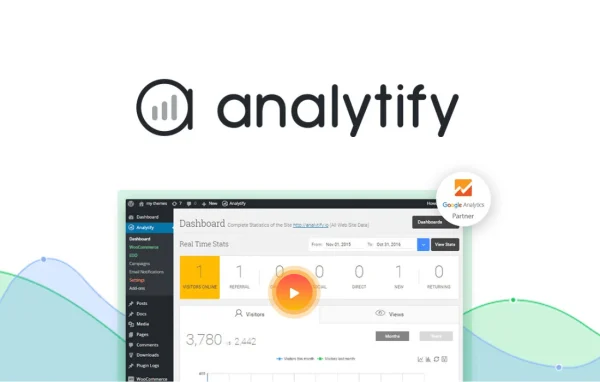
Analytify Pro by WPBrigade is a WordPress plugin that brings your Google Analytics data into the WordPress dashboard. It turns traffic and visitor numbers into clear charts and reports, so you can check how your site and content perform without logging into Google Analytics separately.
- Version
- 9.1.2
- Released
- Aug 17, 2026
- Developer
- Analytify
- Type
- WordPress plugin
- Requires
- Analytify
- Licence
- GPL
- Included in
- Every plan, or $6.39 a year on its own
What’s new in Analytify Pro 9.1.2
Version 9.1.2 · Aug 17, 2026
Latest
- ImprovedAll CSS/JS assets are now properly minified for faster page loads.
- ImprovedLimited the WooCommerce, EDD, and LifterLMS admin scripts to their concerning pages.
- FixedGA4 gtag events no longer get forced into `debug_mode`, so production data isn't routed to GA4 DebugView.
What it does
Google Analytics holds a lot of useful information, but its interface can feel heavy if you only want to know how your posts, pages and campaigns are doing. This plugin pulls that data into WordPress and presents it as charts and graphs aimed at non-technical users. You can watch real-time visitors, see how social media traffic performs and look at statistics for each individual post or page, all from the admin area you already use.
The Pro plugin builds on the base Analytify plugin and now includes the features that used to come as separate add-ons. It adds eCommerce tracking for sales and customer behavior, reports for custom post types such as portfolios or testimonials, campaign tracking for PPC and SEO efforts, and front-end reports you can share with clients. Setup is a one-click process that needs no coding, which suits site owners who want useful numbers without extra tools.
Best for
- Bloggers who want per-post traffic stats in WordPress
- Online shop owners tracking sales and customer behavior
- Agencies sharing analytics reports with clients
Features
One-click setup
Connect your site and start tracking with a one-click setup that requires no coding experience, so analytics are running quickly after you configure the plugin.
Real-time visitor stats
See who is on your site and what they are doing as it happens, which helps you spot traffic trends and react to changes in visitor behavior.
Social media reports
Review how your social media campaigns send traffic to your site with clear reports shown directly in your WordPress dashboard.
eCommerce tracking
Track sales, revenue and customer behavior inside WordPress, with tracking that covers stores and course sites built on tools such as WooCommerce, EDD and LifterLMS.
Custom post type analytics
Get dedicated reports for custom content types like portfolios, galleries and testimonials, so every kind of content on your site has its own numbers.
Page-level statistics
Open detailed stats for every individual post and page to see which pieces of content draw visitors and keep them engaged.
Front-end reporting
Display analytics reports on the front end of your site so clients and collaborators can view stats without needing access to the WordPress dashboard.
Campaign tracking
Follow your marketing campaigns, including PPC and SEO efforts, from one dashboard to compare how each one brings in traffic.
Analytify Pro older versions
- 9.1.1Aug 53 improvements, 6 fixes
- 9.1.0Jul 162 new, 6 improvements, 12 fixes
- 9.0.2May 142 improvements
- 9.0.1May 3
- 9.0.0Apr 30
- 8.1.1Feb 28
- 8.1.0Feb 10
- 8.0.2Jan 13
- 8.0.1Jan 10
- 8.0.0Jan 7
Members and buyers of this product can download older versions.
30 older versions in all. If you need one that is not listed, ask support.
Questions about Analytify Pro
Do I still need to log into Google Analytics to see my stats?
For day-to-day checks, no. The plugin brings your Google Analytics data into the WordPress dashboard as charts and reports, covering real-time visitors, social traffic, campaigns and per-post statistics, so most of what you need is visible without leaving WordPress.
Does it need the free Analytify plugin?
Yes. Analytify Pro works on top of the base Analytify plugin, and all of the add-ons that used to be sold separately are now built into the Pro plugin itself, so you get eCommerce tracking, front-end reports and the other extras together.
Can my clients see reports without an admin account?
Yes. Front-end reporting lets you display analytics on the public side of your site, so clients and collaborators can view the stats you choose to share without logging into the WordPress dashboard.
Will it track my online store's sales?
It includes eCommerce tracking for sales, revenue and customer behavior inside WordPress. Its admin scripts are built to work with WooCommerce, EDD and LifterLMS, which suits stores and course sites using those tools.
Is Analytify Pro free?
The code of Analytify Pro is licensed under the GPL, so anyone may use, change and share it. GPL Feast is a paid service: a plan or a single purchase gives you the download and automatic updates. The developer's own support, licence key and online services are not included.
Which version of Analytify Pro is this?
Version 9.1.2, released Aug 17, 2026. New versions appear here when the developer publishes them, and members get them as automatic updates.
How do I update Analytify Pro?
Install the free GPL Feast Updater on your site and connect it with your API key. It installs new versions of Analytify Pro automatically and keeps a backup, so you can roll back.
What does Analytify Pro need?
Analytify Pro needs Analytify installed and active.
You might also like






