
Plugin
Updated
Appender
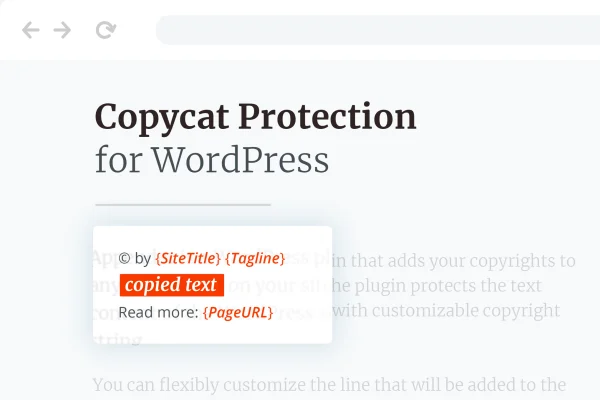
Appender is a WordPress plugin that attaches a copyright notice to any text a visitor copies from your site. You write the message, choose whether it goes before or after the copied text, and add details like your site name, page URL and the time of copying.
- Version
- 1.1.2
- Released
- Feb 25, 2026
- Type
- WordPress plugin
- Requires
- Elementor
- Licence
- GPL
- Included in
- Every plan, or $3.99 on its own
What’s new in Appender 1.1.2
Version 1.1.2 · Feb 25, 2026
Latest
- SecurityFixed plugin security issues
What it does
When someone copies a paragraph from your site and pastes it elsewhere, the link back to you is usually lost. This plugin addresses that by adding your copyright information to the clipboard along with the copied text. The pasted content then carries a clear ownership notice, which discourages people from passing your writing off as their own and points readers back to the original source.
You set up a copyright string and decide where it appears relative to the copied text. Dynamic tags pull in your site title, tagline, website address, page title and page URL, and you can stamp the exact date and time of the copy. It works with WordPress themes and the Gutenberg editor, and the plugin requires Elementor to be active. A POT file is included for translation, with support for right-to-left languages.
Best for
- Bloggers who want credit when their posts get copied
- Business sites publishing original articles or guides
- Writers and creatives protecting their published text
Features
Custom copyright strings
Write your own copyright notice and have it added to text whenever a visitor copies content from your pages, so ownership is stated wherever it gets pasted.
Before or after placement
Choose whether the copyright notice appears ahead of the copied text or after it, depending on how you want the pasted content to read.
Dynamic site details
Insert your Site Title, Tagline, Website Address, Page Title and Page URL automatically, so each copied passage points back to the exact page it came from.
Date and time stamping
Add the precise date and time the text was copied to the notice, giving you a record of when your content was taken.
Theme and Gutenberg compatibility
Designed to work with WordPress themes and fully compliant with the Gutenberg block editor, so it fits into the way you already build pages.
Translation and RTL support
Ships with a POT file for translating the plugin into other languages, and handles right-to-left text directions for sites in languages like Arabic or Hebrew.
Lightweight build
Built as a small, focused plugin that handles one job, adding copyright details to copied text, without piling extra features onto your site.
Questions about Appender
Does this plugin stop visitors from copying my text?
Its main job is to append a copyright notice to whatever text is copied. Visitors can still copy, but the pasted content includes your message along with details like your site name and page URL, which makes the source clear and discourages people from claiming it as their own.
What information can I include in the copyright notice?
You can write your own copyright string and add dynamic details: Site Title, Tagline, Website Address, Page Title and Page URL. You can also include the exact date and time the text was copied, and place the notice either before or after the copied content.
Will it work on a site in a language other than English?
Yes. The plugin includes a POT file so it can be translated into other languages, and it supports right-to-left text directions. That makes it usable on sites written in languages such as Arabic or Hebrew as well as left-to-right languages.
Do I need any other plugins for it to work?
The plugin requires Elementor to be active on your site. It is also built to work with WordPress themes and is compliant with the Gutenberg block editor, so you can keep using your current setup for creating pages and posts.
Is Appender free?
The code of Appender is licensed under the GPL, so anyone may use, change and share it. GPL Feast is a paid service: a plan or a single purchase gives you the download and automatic updates. The developer's own support, licence key and online services are not included.
Which version of Appender is this?
Version 1.1.2, released Feb 25, 2026. New versions appear here when the developer publishes them, and members get them as automatic updates.
How do I update Appender?
Install the free GPL Feast Updater on your site and connect it with your API key. It installs new versions of Appender automatically and keeps a backup, so you can roll back.
What does Appender need?
Appender needs Elementor installed and active.
You might also like






