
Plugin
Updated
Article Read Time
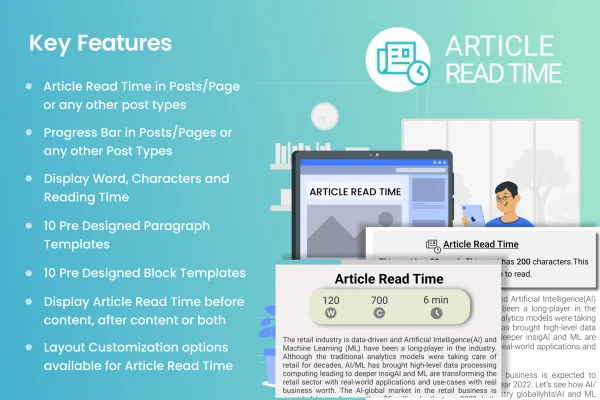
Article Read Time is a WordPress plugin that shows readers how long an article will take to read. It also adds a progress bar that fills as they scroll, so visitors always know how much of the piece is left.
- Version
- 1.0.3
- Released
- Sep 3, 2025
- Type
- WordPress plugin
- Licence
- GPL
- Included in
- Every plan, or $3.99 on its own
What’s new in Article Read Time 1.0.3
Version 1.0.3 · Sep 3, 2025
Latest
What it does
Long posts can feel open-ended. A reader landing on a tutorial or feature story has no quick way to judge whether they have two minutes or twenty to spare. This plugin answers that question at the top of the article with an estimated reading time, then keeps them oriented with a progress bar that tracks their position as they scroll down the page. Both cues help set expectations and give readers a clearer sense of where they are in the content.
The plugin works with blog posts, news articles, tutorials and other text-based content. You can adjust the colors, size, position and style of both the read time label and the progress bar so they match your site's look. The display is responsive, so it works on desktop, tablet and phone screens, and the plugin is built to be lightweight. It is also translation ready, which suits sites that publish in languages other than English.
Best for
- Bloggers who publish long-form posts
- News and magazine websites
- Tutorial and how-to content sites
Features
Estimated reading time
Displays how long an article should take to read, so visitors can decide up front whether to read now or come back later.
Scroll progress bar
A bar that fills as the reader scrolls through the article, giving a visual indicator of how much content remains.
Customizable appearance
Change the colors, size, position and style of both the read time display and the progress bar to fit your branding.
Responsive on all devices
Both elements adapt to desktop, tablet and smartphone screens, so readers get a consistent experience wherever they open your articles.
Works across content types
Use it on blog posts, news articles, tutorials and any other text content where reading time and progress tracking are useful.
Lightweight build
Designed to add read time and progress tracking while keeping its footprint small, so it does not weigh down your pages.
Translation ready
The plugin can be adapted to other languages, which makes it practical for multilingual sites and international audiences.
Questions about Article Read Time
What does this plugin add to my articles?
It adds two things: an estimated reading time that tells visitors how long the article will take, and a progress bar that fills as they scroll so they can see how much content is left.
Can I make the progress bar match my site design?
Yes. You can customize the colors, size, position and style of the progress bar, and the same options apply to the reading time display, so both can follow your existing branding.
Does it work on mobile phones?
The plugin is responsive and works across desktop, tablet and smartphone screens. Readers on any of these devices see the reading time and progress bar adapted to their screen size.
Can I use it on a site that is not in English?
Yes. The plugin is translation ready, so its text can be adapted to other languages. That makes it a reasonable choice for multilingual blogs and publications with international readers.
Is Article Read Time free?
The code of Article Read Time is licensed under the GPL, so anyone may use, change and share it. GPL Feast is a paid service: a plan or a single purchase gives you the download and automatic updates. The developer's own support, licence key and online services are not included.
Which version of Article Read Time is this?
Version 1.0.3, released Sep 3, 2025. New versions appear here when the developer publishes them, and members get them as automatic updates.
How do I update Article Read Time?
Install the free GPL Feast Updater on your site and connect it with your API key. It installs new versions of Article Read Time automatically and keeps a backup, so you can roll back.
You might also like






