
Plugin
Updated
Asgard Messages Builder
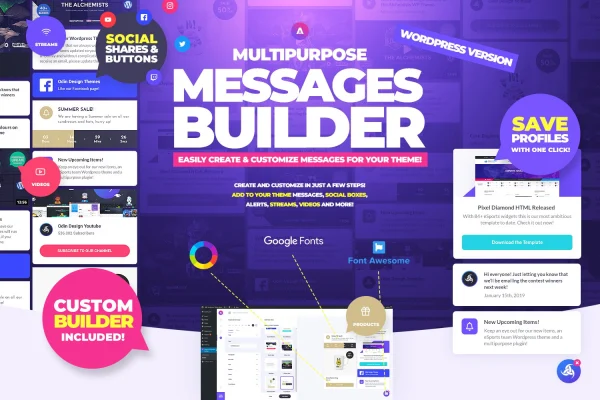
Asgard Messages Builder is a WordPress plugin for creating custom message and media boxes on your site. You can use it to announce products, post updates, feature videos, promote events or point visitors to your social accounts, starting from ready-made templates you adjust to fit your design.
- Version
- 1.1.0
- Released
- May 2, 2023
- Type
- WordPress plugin
- Licence
- GPL
- Included in
- Every plan, or $3.99 on its own
What’s new in Asgard Messages Builder 1.1.0
Version 1.1.0 · May 2, 2023
Latest
What it does
Most sites need a way to put a short, visible message in front of visitors, such as a new product, a schedule change or an upcoming event. This plugin gives you one place to build those boxes. It covers message alerts, notification pop-ups, image and video boxes and social account widgets, so a blog, online store, portfolio or business site can handle several kinds of announcements without separate tools for each.
You start from one of more than 10 base templates and then shape it to suit your site. Icons, buttons, images and videos can be added or removed inside each template, and a live preview shows your changes as you make them. Countdown timers and alerts can sit inside a box when an offer or event has a deadline. If you want finer control, you can add your own CSS and JavaScript to adjust the look and behavior.
Best for
- Blogs announcing new posts, videos or updates
- Online stores promoting product launches and limited-time offers
- Business and event sites highlighting upcoming dates
Features
More than 10 base templates
Start from ready-made templates for message alerts, notification pop-ups, image boxes, video boxes and social share widgets, then adapt them to your site.
Add or remove elements
Each template lets you add or remove icons, buttons, images and videos, so the finished box matches your branding and the message you want to send.
Live preview while editing
See changes in real time as you customize a box, which makes it easier to get the layout and styling right before it goes live.
Social account boxes
Build boxes that let visitors share your content or follow your social accounts with a click, placed wherever they fit on your pages.
Countdown timers and alerts
Add countdown timers and attention-catching alerts inside your message boxes to highlight time-limited offers, launches or upcoming events.
Custom CSS and JavaScript
Advanced users can add their own CSS and JavaScript to adjust the appearance and behavior of message boxes beyond the built-in options.
Responsive layouts
Message and media boxes are built to display properly on phones, tablets and desktop screens, so your announcements read well on any device.
Questions about Asgard Messages Builder
What kinds of boxes can I create with this plugin?
You can build message alerts, notification pop-ups, image boxes, video boxes and social account widgets. These work for product announcements, site updates, featured content, upcoming events and social sharing, all managed from a single plugin.
Do I need to design boxes from scratch?
No. Asgard Messages Builder includes more than 10 base templates. You pick one, then add or remove icons, buttons, images and videos to suit your site, checking the result in the live preview as you go.
Can I add a countdown timer to an announcement?
Yes. Countdown timers and alerts can be placed inside your message boxes, which is useful for sales, product launches or events that have a set start or end time.
Can I customize the styling beyond the built-in options?
Yes. The plugin supports custom CSS and JavaScript, so if you are comfortable with code you can fine-tune the appearance and behavior of your boxes past what the template settings offer.
Is Asgard Messages Builder free?
The code of Asgard Messages Builder is licensed under the GPL, so anyone may use, change and share it. GPL Feast is a paid service: a plan or a single purchase gives you the download and automatic updates. The developer's own support, licence key and online services are not included.
Which version of Asgard Messages Builder is this?
Version 1.1.0, released May 2, 2023. New versions appear here when the developer publishes them, and members get them as automatic updates.
How do I update Asgard Messages Builder?
Install the free GPL Feast Updater on your site and connect it with your API key. It installs new versions of Asgard Messages Builder automatically and keeps a backup, so you can roll back.
You might also like






