
Plugin
Updated
Asgard Twitch Alerts Builder
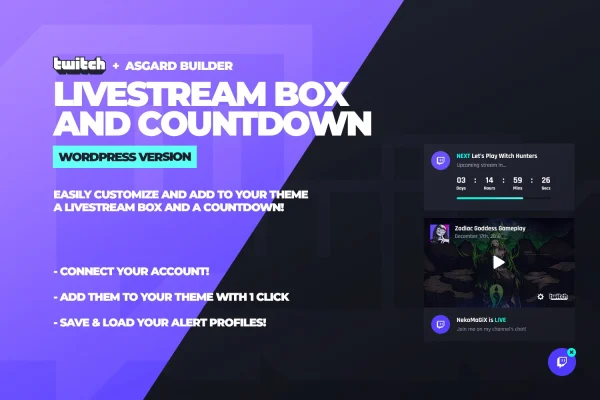
Asgard Twitch Alerts Builder is a WordPress plugin for Twitch streamers. It connects your Twitch account to your site and shows your channel name and live or offline status in a floating box, with an optional countdown timer for your next stream.
- Version
- 1.1.1
- Released
- May 2, 2023
- Type
- WordPress plugin
- Licence
- GPL
- Included in
- Every plan, or $3.99 on its own
What’s new in Asgard Twitch Alerts Builder 1.1.1
Version 1.1.1 · May 2, 2023
Latest
What it does
Many streamers keep a WordPress site alongside their Twitch channel, but visitors often have no quick way to tell whether a stream is running right now. This plugin links your Twitch account to your website and displays your channel name with its current status, online or offline, inside a floating element. Because the box floats on the page, visitors can see your status and reach your stream from wherever they are on the site.
Design is handled through the Asgard builder, where you can change colors, fonts, icons and text so the box fits your branding. Google Fonts and Font Awesome icons are available for extra styling choices. A countdown timer lets you announce an upcoming stream ahead of time. You can also save several alert group configurations, then load and edit them later, which helps when you want different setups for different events or campaigns.
Best for
- Twitch streamers who run a WordPress website
- Gaming and streaming personality sites
- Creators announcing scheduled live streams to site visitors
Features
Automatic Twitch connection
Link your Twitch account and the plugin displays your channel name and live or offline status on your website without manual changes.
Customizable livestream box
Use the Asgard builder to adjust the colors, fonts, icons and text of the livestream box so it matches your site design.
Floating on-page element
The livestream box and countdown sit in a floating element, so they stay visible and easy for visitors to reach as they browse.
Countdown timer
Add a customizable countdown timer that tells fans when your next stream starts, giving them a clear time to come back.
Saved alert groups
Create multiple alert group configurations, save them, and load or edit any of them later without losing earlier setups.
Google Fonts support
Pick from Google Fonts when styling the livestream box and alerts, giving you more typography choices for your branding.
Font Awesome icons
Choose icons from Font Awesome to use in your stream box and alerts, alongside your custom colors and text.
Questions about Asgard Twitch Alerts Builder
Will my website show when I am live on Twitch?
Yes. Once your Twitch account is connected, the plugin automatically displays your channel name and whether your stream is online or offline, inside a floating box that visitors can see while they browse your site.
Can I make the livestream box match my site design?
Yes. The Asgard builder lets you change colors, fonts, icons and text. You can use Google Fonts for typography and Font Awesome for icons, so the box can follow your existing branding.
Can I count down to my next stream?
Yes. The plugin includes a customizable countdown timer that you can show before you go live, letting visitors know exactly when your next stream begins.
Can I keep more than one alert setup?
You can create and save multiple alert group configurations. Each one can be loaded and edited later, so you can switch between setups for different events or campaigns without rebuilding them.
Is Asgard Twitch Alerts Builder free?
The code of Asgard Twitch Alerts Builder is licensed under the GPL, so anyone may use, change and share it. GPL Feast is a paid service: a plan or a single purchase gives you the download and automatic updates. The developer's own support, licence key and online services are not included.
Which version of Asgard Twitch Alerts Builder is this?
Version 1.1.1, released May 2, 2023. New versions appear here when the developer publishes them, and members get them as automatic updates.
How do I update Asgard Twitch Alerts Builder?
Install the free GPL Feast Updater on your site and connect it with your API key. It installs new versions of Asgard Twitch Alerts Builder automatically and keeps a backup, so you can roll back.
You might also like






