
Plugin
Updated
Before & After Images Comparison
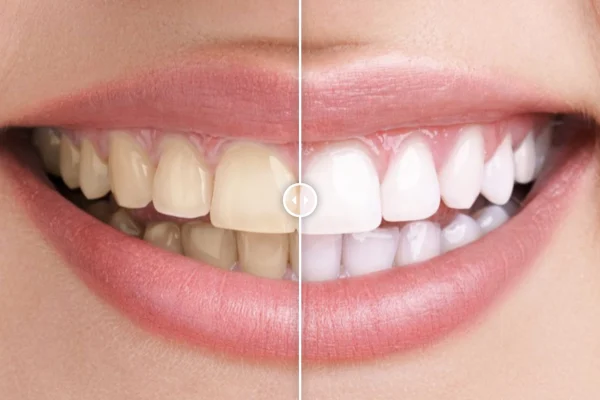
Before & After Images Comparison is a WordPress plugin by CurlyThemes that places two images on top of each other with a slider between them. Visitors drag the slider to reveal the difference, which makes it a clear way to present makeovers, renovations and project progress.
- Version
- 1.0.1
- Released
- May 2, 2023
- Type
- WordPress plugin
- Licence
- GPL
- Included in
- Every plan, or $3.99 on its own
What’s new in Before & After Images Comparison 1.0.1
Version 1.0.1 · May 2, 2023
Latest
What it does
Showing a change with two separate photos asks visitors to flip back and forth and spot the difference themselves. This plugin puts both images in one frame with a divider that visitors can move, so the before and after sit in the same spot and the change is easy to see. It suits makeup artists presenting makeovers, fitness coaches sharing client progress, home improvement businesses showing renovations and designers revealing project updates.
You add a comparison to any page or post with a shortcode, or with a Visual Composer element if you build pages that way. Each comparison can run left to right or top to bottom, start the slider at a position you choose and carry its own before and after labels. The display is responsive and retina ready, so it adapts to different screen sizes and high resolution screens. If you want the look to match your branding, custom CSS lets you adjust the styling.
Best for
- Beauty, makeup and salon sites presenting makeovers
- Fitness coaches sharing client progress photos
- Renovation, home improvement and design portfolios
Features
Horizontal or vertical comparison
Choose a left to right or top to bottom comparison so the slider direction fits your images and the way you want to tell the story.
Custom starting position
Set where the slider sits when the page loads, so visitors first see the part of the image you want them to notice.
Before and after labels
Add your own labels to each side of the comparison to give visitors context about which image shows which state.
Shortcode placement
Insert a comparison slider into any page or post with a shortcode, giving you freedom over where each comparison appears.
Visual Composer element
Visual Composer users can add comparisons through a dedicated element instead of typing a shortcode by hand.
Responsive and retina ready
The slider adjusts to different devices and screen sizes and is built to display sharply on high resolution screens.
Custom CSS support
Override the default styling with your own CSS to match the comparison sliders to your site's colors and branding.
Questions about Before & After Images Comparison
Can the slider move up and down instead of side to side?
Yes. Each comparison can run either left to right or top to bottom, so you can pick the direction that works best for your images and layout.
Do I need a page builder to use it?
No. You can place a comparison in any page or post with a shortcode. If you use Visual Composer, there is also an element for adding comparisons from within that builder.
Can I change the labels and the look of the slider?
You can add your own before and after labels and choose where the slider starts. For deeper styling changes, the plugin supports custom CSS so you can match it to your site design.
Will the comparisons work on phones and tablets?
The plugin is fully responsive, so comparisons adapt to different screen sizes. It is also retina ready, which helps images look sharp on high resolution displays.
Is Before & After Images Comparison free?
The code of Before & After Images Comparison is licensed under the GPL, so anyone may use, change and share it. GPL Feast is a paid service: a plan or a single purchase gives you the download and automatic updates. The developer's own support, licence key and online services are not included.
Which version of Before & After Images Comparison is this?
Version 1.0.1, released May 2, 2023. New versions appear here when the developer publishes them, and members get them as automatic updates.
How do I update Before & After Images Comparison?
Install the free GPL Feast Updater on your site and connect it with your API key. It installs new versions of Before & After Images Comparison automatically and keeps a backup, so you can roll back.
You might also like






