
Plugin
Updated
Bookify Pro
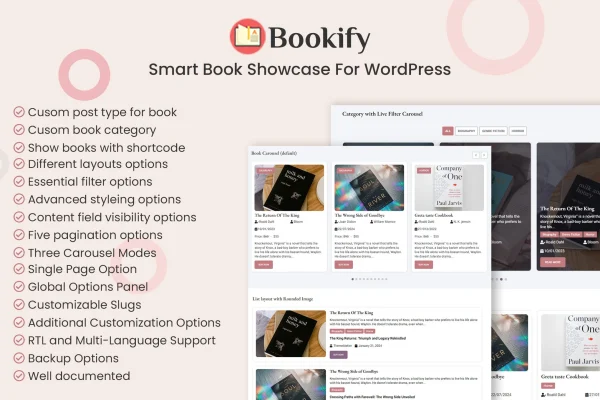
Bookify Pro is a WordPress plugin for presenting books on your site. It adds a dedicated book post type with detailed metadata, custom categories and shortcode-based displays, so authors, publishers and reviewers can build organized book collections and place them on any page.
- Version
- 1.1.0
- Released
- Aug 24, 2026
- Type
- WordPress plugin
- Licence
- GPL
- Included in
- Every plan, or $3.99 on its own
What’s new in Bookify Pro 1.1.0
Version 1.1.0
Latest
- FixedFixed single page permalink issue.
- FixedFixed single page and archive page responsive.
- NewAdded container for single page and archive page.
What it does
Regular posts and pages are a clumsy fit for a book catalog. Details like the ISBN, publisher, format and author bio end up scattered through the text, and keeping a growing list consistent gets harder over time. This plugin gives books their own post type with fields for that information, so each title is entered the same way and stays easy to edit, update or remove from the backend.
Once your books are entered, you group them with custom book categories, such as genres or curated lists, and use shortcodes to place book displays anywhere on your site. The layouts focus on covers and descriptions and adapt to different screen sizes. Each book has its own single page and archive views, and you can add affiliate links to entries, which suits review blogs and recommendation sites as well as author and publisher websites.
Best for
- Authors presenting their published books
- Publishers listing catalogs by genre or series
- Book review and affiliate recommendation blogs
Features
Custom post type for books
Each book is published as its own post, keeping your literary content separate from regular posts and easier to manage as the collection grows.
Detailed book metadata
Add author bios, publisher information, ISBN, format and a synopsis to every entry so readers see the important details about a title at a glance.
Custom book categories
Sort books into your own categories, such as genres or themed lists, so visitors can browse and filter the collection by what interests them.
Shortcode book displays
Embed book displays on any page or post with shortcodes, giving you control over where your collections appear across the site.
Multiple layout styles
Choose from several layouts built to highlight book covers and descriptions, so you can match the display to the page it sits on.
Responsive book pages
Book displays, single book pages and archive pages adapt to different screen sizes, so the collection reads well on phones, tablets and desktops.
Affiliate links on entries
Attach affiliate links directly to individual book entries, which is handy for review sites and recommendation blogs that point readers to retailers.
Simple backend management
Add, edit or remove books from a straightforward admin interface without touching code or rebuilding pages by hand.
Bookify Pro older versions
- 1.0.0Mar 12, 2024
Members and buyers of this product can download older versions.
Questions about Bookify Pro
What details can I add for each book?
Each book entry has fields for author bios, publisher information, ISBN, format and a synopsis, along with the usual title and cover. Because these are dedicated fields, every book in your collection follows the same structure and shows readers the same set of details.
How do I put books on a page?
The plugin uses shortcodes, so you can place a book display in any page or post. You pick from the available layouts, which are designed to highlight covers and descriptions, and the displays adjust to different screen sizes.
Can I organize books by genre?
Yes. Bookify Pro includes custom book categories, so you can create genres, series or curated lists and assign books to them. Visitors can then browse and filter your collection by category.
Can I use it for an affiliate book site?
Yes. You can add affiliate links directly to individual book entries, which makes the plugin a good fit for review blogs and recommendation sites that send readers to retailers to buy the books they feature.
Is Bookify Pro free?
The code of Bookify Pro is licensed under the GPL, so anyone may use, change and share it. GPL Feast is a paid service: a plan or a single purchase gives you the download and automatic updates. The developer's own support, licence key and online services are not included.
Which version of Bookify Pro is this?
Version 1.1.0, released Aug 24, 2026. New versions appear here when the developer publishes them, and members get them as automatic updates.
How do I update Bookify Pro?
Install the free GPL Feast Updater on your site and connect it with your API key. It installs new versions of Bookify Pro automatically and keeps a backup, so you can roll back.
You might also like






