Plugin
Updated
Business Hours
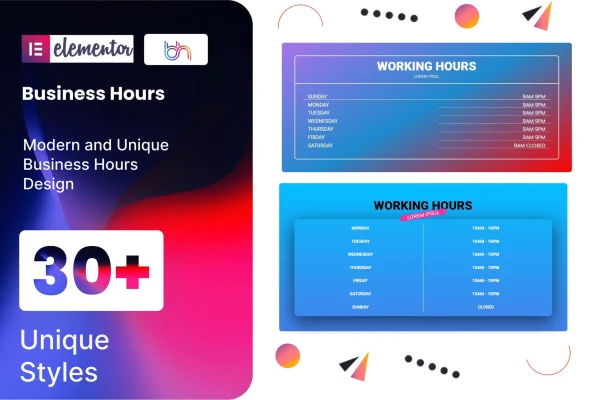
Business Hours is a WordPress plugin that adds a business hours element to Elementor. It gives you preset designs and styling controls so you can show when your shop, office or service is open, all built inside the Elementor editor without writing code.
- Version
- 1.6
- Released
- Aug 26, 2026
- Type
- WordPress plugin
- Requires
- Elementor
- Licence
- GPL
- Included in
- Every plan, or $3.99 on its own
What’s new in Business Hours 1.6
Version 1.6 · Aug 26, 2026
Latest
What it does
Visitors often land on a site just to check when a business is open, and a plain text list can be easy to miss or hard to read on a phone. This addon gives you a dedicated business hours section that you place on any Elementor page. You pick one of more than 30 preset designs, enter your days and times, and the section displays them in a clear, organized layout that fits the rest of your page.
Customization covers the day and time entries, images, colors, backgrounds and icons, so the hours block can match your brand. The layouts are responsive and display consistently across major browsers. It needs Elementor and is meant to work with themes built on Elementor. A .pot file is included, which makes it possible to translate the plugin for sites that serve visitors in other languages.
Best for
- Local shops and restaurants built with Elementor
- Offices and service providers listing opening times
- Freelancers building Elementor sites for small business clients
Features
More than 30 preset designs
Start from one of over 30 ready-made business hours layouts, then adjust it instead of designing the section from scratch.
Day and time customization
Set each day and its opening times individually, so the section reflects your actual schedule, including days with different hours.
Color, image and icon styling
Change colors, backgrounds, images and icons in each business hours section so it fits the look of your brand and page.
Drag and drop setup
Add and configure the business hours section using the Elementor drag and drop editor, with no coding needed at any step.
Responsive layouts
The hours display adapts to different screen sizes, so visitors on phones, tablets and desktops can read your schedule clearly.
Works with Elementor themes
Built to run alongside WordPress themes that are based on Elementor, so you can place the hours block within your existing design.
Translation ready
A .pot file is included, letting you translate the plugin's text into other languages for an international audience.
Cross-browser display
The business hours section is built to look consistent across all major web browsers your visitors are likely to use.
Questions about Business Hours
Do I need Elementor to use this plugin?
Yes. This is an addon for Elementor, so Elementor must be active on your site. The business hours section is added and edited inside the Elementor editor like other page elements.
Can I make the hours section match my brand colors?
Yes. You can adjust colors, backgrounds, images and icons for each business hours section. Combined with the more than 30 preset designs, that gives you room to match the style of your site.
Will the business hours look right on mobile devices?
The layouts are responsive, so they adjust to phone, tablet and desktop screens. The plugin is also built to display consistently across major web browsers.
Can I translate the plugin into another language?
Yes. The plugin is translation ready and includes a .pot file, which you can use with standard WordPress translation tools to present the text in your visitors' language.
Is Business Hours free?
The code of Business Hours is licensed under the GPL, so anyone may use, change and share it. GPL Feast is a paid service: a plan or a single purchase gives you the download and automatic updates. The developer's own support, licence key and online services are not included.
Which version of Business Hours is this?
Version 1.6, released Aug 26, 2026. New versions appear here when the developer publishes them, and members get them as automatic updates.
How do I update Business Hours?
Install the free GPL Feast Updater on your site and connect it with your API key. It installs new versions of Business Hours automatically and keeps a backup, so you can roll back.
What does Business Hours need?
Business Hours needs Elementor installed and active.
You might also like






