
Plugin
Updated
BWD Counter
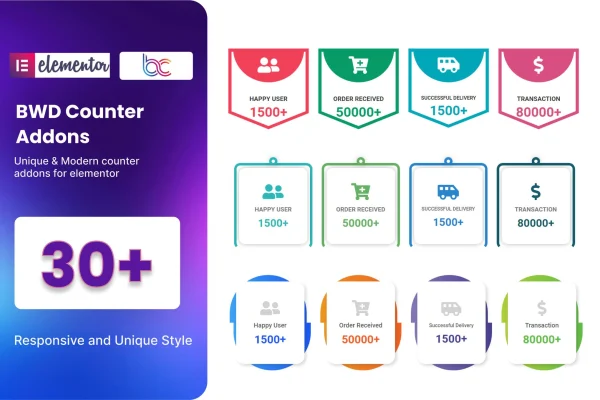
BWD Counter is a WordPress plugin that adds an animated counter widget to the Elementor page builder. It lets you display statistics, milestones and achievements as moving numbers, styled to match your site, without writing any code.
- Version
- 1.5
- Released
- Aug 26, 2026
- Type
- WordPress plugin
- Requires
- Elementor
- Licence
- GPL
- Included in
- Every plan, or $3.99 on its own
What’s new in BWD Counter 1.5
Version 1.5 · Aug 26, 2026
Latest
What it does
Many websites need a clear way to present figures such as completed projects, happy clients or years in business. Plain text numbers are easy to skim past. This addon gives Elementor users a dedicated counter element that animates numbers on the page, so key figures stand out in a section built for them. It requires Elementor and works with any theme built around that page builder, so it fits into the layouts you already use.
The plugin includes more than 30 preset counter designs that act as starting points. From there you can adjust icons, numbers and colors to suit your brand, and add prefix or suffix text so a figure reads as a percentage, a currency amount or a count with context. Counters are responsive across desktops, tablets and phones, the code is W3C validated and works in major browsers, and a POT file is included for translating the plugin on multilingual sites.
Best for
- Business sites displaying client counts or project totals
- Agencies building Elementor pages for clients
- Nonprofits and portfolios highlighting milestones and achievements
Features
More than 30 preset designs
Start from over 30 ready-made counter layouts and pick the one closest to your site's look before adjusting the details.
Custom icons, numbers and colors
Change the icon, number styling and color scheme of each counter so it matches your branding and the rest of the page.
Prefix and suffix text
Add text before or after a number, such as a plus sign or a unit, so visitors understand exactly what the figure represents.
No coding required
Build counter sections inside the Elementor editor using visual controls, which makes it practical for site owners without development experience.
Responsive layouts
Counters adapt to desktop, tablet and phone screens, keeping statistics readable for visitors on any device.
Works with Elementor themes
Use the counters on any WordPress theme built for Elementor, giving you flexibility in how you design the rest of your site.
Translation ready
A POT file is included, so the plugin's text can be translated for sites that serve visitors in other languages.
Validated, cross-browser code
The plugin uses W3C validated code and is built to display correctly in major web browsers.
Questions about BWD Counter
Do I need Elementor to use this plugin?
Yes. This is an addon for the Elementor page builder and requires Elementor to be active. It adds a counter element that you place and style inside the Elementor editor, and it works with any theme built around Elementor.
Can I add symbols like a percent sign or plus sign to the numbers?
Yes. The plugin supports prefix and suffix text, so you can place characters or words before or after a number. This helps a counter read as a percentage, a currency figure or a total with a label.
How much can I change the look of the counters?
You can begin with one of more than 30 preset designs and then customize the icons, numbers and colors. That gives you room to match the counters to your brand and the style of the surrounding page.
Will the counters work on a multilingual or mobile site?
The counters are responsive, so they adjust to desktops, tablets and phones. The plugin also ships with a POT file, which lets you translate its text for sites published in more than one language.
Is BWD Counter free?
The code of BWD Counter is licensed under the GPL, so anyone may use, change and share it. GPL Feast is a paid service: a plan or a single purchase gives you the download and automatic updates. The developer's own support, licence key and online services are not included.
Which version of BWD Counter is this?
Version 1.5, released Aug 26, 2026. New versions appear here when the developer publishes them, and members get them as automatic updates.
How do I update BWD Counter?
Install the free GPL Feast Updater on your site and connect it with your API key. It installs new versions of BWD Counter automatically and keeps a backup, so you can roll back.
What does BWD Counter need?
BWD Counter needs Elementor installed and active.
You might also like






