
Plugin
Updated
BWD Filterable Gallery
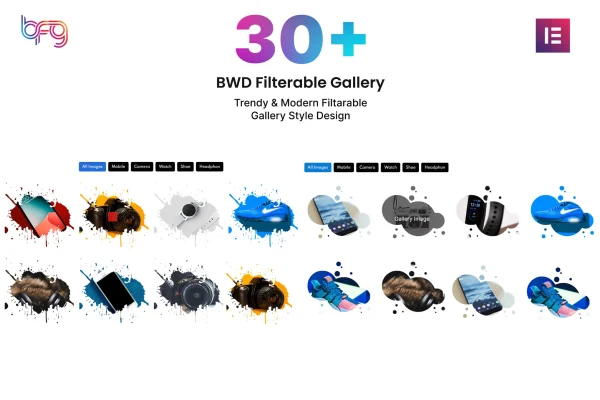
BWD Filterable Gallery is an Elementor addon plugin for building image galleries that visitors can sort with filter buttons. You pick a preset design, name your filters and gallery items, and arrange images in columns, all inside the Elementor editor and without writing code.
- Version
- 1.5
- Released
- May 13, 2026
- Type
- WordPress plugin
- Requires
- Elementor
- Licence
- GPL
- Included in
- Every plan, or $3.99 on its own
What’s new in BWD Filterable Gallery 1.5
Version 1.5 · May 13, 2026
Latest
What it does
A portfolio or product page with dozens of images gets hard to browse when everything sits in one long grid. This plugin adds a gallery widget to Elementor where each image belongs to a category, and visitors click a filter to see only the items they care about. It suits photographers, designers, agencies and businesses that want to present portfolios, products or other visual work in an organized way.
You start from one of more than 30 preset designs, then customize the filter labels, item names and images to match your project. Layouts can use 2, 3 or 4 columns, image sizes can be set for a consistent look, and masking effects add a styled frame to each picture. Clicked images open in a lightbox overlay. The gallery is responsive, works with themes built on Elementor, and ships with a POT file for translation.
Best for
- Photographers presenting categorized portfolios
- Design studios and agencies building client galleries on Elementor
- Businesses displaying products or projects by category
Features
Over 30 preset designs
Choose from more than 30 ready gallery layouts as a starting point, then adjust them to fit the look of your site.
Custom filters and item names
Rename filter buttons and gallery item labels so your categories match your brand, portfolio sections or product groups.
Built-in image lightbox
Visitors can click any gallery image to open a larger view in a lightbox overlay without leaving the page.
Image size control
Set the size of gallery images so every item lines up and the layout stays consistent across the grid.
Masking effects
Apply modern masking effects to gallery images to give them a distinct shape or styled presentation.
Two, three or four columns
Display the gallery in 2, 3 or 4 columns to suit the width of your page and the amount of content.
Responsive layouts
Galleries adapt to different screen sizes so they remain usable on phones, tablets and desktop browsers.
Translation ready
A POT file is included, so the plugin's text can be translated for sites that run in other languages.
Questions about BWD Filterable Gallery
Do I need Elementor to use this gallery?
Yes. The plugin is an addon for Elementor and works inside the Elementor editor. It is compatible with WordPress themes built on Elementor, so you can add filterable galleries to your existing pages without switching themes.
Can I change the filter names to match my own categories?
Yes. Both the filter buttons and the gallery item names are fully customizable, so you can label categories by project type, product line, photo style or whatever grouping fits your content.
How flexible is the gallery layout?
You can start from more than 30 preset designs, show images in 2, 3 or 4 columns, control image sizes and apply masking effects. Images also open in a lightbox when visitors click them.
Can I translate the gallery into another language?
The plugin includes a POT file, which lets you translate its text into other languages using standard WordPress translation tools.
Is BWD Filterable Gallery free?
The code of BWD Filterable Gallery is licensed under the GPL, so anyone may use, change and share it. GPL Feast is a paid service: a plan or a single purchase gives you the download and automatic updates. The developer's own support, licence key and online services are not included.
Which version of BWD Filterable Gallery is this?
Version 1.5, released May 13, 2026. New versions appear here when the developer publishes them, and members get them as automatic updates.
How do I update BWD Filterable Gallery?
Install the free GPL Feast Updater on your site and connect it with your API key. It installs new versions of BWD Filterable Gallery automatically and keeps a backup, so you can roll back.
What does BWD Filterable Gallery need?
BWD Filterable Gallery needs Elementor installed and active.
You might also like






