
Plugin
Updated
BWD Image Compare
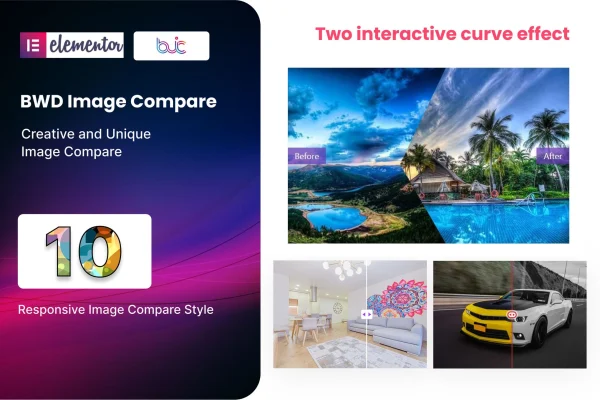
BWD Image Compare is a WordPress plugin that adds an image comparison widget to Elementor. It places two images in one frame with an interactive slider, so visitors can drag across to see the difference between a before and after shot, two product versions or any pair of contrasting visuals.
- Version
- 1.4
- Released
- Aug 26, 2026
- Type
- WordPress plugin
- Requires
- Elementor
- Licence
- GPL
- Included in
- Every plan, or $3.99 on its own
What’s new in BWD Image Compare 1.4
Version 1.4 · Aug 26, 2026
Latest
What it does
Showing a transformation usually means placing two photos side by side and hoping visitors notice what changed. This addon puts both images in the same space and adds a slider that visitors move themselves, which makes the change easy to see. It works for before-and-after edits, renovation or makeover results, product comparisons and visual storytelling, and it needs no coding because everything is built inside Elementor's drag-and-drop editor.
You start from one of 10 preset designs, then adjust the titles, descriptions, buttons, images and colors to match your site. The comparison sliders are responsive and retina ready, so they adapt to different screen sizes and high-resolution displays. The plugin works with WordPress themes that support Elementor, runs across modern browsers and includes a .pot file for translation. Documentation and setup guides are included for beginners and experienced builders.
Best for
- Photographers and retouchers presenting before-and-after edits
- Renovation, beauty and makeover businesses displaying results
- Designers and agencies building client sites in Elementor
Features
Interactive comparison slider
Displays two images in one frame with a slider that visitors drag to reveal the difference between them, ideal for before-and-after results.
Ten preset designs
Includes 10 ready-made comparison designs you can drop onto a page and use as a starting point for your own layout.
Editable content and colors
Change the titles, descriptions, buttons, images and colors of each comparison so it fits your brand and the surrounding page design.
No coding required
Build and adjust comparisons inside Elementor's drag-and-drop editor, with every setting handled through the widget controls instead of custom code.
Responsive and retina ready
Comparison sliders adapt to phones, tablets and desktops, and images stay sharp on high-resolution screens.
Works across themes and browsers
Runs with WordPress themes that support Elementor and has been tested to behave consistently in modern web browsers.
Translation ready
Ships with a .pot file, so you can translate the plugin's text into other languages for sites that serve a multilingual audience.
Questions about BWD Image Compare
Do I need Elementor to use this plugin?
Yes. It is an addon built for Elementor and adds its image comparison widget to the Elementor editor. It works with WordPress themes that support Elementor, so you build and edit comparisons on the same pages you already design with Elementor.
Can I change how the comparison looks?
Yes. You can pick from 10 preset designs and then edit the titles, descriptions, buttons, images and colors. That lets you match the slider to your site's branding without writing any code.
Will the comparison slider work on mobile devices?
The sliders are responsive and retina ready, so they adjust to different screen sizes and keep images sharp on high-resolution displays. They have also been tested across modern browsers.
Can I translate the plugin into another language?
Yes. The plugin is translation ready and includes a .pot file, which you can use with common translation tools to display its text in the language your visitors use.
Is BWD Image Compare free?
The code of BWD Image Compare is licensed under the GPL, so anyone may use, change and share it. GPL Feast is a paid service: a plan or a single purchase gives you the download and automatic updates. The developer's own support, licence key and online services are not included.
Which version of BWD Image Compare is this?
Version 1.4, released Aug 26, 2026. New versions appear here when the developer publishes them, and members get them as automatic updates.
How do I update BWD Image Compare?
Install the free GPL Feast Updater on your site and connect it with your API key. It installs new versions of BWD Image Compare automatically and keeps a backup, so you can roll back.
What does BWD Image Compare need?
BWD Image Compare needs Elementor installed and active.
You might also like






