
Plugin
Updated
BWD Map Masking
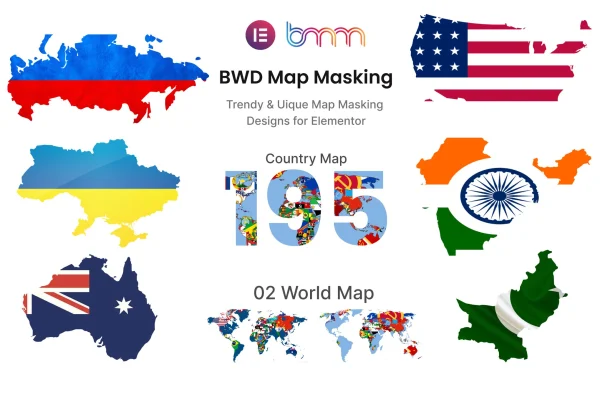
BWD Map Masking is an Elementor addon that turns images into map-shaped designs using clipping and masking effects. You pick a country or world map shape, drop in your own image, and size it to fit your layout, all without writing code.
- Version
- 2.3
- Released
- Jan 6, 2026
- Type
- WordPress plugin
- Requires
- Elementor
- Licence
- GPL
- Included in
- Every plan, or $3.99 on its own
What’s new in BWD Map Masking 2.3
Version 2.3 · Jan 6, 2026
Latest
What it does
Plain map embeds rarely match a site's look, and building a custom country-shaped graphic usually means opening a design tool and exporting a new file every time. This addon handles that inside Elementor. It includes masks for 195 countries plus 2 world map presets, and you can place any image inside the chosen shape. That makes it simple to highlight a single country, mark regions you serve, or add a world map graphic that uses your own photos or brand colors.
The addon works as a widget in the Elementor editor, so you set the mask, swap the image and adjust width and height from the usual panel. The masked maps are responsive, so they adapt to different screen sizes, and they work across major browsers. A POT file is included for translating the addon's text into other languages. It fits travel blogs, business directories, local guides and any Elementor site that needs geographic visuals presented in a more designed way.
Best for
- Travel blogs highlighting destinations by country
- Business directories and local guide websites
- Designers building Elementor sites with custom map graphics
Features
195 country mask presets
Choose from predefined masks covering 195 countries to display a single nation's outline filled with the image of your choice.
Two world map presets
Use one of 2 world map masking designs when you want to present the whole globe instead of a single country.
Custom map images
Replace the default visuals with your own images so the masked map matches your branding, photography or content theme.
Adjustable width and height
Set the dimensions of each masked map so it fits neatly into columns, sections and other parts of your page layout.
No coding required
Create map masking effects through the Elementor editor interface, with settings handled visually instead of through custom CSS or code.
Responsive display
Masked maps adjust to different screen sizes so they display properly on desktops, tablets and phones.
Translation ready
A POT file is included so the addon's text can be translated into other languages for sites serving different audiences.
Cross-browser compatibility
The masking effects are built to display consistently across major browsers, so visitors see the same design whatever they use.
Questions about BWD Map Masking
Do I need Elementor to use this addon?
Yes. It is built as an addon for Elementor and works inside the Elementor editor. It is designed to work with WordPress themes built on Elementor, so you add and configure the masked maps the same way you work with other Elementor widgets.
Can I use my own image inside the map shape?
Yes. The addon accepts custom map images, so you can fill a country or world map mask with your own photo, pattern or branded graphic. This lets the map match your site's style instead of relying on a generic default look.
How many map shapes are included?
The addon includes masking presets for 195 countries along with 2 world map designs. You can pick the one that suits your content, then adjust its image, width and height to fit your page.
Will the masked maps look right on mobile devices?
The masked maps are responsive, so they adapt to different screen sizes. You can also control the image width and height to fine-tune how each map sits in your layout on smaller screens.
Is BWD Map Masking free?
The code of BWD Map Masking is licensed under the GPL, so anyone may use, change and share it. GPL Feast is a paid service: a plan or a single purchase gives you the download and automatic updates. The developer's own support, licence key and online services are not included.
Which version of BWD Map Masking is this?
Version 2.3, released Jan 6, 2026. New versions appear here when the developer publishes them, and members get them as automatic updates.
How do I update BWD Map Masking?
Install the free GPL Feast Updater on your site and connect it with your API key. It installs new versions of BWD Map Masking automatically and keeps a backup, so you can roll back.
What does BWD Map Masking need?
BWD Map Masking needs Elementor installed and active.
You might also like






