
Plugin
Updated
BWD Post Grid
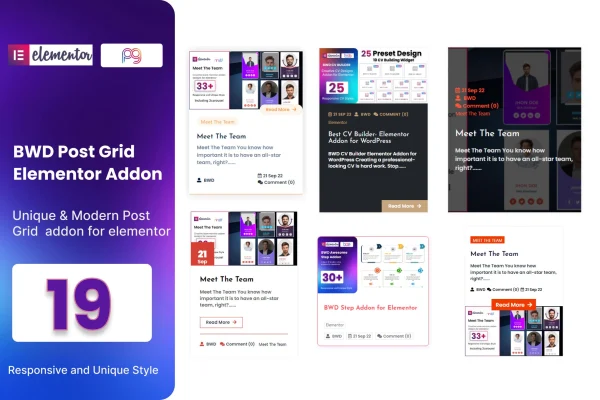
BWD Post Grid is a WordPress plugin that adds post grid layouts to the Elementor page builder. It lets you display blogs, news or articles in styled grids, then adjust titles, descriptions, buttons and colors to match your site, all without writing code.
- Version
- 2.5
- Released
- Aug 26, 2026
- Type
- WordPress plugin
- Requires
- Elementor
- Licence
- GPL
- Included in
- Every plan, or $3.99 on its own
What’s new in BWD Post Grid 2.5
Version 2.5 · Aug 26, 2026
Latest
What it does
A plain list of posts can make a blog hard to scan, and building a custom grid usually means writing code or fighting with your theme. This addon gives Elementor users a set of ready-made grid layouts for posts instead. You pick one of 19 preset designs, drop it onto a page, and tweak it in the Elementor editor you already know. It works for blog archives, news sections, article listings and any page where you want readers to browse recent content at a glance.
Customization covers the parts of a post card people notice most: titles, descriptions, buttons and colors. Column settings adapt to different screen sizes, so the grid can show several columns on a desktop and fewer on a phone. The plugin requires Elementor and is built to work with themes based on Elementor. The code is W3C validated, works across major browsers, and is translation ready with a .pot file, which helps if your site runs in a language other than English.
Best for
- Bloggers who want grid layouts for their posts
- Web designers building Elementor sites for clients
- News and magazine sites listing many articles
Features
19 preset grid designs
Choose from 19 distinct post grid layouts to set the look of your blog, news or article listings without designing a grid from scratch.
Editable titles and buttons
Change post titles, descriptions, buttons and colors so the grid matches your site's branding and overall style.
Responsive column settings
Adjust the number of columns for different devices so your post grid displays properly on desktops, tablets and smartphones.
Built for the Elementor editor
Create and adjust post grids with Elementor's drag and drop interface, with no coding skills needed to get a working layout.
Translation ready
A .pot file is included, so you can translate the text in your post grids and localize them for sites in other languages.
W3C validated code
The plugin uses standards-compliant markup that is W3C validated, which keeps the output clean and predictable.
Cross-browser support
Post grids are built to display consistently across all major browsers, giving visitors the same layout whichever browser they use.
Works with Elementor themes
The addon is designed to work with WordPress themes built on Elementor, so you can add grids without switching themes.
Questions about BWD Post Grid
Do I need Elementor to use this plugin?
Yes. The plugin is an addon for Elementor and requires it to be active on your site. You build and customize the post grids inside the Elementor editor, and it is designed to work with WordPress themes built on Elementor.
How many grid designs are included?
The plugin includes 19 preset post grid designs. Each one gives you a different layout for displaying blogs, news or articles, and you can then adjust titles, descriptions, buttons and colors to fit your site's style.
Will the post grids look right on mobile devices?
The plugin offers responsive column options, so you can set how many columns appear on different screen sizes. That lets a grid show more columns on a wide desktop screen and fewer on a smartphone.
Can I translate the post grid text into another language?
Yes. The plugin is translation ready and includes a .pot file, which you can use with standard WordPress translation tools to localize the text in your post grids into the language your site uses.
Is BWD Post Grid free?
The code of BWD Post Grid is licensed under the GPL, so anyone may use, change and share it. GPL Feast is a paid service: a plan or a single purchase gives you the download and automatic updates. The developer's own support, licence key and online services are not included.
Which version of BWD Post Grid is this?
Version 2.5, released Aug 26, 2026. New versions appear here when the developer publishes them, and members get them as automatic updates.
How do I update BWD Post Grid?
Install the free GPL Feast Updater on your site and connect it with your API key. It installs new versions of BWD Post Grid automatically and keeps a backup, so you can roll back.
What does BWD Post Grid need?
BWD Post Grid needs Elementor installed and active.
You might also like






