
Plugin
Updated
BWL Advanced FAQ Manager
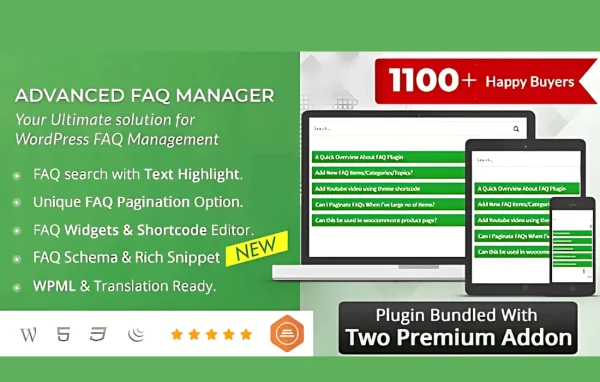
BWL Advanced FAQ Manager is a WordPress plugin for creating and organizing frequently asked questions on your site. It gives you a drag-and-drop builder, customizable templates and a search box so visitors can find answers on their own.
- Version
- 3.0.6
- Released
- Oct 9, 2026
- Type
- WordPress plugin
- Licence
- GPL
- Included in
- Every plan, or $3.99 on its own
What’s new in BWL Advanced FAQ Manager 3.0.6
Version 3.0.6 · Oct 9, 2026
Latest
What it does
Most sites get the same questions over and over, and answering them one email at a time wastes hours. A clear FAQ section handles a lot of that, but building one by hand and keeping it tidy can get messy as the list grows. This plugin gives you a dedicated place to write, sort and display your questions and answers, so the FAQ stays organized as you add more over time.
You build FAQ sections with a drag-and-drop builder that needs no coding. Questions can be grouped into categories and tags, and answers can include images, videos and links through the rich text editor. On the front end, visitors see your FAQs in accordion or toggle layouts based on templates you can adjust to match your branding, and they can search by keyword. The layouts are responsive and the plugin is translation ready, which suits online stores, service businesses and information sites alike.
Best for
- Online stores fielding repeated product and shipping questions
- Service businesses wanting a self-help FAQ page
- Multilingual sites that need translatable FAQ content
Features
Drag-and-drop FAQ builder
Create and arrange FAQ entries by dragging them into place, with no coding needed to build a well-structured section.
Customizable templates
Pick from multiple layouts and adjust them so your FAQ section matches the colors and look of the rest of your site.
Keyword search for visitors
A built-in search lets visitors type keywords and jump straight to the answers they need instead of scrolling through every question.
Categories and tags
Sort your questions into categories and tags so longer FAQ lists stay easy for you to manage and for visitors to browse.
Accordion and toggle layouts
Choose whether FAQs open as accordions or toggles, keeping answers hidden until a visitor clicks the question they care about.
Rich text answers
Use the rich text editor to add images, videos and hyperlinks inside answers when a plain sentence is not enough to explain something.
Responsive display
FAQ sections adapt to different screen sizes, so they read well on desktops, tablets and smartphones.
Translation ready
The plugin supports translations, so you can offer your FAQ content to visitors in more than one language.
BWL Advanced FAQ Manager older versions
- 3.0.5Aug 11, 2025
- 3.0.4Jul 23, 2025
- 3.0.1Jun 25, 2025
- 3.0.0Jun 19, 2025
- 2.2.3Jun 4, 2025
- 2.2.2May 13, 2025
- 2.1.9May 3, 2025
- 2.1.8Apr 26, 2025
- 2.1.7Apr 25, 2025
- 2.1.5Mar 21, 2025
Members and buyers of this product can download older versions.
35 older versions in all. If you need one that is not listed, ask support.
Questions about BWL Advanced FAQ Manager
Do I need to know code to build an FAQ section?
No. The plugin includes a drag-and-drop builder, so you can create, arrange and organize questions and answers without writing any code. Templates handle the layout, and you can adjust them to match your site's branding.
Can visitors search my FAQs?
Yes. There is a built-in search feature that lets visitors look up answers by keyword. Combined with categories and tags, it helps people find the right answer quickly even when your FAQ list is long.
Can I put images or videos in an answer?
Yes. Answers are written with a rich text editor that supports images, videos and hyperlinks, so you can add a screenshot, an embedded video or a link to a related page wherever it helps explain something.
Will the FAQ work on a multilingual site?
The plugin is translation ready, meaning its content can be translated so you can present FAQs to visitors in different languages. This makes it a reasonable fit for sites that serve an international audience.
Is BWL Advanced FAQ Manager free?
The code of BWL Advanced FAQ Manager is licensed under the GPL, so anyone may use, change and share it. GPL Feast is a paid service: a plan or a single purchase gives you the download and automatic updates. The developer's own support, licence key and online services are not included.
Which version of BWL Advanced FAQ Manager is this?
Version 3.0.6, released Oct 9, 2026. New versions appear here when the developer publishes them, and members get them as automatic updates.
How do I update BWL Advanced FAQ Manager?
Install the free GPL Feast Updater on your site and connect it with your API key. It installs new versions of BWL Advanced FAQ Manager automatically and keeps a backup, so you can roll back.
You might also like






