
Plugin
Updated
CheckoutWC
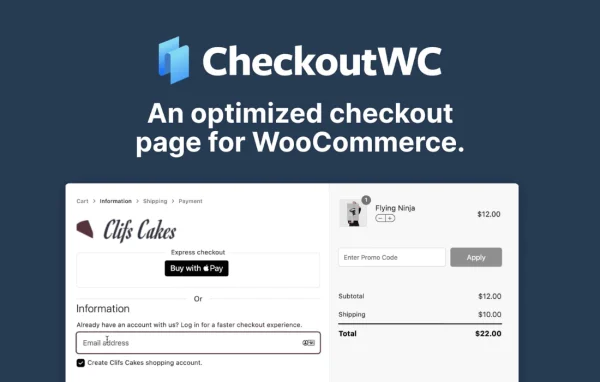
CheckoutWC by Objectiv is a WooCommerce plugin that replaces the default checkout page with clean, Shopify-style templates. It adds a side cart, express payment buttons, order bumps, address autocomplete and custom checkout fields, so store owners can shape the whole buying flow from one place.
- Version
- 11.4.1
- Released
- Oct 12, 2026
- Developer
- Objectiv
- Type
- WordPress plugin
- Requires
- WooCommerce
- Licence
- GPL
- Included in
- Every plan, or $7.99 a year on its own
What’s new in CheckoutWC 11.4.1
Version 11.4.1 · Oct 12, 2026
Latest
- FixedPremium features now turn off if the license can't be checked with checkoutwc.com for 30 days, with a warning showing the date beforehand
- FixedWooCommerce PayPal Payments: Place Order no longer spins forever when paying by card after the checkout updates
- FixedPayment Plugins for PayPal: the PayPal and Pay Later express buttons now line up instead of the second one sitting offset
- FixedPayment Plugins for Braintree: retrying checkout after a declined card now resets the payment form as the gateway expects
- FixedIntegrations: the Simple Cloudflare Turnstile conflict notice now only shows on plans that include Turnstile
- FixedRemoved the extra gap below the coupon field on mobile, which made a full-height Apply button taller than the field
- FixedCheckboxes and radio buttons now stay visibly ticked when a site's own focus styles override CheckoutWC's
- FixedA terms and conditions error now shows with the other checkout errors when the terms checkbox isn't in its usual place, instead of Place Order appearing to do nothing
What it does
The standard WooCommerce checkout works, but it can feel long and dated, and changing it often means custom code or a page builder. This plugin swaps that page for one of 5 mobile-responsive templates that need no page builder. You can adjust logos, fonts and colors so the checkout matches your brand, and the fields adapt to what is in the cart, such as digital versus physical products or local pickup.
Beyond layout, it covers the parts of checkout that store owners usually patch together with separate tools. A flyout side cart lets shoppers review items without leaving the page, order bumps offer add-ons based on cart contents, and abandoned cart emails remind customers to return. A Checkout Editor lets you add custom fields and trust badge rows, and developers get hooks and filters for deeper changes. It also works with WooCommerce Subscriptions for stores selling recurring products.
Best for
- WooCommerce stores wanting a cleaner, mobile-friendly checkout
- Shops selling subscriptions through WooCommerce Subscriptions
- Developers and agencies customizing checkout flows for clients
Features
Checkout templates
Choose from 5 mobile-responsive checkout templates that replace the default WooCommerce page, with logos, fonts and colors you can adjust to fit your brand.
Built-in side cart
A flyout cart lets customers add items and view their cart without leaving the page they are browsing.
Express payment buttons
Offer Apple Pay, Google Pay, PayPal and Amazon Pay buttons so customers can pay with an account they already use.
Order bumps
Show targeted add-on offers at checkout based on what is in the cart, with flexible discount options for each offer.
Custom checkout fields
Add text, text area, dropdown, radio and checkbox fields to any checkout slot, with required settings, character limits, display conditions and optional fixed or percentage fees.
Address autocomplete
Suggests addresses as customers type, which cuts down on typing and on mistakes in shipping and billing details.
Abandoned cart recovery
Sends email reminders to customers who left items in their cart, encouraging them to come back and finish the order.
Trust badge collections
Place a row of payment logos, security marks and guarantee icons, then drag, size and color them to fit any checkout slot.
CheckoutWC older versions
- 11.4.0Sep 289 new, 20 improvements, 21 fixes
- 11.3.0Jul 234 new, 1 improvement, 3 fixes
- 11.2.0Jul 161 new, 5 improvements, 9 fixes, 1 removal
- 11.1.4Jul 5
- 11.1.3Jul 1
- 11.1.2Jun 13
- 11.1.1Jun 10
- 11.1.0May 14
- 11.0.8Apr 14
- 11.0.7Mar 28
Members and buyers of this product can download older versions.
131 older versions in all. If you need one that is not listed, ask support.
Questions about CheckoutWC
Do I need a page builder to customize the checkout?
No. The templates work without a page builder. You pick one of the 5 templates, set your logo, fonts and colors, and use the Checkout Editor to add custom fields and trust badges to the checkout slots you want.
Can I collect extra information from customers at checkout?
Yes. You can add text, text area, dropdown, radio button and checkbox fields, mark them required, limit characters and show them only for certain carts or customers. Entries are saved to the order and appear on the order screen, in order details and in order emails.
Does it work with subscription products?
It is compatible with WooCommerce Subscriptions and popular subscription add-ons, so you can sell recurring products through the new checkout. It requires WooCommerce to be active on your site.
Which express payment options does it support?
The checkout can show express payment buttons for Apple Pay, Google Pay, PayPal and Amazon Pay, letting customers complete orders quickly with accounts they already have.
Is CheckoutWC free?
The code of CheckoutWC is licensed under the GPL, so anyone may use, change and share it. GPL Feast is a paid service: a plan or a single purchase gives you the download and automatic updates. The developer's own support, licence key and online services are not included.
Which version of CheckoutWC is this?
Version 11.4.1, released Oct 12, 2026. New versions appear here when the developer publishes them, and members get them as automatic updates.
How do I update CheckoutWC?
Install the free GPL Feast Updater on your site and connect it with your API key. It installs new versions of CheckoutWC automatically and keeps a backup, so you can roll back.
What does CheckoutWC need?
CheckoutWC needs WooCommerce installed and active.
You might also like






