
Plugin
Updated
CLEVER - HTML5 Radio Player With History - Addon For Visual Composer
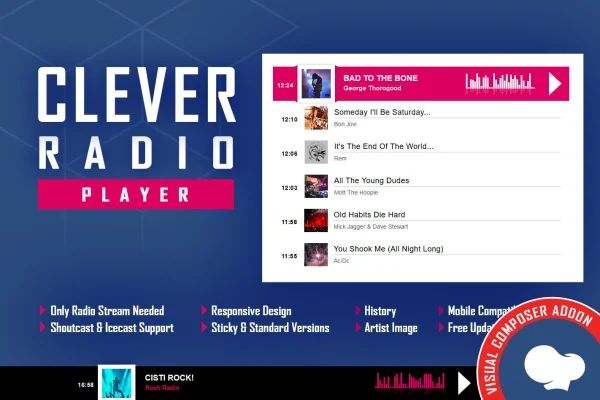
CLEVER - HTML5 Radio Player With History - Addon For Visual Composer is a WordPress plugin that adds a live radio player to pages built with WPBakery. It streams Shoutcast and Icecast stations and shows the current song title along with the artist's photo when one is available.
- Version
- 2.5.2
- Released
- Jul 28, 2026
- Type
- WordPress plugin
- Licence
- GPL
- Included in
- Every plan, or $3.99 on its own
What’s new in CLEVER - HTML5 Radio Player With History - Addon For Visual Composer 2.5.2
Version 2.5.2 · Jul 28, 2026
Latest
What it does
Adding a live radio stream to a WordPress site usually means embedding third-party code or fiddling with player scripts. This addon gives you a radio player element inside the WPBakery page builder, so you can place it on a page and set it up without writing code. It works with Shoutcast and Icecast servers, plays MP3 streams in all browsers and plays AAC streams in browsers that support them.
While a station plays, the player fetches the current song and artist and displays them with an artist image if one can be found. You can stretch the player across the full width of its parent container or keep it compact for smaller spaces. More than 35 parameters control its look and behavior. The layout is responsive and works on iOS and Android, and you can turn responsive behavior off for fixed-width or older layouts.
Best for
- Internet radio stations running Shoutcast or Icecast
- Music blogs that want to feature a live stream
- Agencies building WPBakery sites for broadcasters
Features
Shoutcast and Icecast streaming
Connects to radio servers running either Shoutcast or Icecast, the two common streaming protocols, so you can play your existing station stream on your site.
Now playing with artist photo
Automatically fetches the title of the song currently playing and shows it next to the artist's image when one is available.
MP3 and AAC playback
Plays MP3 streams across browsers and AAC streams in browsers that support the format, giving you flexibility in how your station is encoded.
Full width or compact size
Set the player to span the entire parent container for a prominent layout, or choose a smaller size that fits sidebars and tighter spaces.
Over 35 settings
More than 35 configurable parameters let you adjust the player's appearance and behavior so it matches your branding and page design.
Responsive and mobile ready
The player layout adapts to desktops, tablets and phones, and it works on iOS and Android devices for listeners on the go.
Optional responsive disable
Turn off responsive behavior when the player sits inside a fixed-width or legacy site layout that needs a set size.
Built into WPBakery
Add and configure the radio player directly in the WPBakery page builder with no coding, alongside the other elements on your page.
CLEVER - HTML5 Radio Player With History - Addon For Visual Composer older versions
- 2.5.1Jan 23
- 2.5Feb 15, 2024
Members and buyers of this product can download older versions.
Questions about CLEVER - HTML5 Radio Player With History - Addon For Visual Composer
Which streaming servers does this player work with?
It supports Shoutcast and Icecast, which covers most internet radio servers. You point the player at your stream and it handles playback, along with fetching the current song and artist details to show listeners.
Will AAC streams play for every visitor?
MP3 streams play across browsers. AAC streams play in browsers that support the AAC format, so if broad playback matters most to you, an MP3 stream is the safer choice.
Do I need WPBakery to use it?
Yes. This is an addon for the WPBakery page builder, and the player is added and configured as an element inside WPBakery. No coding is needed to place it on a page.
Can I control how big the player is on the page?
You can make it fill the full width of its parent container or keep it compact. It is responsive by default, and you can switch responsive behavior off if your site uses a fixed-width layout.
Is CLEVER - HTML5 Radio Player With History - Addon For Visual Composer free?
The code of CLEVER - HTML5 Radio Player With History - Addon For Visual Composer is licensed under the GPL, so anyone may use, change and share it. GPL Feast is a paid service: a plan or a single purchase gives you the download and automatic updates. The developer's own support, licence key and online services are not included.
Which version of CLEVER - HTML5 Radio Player With History - Addon For Visual Composer is this?
Version 2.5.2, released Jul 28, 2026. New versions appear here when the developer publishes them, and members get them as automatic updates.
How do I update CLEVER - HTML5 Radio Player With History - Addon For Visual Composer?
Install the free GPL Feast Updater on your site and connect it with your API key. It installs new versions of CLEVER - HTML5 Radio Player With History - Addon For Visual Composer automatically and keeps a backup, so you can roll back.
You might also like







CLEVER - HTML5 Radio Player With History - Addon For Visual Composerv2.5.2 · From $14/month or $3.99
See plans