
Plugin
Updated
CLEVER - HTML5 Radio Player With History - Shoutcast and Icecast
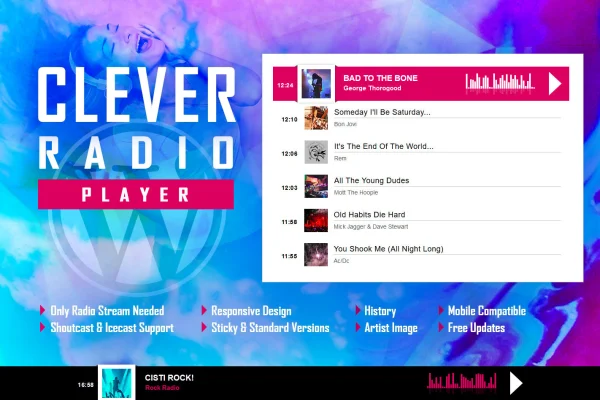
CLEVER - HTML5 Radio Player With History - Shoutcast and Icecast is a WordPress plugin that puts an HTML5 radio player on your site. It plays Shoutcast and Icecast streams, shows the current song and artist image, and keeps a history of previously played tracks for listeners.
- Version
- 2.6.2
- Released
- Apr 13, 2026
- Type
- WordPress plugin
- Licence
- GPL
- Included in
- Every plan, or $3.99 on its own
What’s new in CLEVER - HTML5 Radio Player With History - Shoutcast and Icecast 2.6.2
Version 2.6.2 · Apr 13, 2026
Latest
What it does
Online radio stations and music sites often need a player that does more than play audio. Listeners want to know what is on air and what they just heard. This plugin handles both jobs: it pulls the current song title and artist image from your stream automatically, and its history feature lets visitors look back at tracks that played earlier. Setup centers on your radio stream URL, so you do not have to build anything by hand.
The player works with Shoutcast and Icecast servers, playing MP3 streams in all browsers and AAC streams in browsers that support it. It is built with HTML, CSS and JavaScript, runs on iOS and Android, and adapts to different screen sizes. More than 35 parameters let you adjust colors, layout, fonts and behavior. You can stretch the player to the full width of its container, or switch off responsive behavior for fixed-width or custom layouts.
Best for
- Internet radio stations using Shoutcast or Icecast
- Music blogs that stream a live radio feed
- Agencies building websites for broadcasters
Features
Shoutcast and Icecast streams
Connects to Shoutcast and Icecast radio servers and plays MP3 streams everywhere, plus AAC streams on browsers that support that format.
Current song and artist
Automatically fetches the title of the song playing now and displays it alongside the artist's image, so listeners always see what is on air.
Track history
Keeps a list of previously played tracks that listeners can browse, which helps them find a song they heard a few minutes ago.
Over 35 settings
More than 35 parameters cover colors, layout, fonts and player behavior, so you can match the player to your site's design.
Full width option
Lets the player expand to fill the entire width of its parent element, which suits headers, footers and wide content areas.
Responsive with an off switch
Adapts to screen sizes on desktop, iOS and Android, and you can turn responsive behavior off for non-responsive or custom-built sites.
Stream URL setup
The player needs only your radio stream URL to get started, keeping configuration simple for people with little technical experience.
CLEVER - HTML5 Radio Player With History - Shoutcast and Icecast older versions
- 2.6.1Jun 17, 2025
- 2.6Feb 15, 2024
Members and buyers of this product can download older versions.
Questions about CLEVER - HTML5 Radio Player With History - Shoutcast and Icecast
Which streaming servers and audio formats does it work with?
It works with Shoutcast and Icecast servers. MP3 streams play in all modern browsers, while AAC streams play in browsers that support the AAC format.
Can listeners see songs that played earlier?
Yes. The history feature shows previously played tracks, so visitors can scroll back and see what aired before the current song. The player also shows the current song title and artist image automatically.
Will the player work on phones and tablets?
The player is responsive and works on iOS and Android devices, adjusting to the screen size. If your site is not responsive, you can disable that behavior so the player keeps a fixed layout.
How much can I change the look of the player?
There are more than 35 parameters for adjusting colors, layout, fonts and behavior. You can also set the player to stretch across the full width of the element it sits in.
Is CLEVER - HTML5 Radio Player With History - Shoutcast and Icecast free?
The code of CLEVER - HTML5 Radio Player With History - Shoutcast and Icecast is licensed under the GPL, so anyone may use, change and share it. GPL Feast is a paid service: a plan or a single purchase gives you the download and automatic updates. The developer's own support, licence key and online services are not included.
Which version of CLEVER - HTML5 Radio Player With History - Shoutcast and Icecast is this?
Version 2.6.2, released Apr 13, 2026. New versions appear here when the developer publishes them, and members get them as automatic updates.
How do I update CLEVER - HTML5 Radio Player With History - Shoutcast and Icecast?
Install the free GPL Feast Updater on your site and connect it with your API key. It installs new versions of CLEVER - HTML5 Radio Player With History - Shoutcast and Icecast automatically and keeps a backup, so you can roll back.
You might also like







CLEVER - HTML5 Radio Player With History - Shoutcast and Icecastv2.6.2 · From $14/month or $3.99
See plans