
Plugin
Updated
Click To Contact
Click To Contact Addon For Elementor is a WordPress plugin that adds click-to-contact buttons to pages built with Elementor. Visitors can reach you through WhatsApp, Messenger or email with one click, and you set up each button without writing code.
- Version
- 1.6
- Released
- Aug 26, 2026
- Type
- WordPress plugin
- Requires
- Elementor
- Licence
- GPL
- Included in
- Every plan, or $3.99 on its own
What’s new in Click To Contact 1.6
Version 1.6 · Aug 26, 2026
Latest
What it does
Many sites bury their contact details on a single page, so visitors have to hunt for a way to get in touch. This addon puts contact buttons right on your pages. You can add WhatsApp, Messenger and email buttons, so people can start a conversation through the channel they already use. It works inside Elementor, which means you build and place the buttons with the same editor you use for the rest of your layout.
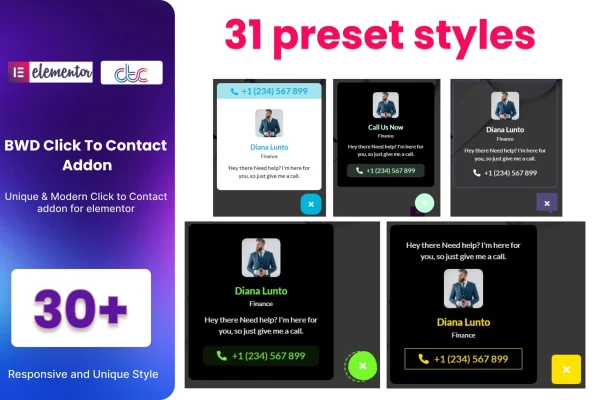
You start from one of more than 30 preset designs, then adjust the image, text, color, icon and size to match your branding. The buttons are responsive, so they adapt to phones, tablets and desktops, and they are built to work across browsers. The plugin requires Elementor and supports Elementor-based themes. A POT file is included for translation, which helps if your site serves visitors in more than one language.
Best for
- Small businesses that want visitors to message them quickly
- Service providers who take inquiries through WhatsApp or Messenger
- Freelancers and portfolio owners building sites with Elementor
Features
WhatsApp, Messenger and email
Add contact buttons for WhatsApp, Messenger and email directly into your Elementor pages so visitors can reach you through the channel they prefer.
More than 30 preset designs
Pick from over 30 ready-made button designs as a starting point, then adapt the one you choose to fit the look of your site.
Customizable button elements
Change the image, text, color, icon and size of each button so it matches your branding and sits naturally in your page design.
No coding required
Create and place a click-to-contact button using the Elementor editor, with no need to write or edit code to get it working.
Responsive layout
Buttons adjust to different screen sizes, so they display properly for visitors on phones, tablets and desktop computers.
Translation ready
A POT file is included, so you can translate the plugin's text and offer contact buttons in the language your visitors speak.
Works with Elementor themes
Built to support Elementor-based WordPress themes and tested across browsers, so the buttons behave consistently for visitors using different browsers.
Questions about Click To Contact
Do I need Elementor to use this plugin?
Yes. This addon is made for Elementor-powered websites and requires Elementor to work. You add and edit the contact buttons inside the Elementor editor, and it supports Elementor-based WordPress themes.
Which contact channels can the buttons link to?
The plugin lets you add WhatsApp, Messenger and email buttons to your pages. Visitors click the button and can start a conversation through that channel, which makes it easier for them to reach you without searching for contact details.
Can I make the buttons match my site's design?
Yes. You can begin with one of more than 30 preset designs and then change the image, text, color, icon and size. That gives you enough control to fit the buttons to your branding and page style.
Will the buttons work on mobile devices?
The buttons are responsive, so they adapt to phones, tablets and desktop screens. The plugin is also built for cross-browser compatibility, which helps the buttons look and behave consistently for visitors on different browsers.
Is Click To Contact free?
The code of Click To Contact is licensed under the GPL, so anyone may use, change and share it. GPL Feast is a paid service: a plan or a single purchase gives you the download and automatic updates. The developer's own support, licence key and online services are not included.
Which version of Click To Contact is this?
Version 1.6, released Aug 26, 2026. New versions appear here when the developer publishes them, and members get them as automatic updates.
How do I update Click To Contact?
Install the free GPL Feast Updater on your site and connect it with your API key. It installs new versions of Click To Contact automatically and keeps a backup, so you can roll back.
What does Click To Contact need?
Click To Contact needs Elementor installed and active.
You might also like






