
Plugin
Updated
Click To Dial Pro
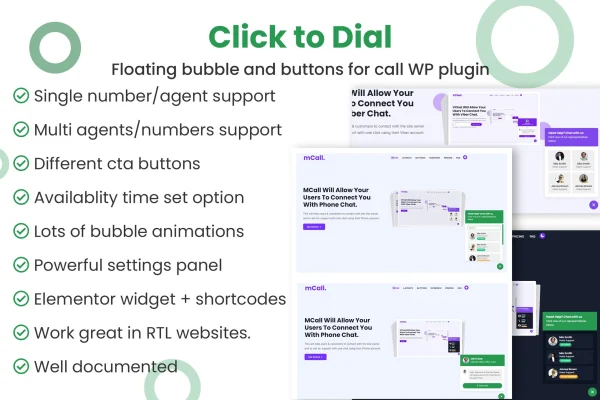
Click To Dial Pro is a WordPress plugin that lets visitors call your business straight from your website. It adds a floating bubble button or call buttons on your pages, so people can reach you without copying a phone number or leaving the site.
- Version
- 1.2.6
- Released
- May 10, 2025
- Type
- WordPress plugin
- Requires
- Elementor
- Licence
- GPL
- Included in
- Every plan, or $3.99 on its own
What’s new in Click To Dial Pro 1.2.6
Version 1.2.6 · May 10, 2025
Latest
- FixedFixed timezone Issue
What it does
Many visitors who want to talk to a business end up copying a number, switching apps and dialing by hand. Some give up partway through. Click To Dial Pro shortens that path by placing a call button on your site that starts a phone call in three clicks. You can add an interactive bubble button that stays on screen, or place pre-designed call buttons anywhere on your pages. Setup happens inside WordPress without coding, so site owners with little technical experience can configure it.
The plugin handles both a single phone number and multiple numbers. A solo operator can link the bubble to one direct line, while a team can list several agents or departments and let visitors pick who to call. The buttons are configurable to match your brand, and the design is responsive and retina ready for desktop and mobile screens. The plugin works alongside Elementor, which it lists as a requirement.
Best for
- Service businesses that take bookings or inquiries by phone
- Teams routing callers to different agents or departments
- Freelancers and agencies adding call buttons to client sites
Features
Floating bubble call button
Add an interactive bubble button to your site that links visitors directly to a phone number, giving them a constant, visible way to start a call.
Single number support
Connect the button to one direct phone line, a simple setup for solo operators and small businesses that take calls on a single number.
Multiple agents and numbers
Add as many phone numbers as you need so visitors can choose the right agent or department to speak with before placing the call.
Pre-designed call buttons
Choose from a variety of pre-designed call-to-action buttons and place them anywhere on your website to prompt visitors to phone you.
Brand-matched button settings
Configure each call button so its look and purpose fit your brand and the kind of calls you want to receive.
Three-click call process
Visitors can start a phone call in three quick clicks, without copying your number or navigating away from the page they are on.
Responsive and retina ready
The buttons adapt to desktop and mobile screens and display crisp graphics on high-resolution displays.
No-code setup
Configure the plugin within WordPress without writing code, which keeps it approachable for users at any technical skill level.
Questions about Click To Dial Pro
Can visitors choose which person or department to call?
Yes. You can add multiple phone numbers, and visitors pick the agent or department they want before the call starts. If you only need one line, you can link the bubble button to a single direct number instead.
Do I need to know how to code to set it up?
No coding is required. You configure the call buttons and phone numbers from within WordPress, so the plugin is usable by site owners without technical experience.
Will the call buttons work on phones and tablets?
The design is responsive and retina ready, so the buttons adjust to different screen sizes and display sharply on both desktop and mobile devices.
Does this plugin need Elementor?
Yes, Elementor is listed as a requirement for this plugin, so you will need it active on your WordPress site.
Is Click To Dial Pro free?
The code of Click To Dial Pro is licensed under the GPL, so anyone may use, change and share it. GPL Feast is a paid service: a plan or a single purchase gives you the download and automatic updates. The developer's own support, licence key and online services are not included.
Which version of Click To Dial Pro is this?
Version 1.2.6, released May 10, 2025. New versions appear here when the developer publishes them, and members get them as automatic updates.
How do I update Click To Dial Pro?
Install the free GPL Feast Updater on your site and connect it with your API key. It installs new versions of Click To Dial Pro automatically and keeps a backup, so you can roll back.
What does Click To Dial Pro need?
Click To Dial Pro needs Elementor installed and active.
You might also like






