
Plugin
Updated
Client Portal
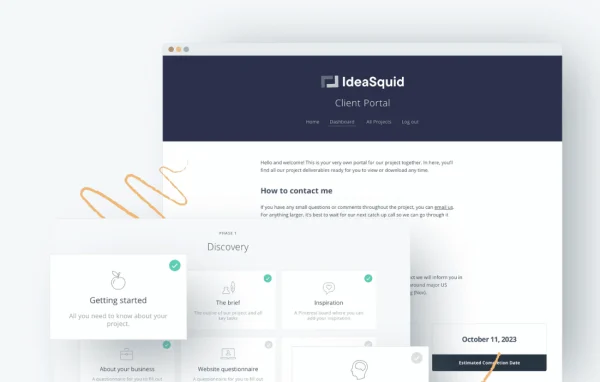
Client Portal is a WordPress plugin by Laura Elizabeth that gives your clients a private, login-protected dashboard on your own site. Each portal collects project files, deliverables, tasks and updates in one place, so clients can check progress without digging through email threads.
- Version
- 5.10.0
- Released
- Sep 28, 2026
- Developer
- Laura Elizabeth
- Type
- WordPress plugin
- Licence
- GPL
- Included in
- Every plan, or $10.39 a year on its own
What’s new in Client Portal 5.10.0
Version 5.10.0 · Sep 28, 2026
Latest
- NewCreating a portal now opens a chooser. Start from scratch, use one of your own templates, or pick a ready-made portal from the Portal Gallery.
- NewYou can favourite a template so it sorts first under My Templates.
- NewYou can export a portal or template as JSON from the list screen, and import that file from the chooser. Content pages, synced patterns, navigation, and files come with the export.
- NewFiles and Private Files can show clients a title instead of the uploaded filename. The title starts as the name in the Media Library, and you can change it on the module.
- NewClients can now be emailed when you add files to a Files or Private Files module in their portal. The email waits a few minutes after you last save so you can add more files without extra messages. This is on by default. You can turn it off or change the wording in Notifications, the same way as the other emails.
- NewAfter you update a content page, you can email the clients who can see that page. Updating the page does not send the email. You choose who to notify from the confirmation that appears after you save. Turn this off in Notifications to hide the link.
- NewEach module can use its own icon. PNG, JPG, GIF, and WebP work by default. SVG is available when your site already allows SVG uploads.
- NewPortal text now follows your site language, including comments, module actions, and Client Uploads. Belgian Dutch is included.
What it does
Client work tends to scatter across email threads, shared drives and chat messages, and clients end up asking where the latest file is or what stage the project has reached. This plugin puts that information into a dedicated portal for each client. They log in to view project status, download files and read updates, and you control what each person can see through role-based access levels.
Portals are built from modules, such as Files, Private Files and content pages, and each module can carry its own icon. When you create a portal you can start from scratch, use one of your own templates or pick a ready-made design from the Portal Gallery. Portals and templates can be exported as JSON and imported elsewhere. Email notifications can tell clients about new files or updated pages, and portal text follows your site language.
Best for
- Freelancers delivering files and updates to multiple clients
- Agencies managing several client projects at once
- Small service businesses wanting a branded client area
Features
Secure client dashboards
Clients log in to a private dashboard where their project information, files and updates are kept behind user management and login protection.
Role-based access controls
Set different access levels for clients so sensitive project details are visible only to the people who are authorized to see them.
File sharing with custom titles
Files and Private Files modules let clients download project assets, and you can show a readable title in place of the uploaded filename.
Task and deliverable tracking
Display ongoing tasks and deliverables with progress indicators, so clients can follow project timelines and current status at a glance.
Configurable email notifications
Clients can be emailed when files are added, with a short delay that groups uploads into one message. You can edit the wording or turn emails off.
Page update alerts
After saving a content page, you can choose which clients who can see it should get an email. Saving alone never sends the message.
Templates and portal gallery
Start a new portal from scratch, from your own templates or from the Portal Gallery. Favourite templates sort first under My Templates.
JSON export and import
Export a portal or template as JSON, including content pages, synced patterns, navigation and files, then import it again from the creation chooser.
Client Portal older versions
- 5.9.1Sep 91 improvement, 4 fixes
- 5.8.0May 133 new, 8 improvements, 5 fixes, 1 security fix
- 5.7.3Apr 131 fix
- 5.7.2Apr 6
- 5.7.1Mar 30
- 5.6.3Jan 17
- 5.6.2Jan 7
- 5.6.1Dec 12, 2025
- 5.6.0Aug 17, 2025
- 5.5.2Aug 11, 2025
Members and buyers of this product can download older versions.
18 older versions in all. If you need one that is not listed, ask support.
Questions about Client Portal
Can I make the portal match my brand?
Yes. The interface can be customized to fit your brand's look without writing code, and each module can use its own icon. PNG, JPG, GIF and WebP icons work by default, and SVG works if your site already allows SVG uploads.
Will clients get flooded with emails when I upload several files?
No. The file notification waits a few minutes after your last save, so you can add several files and clients receive a single message. The email is on by default, and you can turn it off or change its wording in Notifications.
Can I reuse a portal setup for new clients?
Yes. You can save your own templates, favourite the ones you use most, and start new portals from them. Portals and templates can also be exported as JSON files, including pages, navigation and files, and imported later.
Does the portal work on phones and in other languages?
The portal uses a responsive design so clients can check project details on different devices. Portal text, including comments, module actions and Client Uploads, follows your site language, and Belgian Dutch is included.
Is Client Portal free?
The code of Client Portal is licensed under the GPL, so anyone may use, change and share it. GPL Feast is a paid service: a plan or a single purchase gives you the download and automatic updates. The developer's own support, licence key and online services are not included.
Which version of Client Portal is this?
Version 5.10.0, released Sep 28, 2026. New versions appear here when the developer publishes them, and members get them as automatic updates.
How do I update Client Portal?
Install the free GPL Feast Updater on your site and connect it with your API key. It installs new versions of Client Portal automatically and keeps a backup, so you can roll back.
You might also like






