
Plugin
Updated
CommandUI
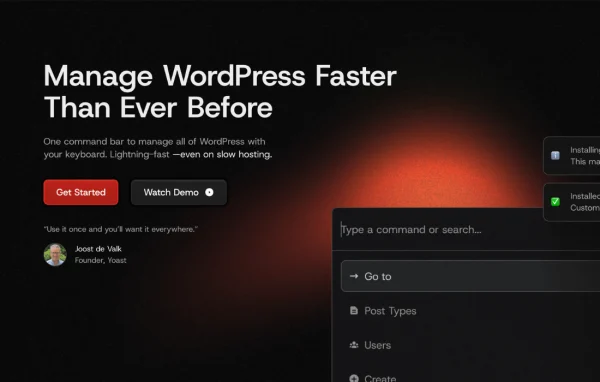
CommandUI is a WordPress plugin that adds a universal command bar to your dashboard. It lets you open posts, edit pages, switch users and manage plugins from the keyboard, with commands running without page reloads.
- Version
- 1.11.0
- Released
- Aug 1, 2026
- Type
- WordPress plugin
- Licence
- GPL
- Included in
- Every plan, or $6.39 a year on its own
What’s new in CommandUI 1.11.0
Version 1.11.0 · Aug 1, 2026
Latest
- FixedFixed shortcuts firing inside Iframe editors
- ImprovedImproved reliability during third-party plugin updates
- NewUnloads the default global command palette in WordPress 6.9 and newer.
What it does
Routine admin work in WordPress often means clicking through menus, waiting for screens to load and hunting for the right post or setting. This plugin puts a single command bar in the dashboard, so you type what you want and act on it right away. The search is typo tolerant, which means a slightly misspelled post title, page name, user or plugin still turns up in the results. Actions run in real time without reloading the page, so you can keep working without losing your place.
The plugin is built for people who spend a lot of time inside WordPress: developers, content creators and site administrators. It works with the Elementor and Bricks page builders, so content made with those tools can be reached from the command bar too. You can switch between user accounts for testing, activate or deactivate plugins and themes, and customize the command palette and shortcuts to fit how you work. It is also designed to work with screen readers and other assistive technologies.
Best for
- Developers who manage many WordPress sites daily
- Site administrators who prefer keyboard shortcuts
- Content teams building pages with Elementor or Bricks
Features
Universal command bar
A single bar in the WordPress dashboard where you search for content and run commands across your site from one place.
Full keyboard navigation
Handle management tasks with keyboard shortcuts, so opening posts, editing pages and moving around the admin area does not depend on the mouse.
Typo-tolerant search
Find posts, pages, users and plugins even when your search terms contain minor misspellings or you only half remember a name.
Elementor and Bricks support
Access and manage content built with the Elementor and Bricks page builders directly from the command bar.
Quick user switching
Move between user accounts on your site without logging out, which helps when testing roles, permissions or what different users see.
Plugin and theme management
Activate, deactivate or configure plugins and themes through commands instead of navigating to their admin screens.
Customizable command palette
Adjust the available command options and keyboard shortcuts so the palette matches your own workflow and preferences.
Accessibility in mind
Designed to be compatible with screen readers and other assistive technologies, so more people on your team can use it.
CommandUI older versions
- 1.10Oct 13, 2025
- 1.9.0Jul 22, 20251 new, 1 fix
- 1.8.0Jul 13, 20251 new
Members and buyers of this product can download older versions.
Questions about CommandUI
Does it work with Elementor and Bricks?
Yes. The plugin works with both Elementor and Bricks, so you can reach and manage content created with those page builders directly from the command bar alongside your regular posts and pages.
What if I misspell something when searching?
The search is typo tolerant. Minor misspellings still return matching posts, pages, users and plugins, so you can find what you need even if you do not remember the exact name.
Can I switch between user accounts with it?
Yes. You can switch to a different user account on your site without logging out, which is handy for testing what other roles see or checking permissions during site administration.
Can I change the commands and shortcuts?
The command palette is customizable. You can tailor the command options and keyboard shortcuts so they suit your workflow and the tasks you perform most often.
Is CommandUI free?
The code of CommandUI is licensed under the GPL, so anyone may use, change and share it. GPL Feast is a paid service: a plan or a single purchase gives you the download and automatic updates. The developer's own support, licence key and online services are not included.
Which version of CommandUI is this?
Version 1.11.0, released Aug 1, 2026. New versions appear here when the developer publishes them, and members get them as automatic updates.
How do I update CommandUI?
Install the free GPL Feast Updater on your site and connect it with your API key. It installs new versions of CommandUI automatically and keeps a backup, so you can roll back.
You might also like






