
Plugin
Updated
Count Down
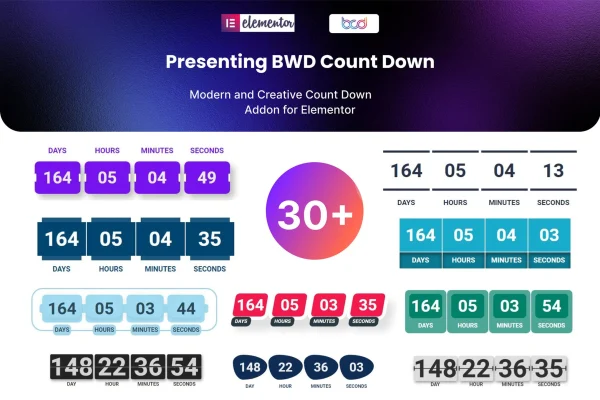
BWD Count Down addon for Elementor is a WordPress plugin that adds countdown timer sections to pages built with Elementor. It gives you more than 30 preset designs, editable dates, colors and unit labels, and a choice of what happens when the timer runs out.
- Version
- 1.4
- Released
- Aug 26, 2026
- Type
- WordPress plugin
- Requires
- Elementor
- Licence
- GPL
- Included in
- Every plan, or $3.99 on its own
What’s new in Count Down 1.4
Version 1.4 · Aug 26, 2026
Latest
What it does
Countdown timers are a common way to show visitors how long an offer, launch or event has left, but building one by hand usually means custom code or a clunky embed. This plugin works inside Elementor, so you place a countdown section on a page the same way you would any other element and adjust it from the editor without writing code.
You start from one of over 30 preset designs, then set the target date and time, change the colors and rename the unit titles for days, hours, minutes and seconds. You can flip the direction of the time units and choose a post-expire action for when the countdown ends. The timers are responsive and retina-ready, and a POT file is included for translating the text on multi-language sites.
Best for
- Online stores running time-limited sales
- Sites announcing product launches or upcoming events
- Elementor users who want countdowns without writing code
Features
Over 30 preset designs
Choose from more than 30 ready-made countdown layouts as a starting point, then adjust them to fit the look of your site.
Custom date, time and colors
Set the exact date and time the countdown targets and change its colors so the timer matches your brand.
Editable unit titles
Rename the labels for days, hours, minutes and seconds, which is handy for shorter labels or wording in another language.
Flip time unit direction
Change the direction in which the time units are displayed to give the countdown a different layout or animation feel.
Post-expire actions
Decide what happens on the page once the countdown reaches zero, so visitors are not left looking at an empty timer.
Responsive and retina-ready
Countdown sections adapt to different screen sizes and display sharply on high-resolution screens, from phones to desktop monitors.
Translation ready
A POT file is included, so you can translate the plugin's text for sites that run in other languages or several languages.
Questions about Count Down
Do I need Elementor to use this plugin?
Yes. It is an addon for Elementor, so you need Elementor active on your site. The countdown timers are added and edited inside the Elementor editor alongside your other page content.
Can I change what the countdown says and how it looks?
You can. Pick one of the 30+ preset designs, then customize the date, time and colors. The unit titles for days, hours, minutes and seconds are editable, and you can flip the direction of the time units.
What happens when the timer reaches zero?
The plugin includes post-expire actions, which let you control what happens once the countdown finishes. This keeps the section useful after an offer or event deadline has passed.
Will the countdown work on mobile devices?
The timers are responsive and retina-ready, so they adjust to different screen sizes and display clearly on high-resolution phone, tablet and desktop screens.
Is Count Down free?
The code of Count Down is licensed under the GPL, so anyone may use, change and share it. GPL Feast is a paid service: a plan or a single purchase gives you the download and automatic updates. The developer's own support, licence key and online services are not included.
Which version of Count Down is this?
Version 1.4, released Aug 26, 2026. New versions appear here when the developer publishes them, and members get them as automatic updates.
How do I update Count Down?
Install the free GPL Feast Updater on your site and connect it with your API key. It installs new versions of Count Down automatically and keeps a backup, so you can roll back.
What does Count Down need?
Count Down needs Elementor installed and active.
You might also like






