
Plugin
Updated
Countdown Product Woocommerce
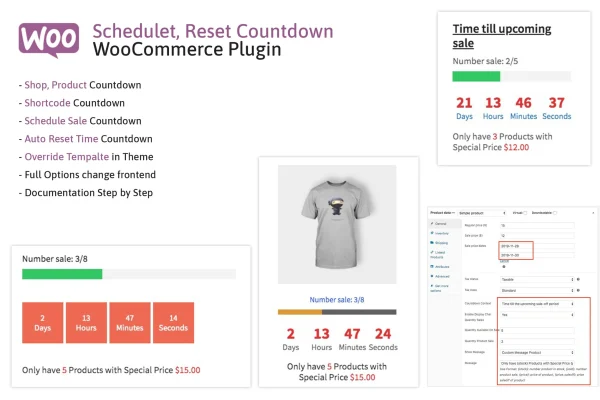
Countdown Product Woocommerce is a WooCommerce plugin that shows countdown timers for current and upcoming sale campaigns. It adds scheduling and automatic reset options, so stores running frequent or recurring promotions can show shoppers how much time is left on a discount.
- Version
- 1.0.0
- Released
- Jun 13, 2018
- Type
- WordPress plugin
- Requires
- WooCommerce
- Licence
- GPL
- Included in
- Every plan, or $3.99 on its own
What’s new in Countdown Product Woocommerce 1.0.0
Version 1.0.0 · Jun 13, 2018
Latest
- NewInitial Public Beta Release
What it does
Running timed promotions in WooCommerce usually means telling shoppers when a sale ends and keeping that message accurate. This plugin handles it by displaying a countdown for ongoing and upcoming sales. You can schedule countdowns for future campaigns ahead of time, and you can set a timer to reset automatically after it finishes, which keeps a countdown on display for recurring offers without manual changes each time.
Timers can appear on product detail pages and shop or category listings, and a shortcode lets you place them in posts, pages, product descriptions and widgets. Each location has its own display settings, so the shop view can behave differently from a product page. The countdown boxes are responsive, their templates can be adjusted in a child theme to match your design, and the plugin is WPML ready for multilingual stores. It requires WooCommerce.
Best for
- WooCommerce stores running flash sales or limited-time offers
- Shops with recurring promotions that need auto resetting timers
- Multilingual WooCommerce stores using WPML
Features
Countdowns for sale campaigns
Display the time remaining for current sales, or the time until an upcoming promotion starts, directly on your WooCommerce storefront.
Scheduling for future sales
Plan countdowns for upcoming campaigns in advance so the timers are ready when each sale period begins.
Automatic countdown reset
Set a timer to restart on its own after it completes, keeping a countdown visible for recurring or ongoing offers.
Shortcode placement
Embed countdowns with a shortcode in posts, pages, product descriptions and widgets, beyond the default product and shop page spots.
Settings per location
Control display settings separately for shop pages, product detail pages and shortcodes to match how each campaign should appear.
Editable countdown templates
Change the look of the countdown boxes by modifying their templates in a child theme so they fit your brand and layout.
Responsive display
Countdown timers adapt to different screen sizes, so they work on desktops, tablets and smartphones.
WPML ready
Show countdown timers in multiple languages on stores that use WPML to serve an international audience.
Questions about Countdown Product Woocommerce
Where can I show the countdown timers?
Timers can appear on product detail pages and on shop or category listings. A shortcode also lets you place them inside posts, pages, product descriptions and widgets, and each of these locations has its own display settings.
Can a countdown restart by itself when it ends?
Yes. The auto reset option restarts the timer after it completes, so a countdown stays visible for recurring promotions without you editing it every time the period runs out.
Can I change how the countdown looks?
The countdown boxes use templates that you can modify in a child theme. That lets you adjust the appearance to match your store design, and the timers are responsive across desktop and mobile screens.
Does it work on a multilingual store?
The plugin is WPML ready, so countdown timers can be shown in multiple languages on WooCommerce stores that use WPML for translation.
Is Countdown Product Woocommerce free?
The code of Countdown Product Woocommerce is licensed under the GPL, so anyone may use, change and share it. GPL Feast is a paid service: a plan or a single purchase gives you the download and automatic updates. The developer's own support, licence key and online services are not included.
Which version of Countdown Product Woocommerce is this?
Version 1.0.0, released Jun 13, 2018. New versions appear here when the developer publishes them, and members get them as automatic updates.
How do I update Countdown Product Woocommerce?
Install the free GPL Feast Updater on your site and connect it with your API key. It installs new versions of Countdown Product Woocommerce automatically and keeps a backup, so you can roll back.
What does Countdown Product Woocommerce need?
Countdown Product Woocommerce needs WooCommerce installed and active.
You might also like






