
Plugin
Updated
Countdown Timer for Elementor
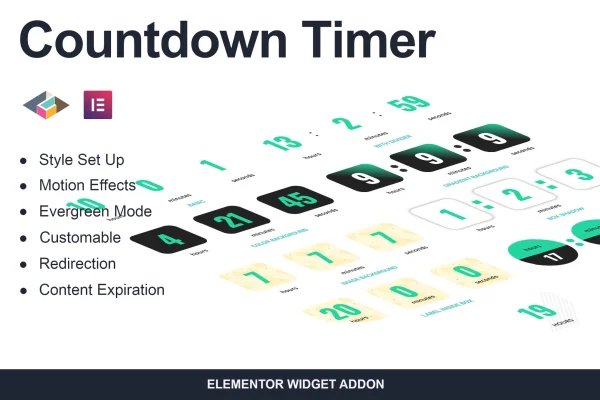
Countdown Timer for Elementor is a WordPress plugin that adds countdown timers to pages you build with Elementor. You can style each timer to match your site, choose what happens when it reaches zero, and run evergreen timers that reset for each visitor.
- Version
- 1.0.2
- Released
- May 2, 2023
- Type
- WordPress plugin
- Requires
- Elementor
- Licence
- GPL
- Included in
- Every plan, or $3.99 on its own
What’s new in Countdown Timer for Elementor 1.0.2
Version 1.0.2 · May 2, 2023
Latest
What it does
Time-limited offers, product launches and events all need a clear deadline on the page. This plugin gives you a countdown timer you can place and style inside the Elementor editor, so the deadline shows up wherever you need it. It requires Elementor, and you work with the timer in the same interface you already use to build your pages, adjusting fonts, colors, backgrounds, layouts, formats and labels.
The plugin also handles what happens after the clock runs out. When a timer hits zero, it can show alternative content or send visitors to another URL, such as a special offer page or a sold-out notice. Evergreen mode resets timers based on user visits, which suits ongoing campaigns where you would rather not reset dates by hand. Timers are responsive across desktops, tablets and phones, and you can add motion effects for a bit of movement.
Best for
- Online stores running limited-time sales
- Event sites counting down to a launch or date
- Marketers running evergreen promotional campaigns
Features
Built into Elementor
Add and customize countdown timers inside the Elementor interface, so you can design them alongside the rest of your page content.
Content expiration handling
When the countdown reaches zero, the timer can automatically display alternative content in its place for visitors who arrive after the deadline.
Redirect after expiry
Send visitors to another URL once a timer expires, for example a special offer page or a page explaining that an item has sold out.
Evergreen timer mode
Set timers to reset automatically based on user visits, which keeps ongoing campaigns running without you changing end dates manually.
Style customization
Adjust fonts, colors, backgrounds and layouts so each countdown timer fits your site's branding and overall design.
Formats and custom labels
Pick from several timer formats and edit the labels to suit different kinds of events, sales or promotions.
Responsive display
Timers adapt to desktops, tablets and smartphones, so the countdown displays properly on whatever device a visitor uses.
Motion effects
Apply subtle animations and motion effects to your countdown timers to draw the eye to an upcoming deadline.
Questions about Countdown Timer for Elementor
Do I need Elementor to use this plugin?
Yes. The plugin is an addon for Elementor and requires it. You add and style the countdown timers inside the Elementor editor, alongside the other elements on your page.
What happens when the countdown reaches zero?
You can choose how the timer behaves at expiry. It can display alternative content in place of the timer, or it can automatically redirect visitors to another URL, such as a special offer page or a sold-out notice.
Can I run a timer that resets for each visitor?
Yes. Evergreen timer mode resets timers automatically based on user visits. This is useful for ongoing campaigns where you want each visitor to see a countdown without updating the end date yourself.
Can I make the timer match my site's design?
You can customize fonts, colors, backgrounds and layouts, choose between several timer formats and edit the labels. Motion effects are also available if you want the timer to animate.
Is Countdown Timer for Elementor free?
The code of Countdown Timer for Elementor is licensed under the GPL, so anyone may use, change and share it. GPL Feast is a paid service: a plan or a single purchase gives you the download and automatic updates. The developer's own support, licence key and online services are not included.
Which version of Countdown Timer for Elementor is this?
Version 1.0.2, released May 2, 2023. New versions appear here when the developer publishes them, and members get them as automatic updates.
How do I update Countdown Timer for Elementor?
Install the free GPL Feast Updater on your site and connect it with your API key. It installs new versions of Countdown Timer for Elementor automatically and keeps a backup, so you can roll back.
What does Countdown Timer for Elementor need?
Countdown Timer for Elementor needs Elementor installed and active.
You might also like






