
Plugin
Updated
CountDown With Image or Video Background
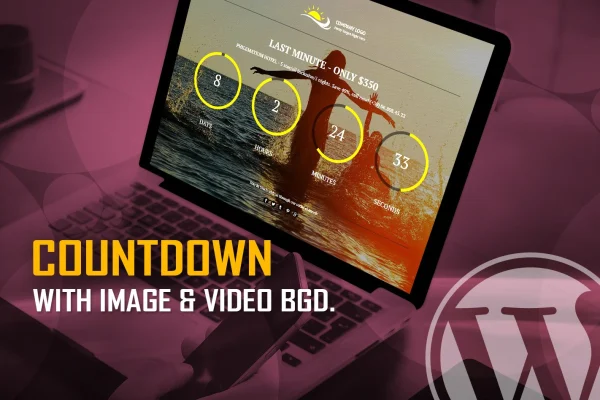
CountDown With Image or Video Background is a WordPress plugin for building countdown timers that sit on top of an image or a video. It comes in circular and digital versions, and it suits product launches, events, limited-time offers and sites under construction.
- Version
- 1.6
- Released
- Jan 23, 2026
- Type
- WordPress plugin
- Licence
- GPL
- Included in
- Every plan, or $3.99 on its own
What’s new in CountDown With Image or Video Background 1.6
Version 1.6 · Jan 23, 2026
Latest
What it does
A plain countdown timer can feel like an afterthought on a page. This plugin pairs the timer with a full image or video background, so the countdown becomes a proper visual section that announces a launch, an event, a discount period or a maintenance window. You set exact start and end times down to the second, and the timer counts toward that moment on desktops, tablets and phones, including iOS and Android devices.
There are two versions to pick from: a digital timer and a circular layout. Both are configured through more than 100 parameters, which lets you match colors, layout and behavior to your site's design. When the countdown finishes, a callback lets you run your own JavaScript function, for example to reveal content or redirect visitors. The package also includes HTML, CSS, JS and PSD files for people who want to work with the source assets.
Best for
- Stores running limited-time offers or discount periods
- Sites announcing product launches or upcoming events
- Websites under construction or in maintenance mode
Features
Image or video backgrounds
Place the countdown over a still image or a video, turning the timer into a full visual section on the page instead of a small block of numbers.
Circular and digital versions
Choose a digital timer or a circular countdown layout. Both versions are fully configurable through the plugin's parameters.
Over 100 settings
Adjust the look and behavior of the timer with more than 100 parameters so it fits your brand style and the campaign you are running.
Second-level scheduling
Set exact begin and end dates and times, including year, month, day, hour, minute and second, for precise event timing.
Callback after completion
Define a custom JavaScript function that runs right after the countdown ends, so you can trigger your own actions on the site.
Responsive on all screens
The timer adapts to different screen sizes and resolutions, and it works on iOS and Android mobile devices.
Source files included
HTML, CSS, JS and PSD files come with the plugin, which helps if you want to adjust the design or reuse assets elsewhere.
Questions about CountDown With Image or Video Background
Can I use a video instead of an image behind the timer?
Yes. The plugin supports both image and video backgrounds, so you can pick whichever suits your campaign. The countdown displays on top of the chosen background in either the circular or digital version.
How precise can the countdown schedule be?
You can set the start and end times down to the second, including year, month, day, hour and minute. That makes it practical for timed launches, sales that end at a set moment, or events with a fixed start.
Can something happen automatically when the countdown reaches zero?
Yes. The plugin offers a callback function where you define custom JavaScript that runs right after the countdown ends. This requires some JavaScript knowledge, but it lets you trigger your own actions on the page.
Will the timer look right on phones?
The plugin is responsive and adapts to different screen sizes and resolutions. It is also built to work on iOS and Android devices, so visitors on mobile see a working countdown.
Is CountDown With Image or Video Background free?
The code of CountDown With Image or Video Background is licensed under the GPL, so anyone may use, change and share it. GPL Feast is a paid service: a plan or a single purchase gives you the download and automatic updates. The developer's own support, licence key and online services are not included.
Which version of CountDown With Image or Video Background is this?
Version 1.6, released Jan 23, 2026. New versions appear here when the developer publishes them, and members get them as automatic updates.
How do I update CountDown With Image or Video Background?
Install the free GPL Feast Updater on your site and connect it with your API key. It installs new versions of CountDown With Image or Video Background automatically and keeps a backup, so you can roll back.
You might also like






