
Plugin
Updated
CSS3 Vertical Web Pricing Tables
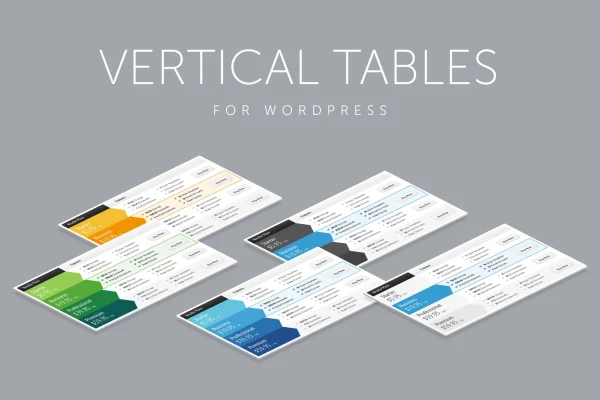
CSS3 Vertical Web Pricing Tables is a WordPress plugin for presenting pricing plans in a vertical layout. Instead of side-by-side columns, each plan sits in its own row, built with CSS3 and HTML. You set up tables in an admin panel and place them on pages with a shortcode.
- Version
- 2.0
- Released
- Jan 14, 2026
- Type
- WordPress plugin
- Licence
- GPL
- Included in
- Every plan, or $3.99 on its own
What’s new in CSS3 Vertical Web Pricing Tables 2.0
Version 2.0 · Jan 14, 2026
Latest
What it does
Most pricing tables line plans up as columns, which can get cramped when you have several tiers or long feature lists. This plugin turns that layout on its side and shows each pricing option as a row. Visitors read down the page to compare plans, which works well on narrower screens and gives you room for detailed feature lists. The tables are responsive, and you can set their width so they sit comfortably inside your theme's content area.
You build and edit tables from an admin panel in WordPress, then drop them into any post or page with a shortcode. Ten predefined color skins let you change the look without writing code, and CSS3 animated hover states add a bit of motion when visitors move over a plan. There is no cap on the number of tables or rows, and font-face fonts handle the typography. Designers who want to adjust the visuals further get a PSD source file to work from.
Best for
- Service businesses listing several pricing tiers
- Freelancers presenting package options to clients
- Agencies building pricing pages for client sites
Features
Vertical row-based layout
Pricing tiers are displayed as rows instead of columns, giving each plan its own horizontal band and leaving space for longer feature lists.
Ten predefined color skins
Choose from 10 color skins to match your tables to your brand colors without editing any CSS or writing code.
Animated hover states
CSS3 animations respond when visitors hover over a plan, drawing attention to the pricing details they are looking at.
Unlimited tables and rows
Create as many pricing tables as you need, each with as many rows and features as your plans require.
Admin panel for editing
An admin panel inside WordPress lets you create, customize and manage your vertical pricing tables in one place.
Configurable width and responsive
Set the table width to fit your layout, and the responsive design adjusts the tables for different screen sizes.
Shortcode embedding
Place any pricing table in a post, page or other content area by adding its shortcode where you want it to appear.
PSD source file included
A PSD source file comes with the plugin so designers can rework the visual elements of the tables if needed.
Questions about CSS3 Vertical Web Pricing Tables
How is a vertical pricing table different from a regular one?
A regular pricing table places plans side by side in columns. This plugin shows each plan as a row stacked down the page, which gives more horizontal room for feature details and reads naturally as visitors scroll.
Can I change the colors without coding?
Yes. The plugin includes 10 predefined color skins you can apply to a table to match your brand. If you need deeper visual changes, the included PSD source file gives designers a starting point.
How do I add a pricing table to a page?
Each table you build in the admin panel can be embedded with a shortcode. Paste the shortcode into a post or page wherever you want the pricing table to show up.
Will the tables work on mobile screens?
The tables are responsive, so they adjust to different screen sizes. You can also configure the table width so it fits within your theme's layout on larger screens.
Is CSS3 Vertical Web Pricing Tables free?
The code of CSS3 Vertical Web Pricing Tables is licensed under the GPL, so anyone may use, change and share it. GPL Feast is a paid service: a plan or a single purchase gives you the download and automatic updates. The developer's own support, licence key and online services are not included.
Which version of CSS3 Vertical Web Pricing Tables is this?
Version 2.0, released Jan 14, 2026. New versions appear here when the developer publishes them, and members get them as automatic updates.
How do I update CSS3 Vertical Web Pricing Tables?
Install the free GPL Feast Updater on your site and connect it with your API key. It installs new versions of CSS3 Vertical Web Pricing Tables automatically and keeps a backup, so you can roll back.
You might also like






