
Plugin
Updated
DM Pricing
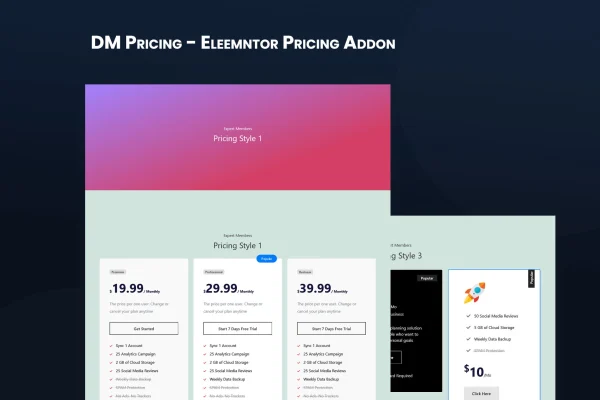
DM Pricing is a WordPress plugin for building pricing tables inside Elementor. It gives you preset layouts, a drag-and-drop settings panel and full control over colors and fonts, so you can present service plans or product packages clearly without writing code.
- Version
- 1.0.0
- Released
- May 2, 2023
- Type
- WordPress plugin
- Requires
- Elementor
- Licence
- GPL
- Included in
- Every plan, or $3.99 on its own
What’s new in DM Pricing 1.0
Version 1.0
Latest
- ChangedA change since the previous version.
- ChangedAnother change.
What it does
Visitors comparing plans want to see prices, features and differences at a glance. Building that kind of table by hand often means fiddling with columns and styling. This plugin requires Elementor and works inside its editor, so you set up pricing tables with the same interface you already use for the rest of your pages. You start from one of the preset design styles, then adjust colors, typography, layout and images to match your brand.
The settings panel lets you add, modify and reorder pricing elements by dragging them, with no coding involved. You can create as many pricing plans as you need, which suits tiered subscriptions, team packages or a range of products. Tables are built on the Bootstrap 5 framework and respond to phones, tablets and desktops, graphics are retina ready, and you can add social media icons to a table if that fits your page.
Best for
- Service businesses presenting tiered plans or packages
- Freelancers and agencies listing their service rates
- Elementor sites that need styled pricing tables
Features
Preset design styles
Start from one of three or more clean pricing table layouts, then adjust it to fit your site instead of designing a table from scratch.
Elementor styling controls
Change colors, fonts, layouts and images through the Elementor interface, keeping your pricing tables consistent with the rest of your page designs.
Drag-and-drop settings panel
Add, edit and reorder the elements inside each pricing table by dragging them into place, with no code required at any step.
Unlimited pricing plans
Create and manage as many pricing tables and plans as your offering needs, from simple single packages to multi-tier subscription options.
Responsive Bootstrap 5 layout
Tables are built on the Bootstrap 5 framework and adapt to phones, tablets and desktops so plans stay readable on any screen size.
Custom typography and colors
Set font families, sizes and colors for each table so your pricing matches your brand identity and the look of your theme.
Social media icons
Include social media links directly in your pricing tables, which can be handy for freelancers, teams or agencies presenting their services.
Retina ready graphics
Visuals in your pricing tables display sharply on high-resolution screens, giving plans a clean and polished appearance.
Questions about DM Pricing
Do I need Elementor to use this plugin?
Yes. The plugin requires Elementor and works through its editor. You build and style your pricing tables with Elementor controls for colors, fonts, layouts and images, so it fits naturally into sites already built with that page builder.
Can I create more than one pricing table?
Yes. You can add and manage unlimited pricing plans and tables. That makes it practical for businesses with several services, tiered subscriptions, team packages or a range of products that each need their own pricing display.
Will the pricing tables work on mobile devices?
The tables are built on the Bootstrap 5 framework and are fully responsive, adjusting to phones, tablets and desktops. Graphics are also retina ready, so they stay sharp on high-resolution screens.
Do I need coding skills to customize the tables?
No. A drag-and-drop settings panel lets you modify and reorder pricing elements, and Elementor handles styling such as typography and colors. You can start from a preset design and adjust it visually.
Is DM Pricing free?
The code of DM Pricing is licensed under the GPL, so anyone may use, change and share it. GPL Feast is a paid service: a plan or a single purchase gives you the download and automatic updates. The developer's own support, licence key and online services are not included.
Which version of DM Pricing is this?
Version 1.0.0, released May 2, 2023. New versions appear here when the developer publishes them, and members get them as automatic updates.
How do I update DM Pricing?
Install the free GPL Feast Updater on your site and connect it with your API key. It installs new versions of DM Pricing automatically and keeps a backup, so you can roll back.
What does DM Pricing need?
DM Pricing needs Elementor installed and active.
You might also like






