
Plugin
Updated
Dropzone Field For Elementor Form
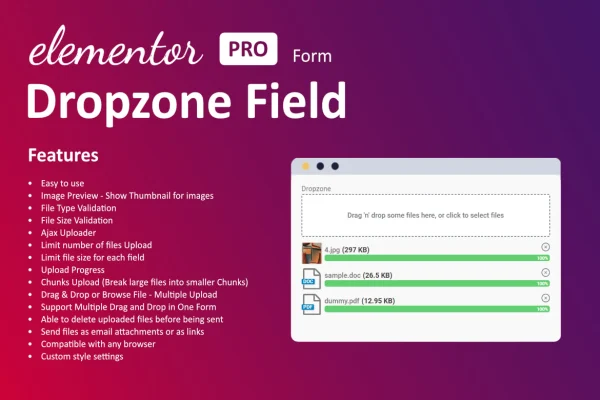
Dropzone Field For Elementor Form is a WordPress plugin that adds a drag and drop upload area to forms built with Elementor. Visitors can drop one or several files straight into the form, see upload progress, and get clear feedback when something goes wrong.
- Version
- 1.4.0
- Released
- Aug 27, 2026
- Type
- WordPress plugin
- Requires
- Elementor
- Licence
- GPL
- Included in
- Every plan, or $3.99 on its own
What’s new in Dropzone Field For Elementor Form 1.4.0
Version 1.4.0 · Aug 27, 2026
Latest
What it does
A standard file input works, but it can feel clunky, especially when someone needs to send more than one file. This plugin replaces that plain field with a dropzone inside your Elementor form. Visitors drag files into the area or pick them from their device, and the field shows a progress indicator while each file uploads. It requires Elementor, and the field is added within an Elementor form like any other form field.
It fits anywhere a form needs attachments: contact forms, job applications with a resume, feedback forms with screenshots, or requests that include images and documents. You can limit which file types are accepted and set a maximum file size, so submissions arrive in the formats you expect. Colors, sizes and messages can be adjusted to match your site's design without writing code, and the field is built to work on desktops, tablets and phones.
Best for
- Elementor sites with contact forms that accept attachments
- Job boards and careers pages collecting resumes
- Businesses gathering images or documents from customers
Features
Drag and drop uploads
Visitors upload files by dragging them into the form area, which turns a plain file input into a clear, interactive drop zone.
Multiple files at once
Allow people to upload several files in a single step, useful for forms that need a set of images or documents.
File type and size limits
Restrict which file types are accepted and set a maximum file size so only valid files can be submitted through the form.
Upload progress indicator
A real-time progress indicator shows visitors how their upload is going, so they know when files have finished sending.
Adjustable design
Change the colors, sizes and messages of the dropzone so it matches the look of the rest of your website, with no coding needed.
Custom success and error messages
Write your own success and error messages to give visitors clear instructions or feedback when an upload works or fails.
Works inside Elementor forms
Add the dropzone field within any Elementor form, keeping your existing form layout and setup in the page builder you already use.
Mobile friendly field
The upload field is responsive and designed to work across desktops, tablets and smartphones for a consistent experience.
Dropzone Field For Elementor Form older versions
- 1.3.0Sep 3, 2025
Members and buyers of this product can download older versions.
Questions about Dropzone Field For Elementor Form
Do I need Elementor to use this plugin?
Yes. The plugin requires Elementor and works as a field you add inside Elementor forms. It adds the drag and drop upload area to those forms rather than acting as a standalone form builder.
Can visitors upload more than one file in a single form?
Yes. Multiple file upload is supported, so visitors can add several files at once. This is handy for job applications, project requests or feedback forms where people need to send a few images or documents together.
Can I control which files people are allowed to upload?
You can restrict the accepted file types and set a maximum file size. Files that do not meet those rules are blocked, and you can customize the error message so visitors understand what to change.
Will the dropzone match my site's design?
The field's colors, sizes and messages can be adjusted from the settings without code, so you can style it to fit your branding. It is also responsive, so it adapts to desktop, tablet and phone screens.
Is Dropzone Field For Elementor Form free?
The code of Dropzone Field For Elementor Form is licensed under the GPL, so anyone may use, change and share it. GPL Feast is a paid service: a plan or a single purchase gives you the download and automatic updates. The developer's own support, licence key and online services are not included.
Which version of Dropzone Field For Elementor Form is this?
Version 1.4.0, released Aug 27, 2026. New versions appear here when the developer publishes them, and members get them as automatic updates.
How do I update Dropzone Field For Elementor Form?
Install the free GPL Feast Updater on your site and connect it with your API key. It installs new versions of Dropzone Field For Elementor Form automatically and keeps a backup, so you can roll back.
What does Dropzone Field For Elementor Form need?
Dropzone Field For Elementor Form needs Elementor installed and active.
You might also like






