
Plugin
Updated
DVFAQ
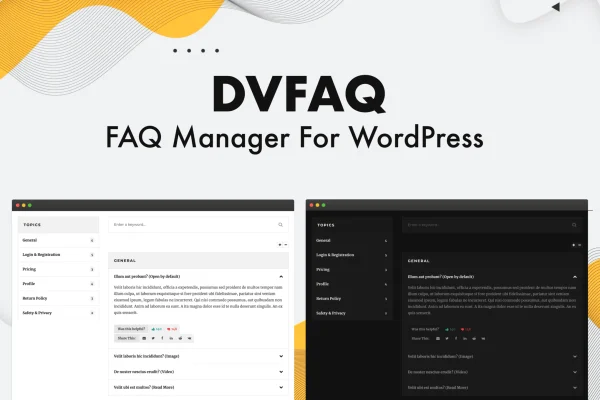
DVFAQ is a WordPress plugin for adding and managing frequently asked questions on your site. It displays answers in accordion-style toggles, sorts them into categories, and lets visitors search, rate and share individual answers.
- Version
- 1.3.2
- Released
- Mar 30, 2023
- Type
- WordPress plugin
- Requires
- Elementor
- Licence
- GPL
- Included in
- Every plan, or $3.99 on its own
What’s new in DVFAQ 1.3.2
Version 1.3.2 · Mar 30, 2023
Latest
- ImprovedUpdated CMB2
- FixedBug fixes
What it does
Most sites get the same questions again and again, and answering each one by email or chat takes time. A well-organized FAQ section gives visitors a place to find answers on their own. This plugin handles the content side by letting you group questions into categories and sub-categories, then shows them in accordion toggles so a long list stays easy to scan. A live search field returns matching results as visitors type, which helps on pages with many questions.
You can place FAQs on any page or post with shortcodes, which work with any WordPress theme and need no coding. The plugin requires Elementor, and it adds two Elementor widgets so you can drop FAQ blocks into your page designs directly. The layout is responsive across mobile, tablet and desktop. A like and dislike rating on each item shows you which answers help and which need rewriting, and social sharing buttons let visitors pass useful answers along.
Best for
- Businesses that field the same customer questions repeatedly
- Elementor sites needing a searchable FAQ or help section
- Agencies building support pages for client websites
Features
Accordion-style toggles
Questions display in collapsible toggles, so visitors open only the answers they need and long FAQ pages stay tidy and easy to read.
Categories and sub-categories
Custom taxonomies let you sort questions into categories and sub-categories, giving visitors clear navigation through topics like billing, shipping or account help.
Live search
A predictive search field shows matching FAQ results as visitors type, helping them reach the right answer without scrolling through every question.
Like and dislike ratings
Visitors can rate each FAQ item, giving you feedback on which answers work and which ones may need clearer wording or more detail.
Shortcodes for any theme
Add FAQs to any page or post with simple shortcodes that work with every WordPress theme, with no coding required.
Two Elementor widgets
Dedicated Elementor widgets let you place FAQ sections inside your Elementor layouts alongside the rest of your page design.
Social sharing buttons
Visitors can share a helpful FAQ answer directly to their social networks from the item itself.
Responsive layout
FAQ sections adapt to mobile, tablet and desktop screens so questions and answers remain readable on any device.
Questions about DVFAQ
Does DVFAQ work with my theme?
Yes. FAQs are added through shortcodes that are compatible with every WordPress theme, so you can place them in any page or post. The plugin does require Elementor to be active, and it includes two Elementor widgets for building FAQ sections in your layouts.
Can I organize questions by topic?
You can. The plugin uses custom taxonomies, so questions can be grouped into categories and sub-categories. This makes larger FAQ collections easier to browse, and visitors can also use the live search to find answers across your questions as they type.
How do I know which answers are helpful?
Each FAQ item has a like and dislike rating that visitors can use. Over time this shows you which answers resonate with readers and which ones might need to be rewritten or expanded.
Will the FAQ section look right on phones?
The plugin uses a responsive design, so FAQ sections adjust to mobile, tablet and desktop screens. The accordion toggles also keep the page compact on smaller displays, since answers stay hidden until a visitor opens them.
Is DVFAQ free?
The code of DVFAQ is licensed under the GPL, so anyone may use, change and share it. GPL Feast is a paid service: a plan or a single purchase gives you the download and automatic updates. The developer's own support, licence key and online services are not included.
Which version of DVFAQ is this?
Version 1.3.2, released Mar 30, 2023. New versions appear here when the developer publishes them, and members get them as automatic updates.
How do I update DVFAQ?
Install the free GPL Feast Updater on your site and connect it with your API key. It installs new versions of DVFAQ automatically and keeps a backup, so you can roll back.
What does DVFAQ need?
DVFAQ needs Elementor installed and active.
You might also like






