
Plugin
Updated
DZS Restaurant Menu
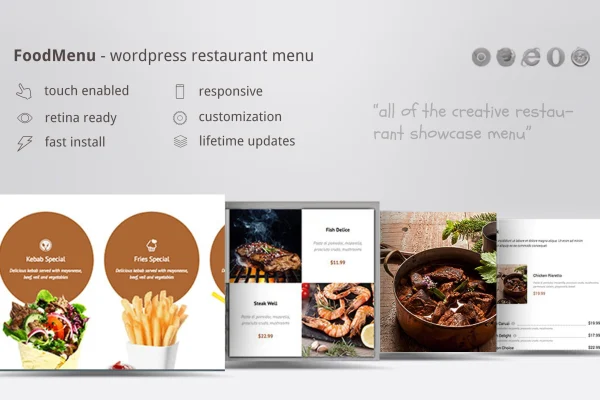
This WordPress plugin presents restaurant, cafe and food business menus on your website using WooCommerce. Your dishes are managed as products, then displayed in one of several layouts and visual skins, with room for ingredients, tags and parallax scrolling effects.
- Version
- 1.20
- Released
- May 2, 2023
- Type
- WordPress plugin
- Requires
- WooCommerce
- Licence
- GPL
- Included in
- Every plan, or $3.99 on its own
What’s new in DZS Restaurant Menu 1.20
Version 1.20 · May 2, 2023
Latest
What it does
Many food businesses already run WooCommerce, yet the default shop layout rarely looks like a menu. DZS Restaurant Menu closes that gap. You keep managing each dish as a WooCommerce product, and the plugin displays those items in a menu-style layout that customers can browse. It suits places that want to group dishes by category, point out daily specials or simply give their online menu a look that fits the restaurant.
Presentation is controlled through settings rather than code. You pick from five display modes and four skins, so you can try different layouts and visual styles until one matches your branding. Each dish can carry an ingredient list and tags, which helps diners understand what they are ordering. Parallax scrolling adds some depth as visitors move down the page, and the responsive, retina-ready design keeps the menu sharp on phones, tablets and desktops.
Best for
- Restaurants selling food online through WooCommerce
- Cafes wanting a styled, browsable menu page
- Freelancers building websites for food businesses
Features
Five display modes
Choose between five layout styles for presenting your menu items, so you can pick the arrangement that makes your dishes easiest to browse.
Four switchable skins
Swap between four visual skins to match your restaurant's branding and site design, with no coding needed to change the look.
WooCommerce product menus
Menu items are managed as WooCommerce products, so your dishes live in the same system you use for online ordering and checkout.
Ingredients and tags
Add ingredient lists and category tags to each dish, giving customers the details they need to choose what to order.
Parallax scrolling effects
Apply parallax effects that add visual depth to the menu page as visitors scroll through your dishes and categories.
Responsive, retina-ready display
The menu adapts to different screen sizes and looks crisp on high-resolution displays, from desktop monitors down to mobile phones.
Settings-based customization
Adjust how your menu looks through straightforward settings, which keeps setup manageable for site owners without advanced technical knowledge.
Questions about DZS Restaurant Menu
Do I need WooCommerce to use this plugin?
Yes. The plugin requires WooCommerce and works with it directly. Your menu items are created and managed as WooCommerce products, which the plugin then displays in its menu layouts and skins.
Can I change how the menu looks?
You can. There are five display modes for the layout and four skins for the visual style, and you can mix and switch between them through the settings to match your restaurant's branding without writing code.
Can I list ingredients for each dish?
Yes. Each dish can have an ingredient list and category tags. This lets customers see what goes into a meal and helps you organize dishes into groups that are easier to browse.
Will the menu work on mobile phones?
The plugin uses a responsive, retina-ready design, so the menu adjusts to different screen sizes and stays sharp on high-resolution screens, including desktops, tablets and phones.
Is DZS Restaurant Menu free?
The code of DZS Restaurant Menu is licensed under the GPL, so anyone may use, change and share it. GPL Feast is a paid service: a plan or a single purchase gives you the download and automatic updates. The developer's own support, licence key and online services are not included.
Which version of DZS Restaurant Menu is this?
Version 1.20, released May 2, 2023. New versions appear here when the developer publishes them, and members get them as automatic updates.
How do I update DZS Restaurant Menu?
Install the free GPL Feast Updater on your site and connect it with your API key. It installs new versions of DZS Restaurant Menu automatically and keeps a backup, so you can roll back.
What does DZS Restaurant Menu need?
DZS Restaurant Menu needs WooCommerce installed and active.
You might also like






