
Plugin
Updated
Elementor Form - International Telephone
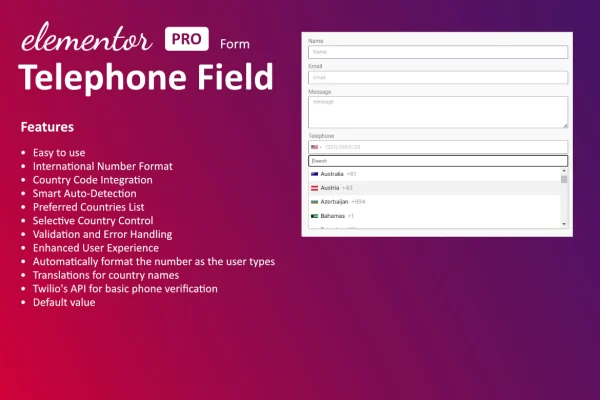
This plugin adds a dedicated telephone input field to the Elementor form widget. It accepts phone numbers from all countries, applies formatting and checks entries as visitors type, so the numbers you collect are easier to use for follow-up calls and messages.
- Version
- 1.3.0
- Released
- Jul 19, 2024
- Type
- WordPress plugin
- Requires
- Elementor
- Licence
- GPL
- Included in
- Every plan, or $3.99 on its own
What’s new in Elementor Form - International Telephone 1.3.0
Version 1.3.0 · Jul 19, 2024
Latest
- ImprovedDropdown z-index increased.
- ImprovedDependencies update.
What it does
A plain text field is a weak way to collect phone numbers. Visitors type numbers in different formats, leave out country codes or make typos, and you end up with contact details you cannot use. Elementor Form - International Telephone gives your Elementor forms a proper phone field with built-in formatting and validation for numbers from any country, plus a country dropdown that helps visitors enter their number correctly the first time.
The plugin requires Elementor and works inside its form widget, so you add the telephone field the same way you add any other form field. You can adjust colors, fonts and sizes to match your site, pick a number format or define your own, and add placeholders and tooltips that explain what to enter. The field is responsive, which suits contact forms, service booking pages and lead generation pages that get a lot of mobile visitors.
Best for
- Business websites built with Elementor contact forms
- Service booking sites that need reliable phone numbers
- Lead generation pages collecting international contacts
Features
International number support
Accepts phone numbers from all countries, with built-in formatting and validation so entries from visitors abroad come through in a usable form.
Real-time input validation
Checks phone numbers as visitors type and blocks incorrect entries, which cuts down on bad data and makes customer follow-up easier.
Custom styling options
Adjust the colors, fonts and sizes of the telephone field so it matches the rest of your form and your site's branding.
Flexible number formats
Choose from several phone number formats or set up your own format to suit the way your business records contact details.
Placeholders and tooltips
Add placeholder text and tooltips to the field so visitors can see the expected input format before they start typing.
Responsive mobile layout
The field adapts to smartphones and tablets, giving visitors on smaller screens a comfortable way to enter their phone number.
Built for the Elementor form widget
Works inside Elementor's own form widget, so you add and configure the phone field alongside your other form fields.
Questions about Elementor Form - International Telephone
Do I need Elementor for this plugin to work?
Yes. The plugin requires Elementor and adds its telephone field to the Elementor form widget. It is designed for sites that already build their forms with Elementor.
Can visitors from other countries enter their phone numbers?
Yes. The field accepts phone numbers from all countries and includes built-in formatting and validation, so international visitors can submit their numbers in a consistent, usable format.
Can I make the phone field match my site's design?
You can adjust the field's colors, fonts and sizes to fit your branding. You can also add placeholders and tooltips, and choose or customize the phone number format shown to visitors.
Does the field stop people from entering wrong numbers?
The plugin uses real-time input validation to prevent incorrect phone number entries as visitors type. This helps reduce errors in the contact details you collect through your forms.
Is Elementor Form - International Telephone free?
The code of Elementor Form - International Telephone is licensed under the GPL, so anyone may use, change and share it. GPL Feast is a paid service: a plan or a single purchase gives you the download and automatic updates. The developer's own support, licence key and online services are not included.
Which version of Elementor Form - International Telephone is this?
Version 1.3.0, released Jul 19, 2024. New versions appear here when the developer publishes them, and members get them as automatic updates.
How do I update Elementor Form - International Telephone?
Install the free GPL Feast Updater on your site and connect it with your API key. It installs new versions of Elementor Form - International Telephone automatically and keeps a backup, so you can roll back.
What does Elementor Form - International Telephone need?
Elementor Form - International Telephone needs Elementor installed and active.
You might also like






