
Plugin
Updated
Elementor TeamCard
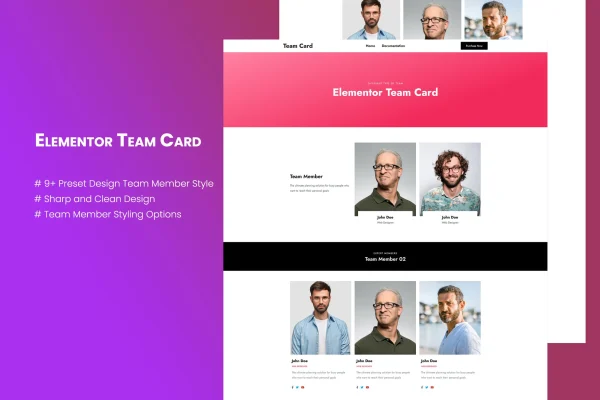
Elementor TeamCard is a WordPress plugin that adds team member cards to pages built with Elementor. Each card can hold a photo, name, designation, short description and social media icons, so visitors can see who works with you and how to reach them.
- Version
- 1.0.0
- Released
- May 2, 2023
- Type
- WordPress plugin
- Requires
- Elementor
- Licence
- GPL
- Included in
- Every plan, or $3.99 on its own
What’s new in Elementor TeamCard 1.0
Version 1.0
Latest
- ChangedA change since the previous version.
- ChangedAnother change.
What it does
Most business sites need a page or section that introduces the people behind the work, and building neat, consistent profile cards by hand in a page builder takes time. This plugin gives you a ready structure for that job. You fill in simple custom fields for each person (image, name, designation and description), pick one of the preset styles, and the card is laid out for you. There is no limit on how many team members you can add.
The plugin requires Elementor and works inside it, with a drag-and-drop settings panel for adjusting the look without code. You can change colors, font size, font family and image layout so the cards match your brand. It includes more than 9 preset designs, uses the Bootstrap 5 framework for its structure, and the layouts are responsive, so cards adapt to phones and tablets. It suits agency sites, corporate pages and creative studios that want a clear team section.
Best for
- Agencies introducing their staff to prospective clients
- Corporate and small business websites with an about page
- Creative studios presenting designers and other team members
Features
More than 9 preset styles
Choose from over 9 preset team member card designs as a starting point, then adjust them to fit the rest of your site.
Drag-and-drop settings panel
Customize card layouts and styles from a drag-and-drop settings panel inside Elementor, with no coding needed for everyday changes.
Styling controls
Set colors, font size, font family and image layout for each card so your team section follows your brand's look.
Social media icons
Every card can show social media icons, giving visitors a direct way to find and follow individual team members on other platforms.
Simple custom fields
Add each person's image, name, designation and description through straightforward custom fields, keeping profiles consistent across the section.
Unlimited team members
Create as many team member profiles as you need, which helps growing companies and agencies with larger staff lists.
Responsive layouts
Cards are built with responsive layouts on the Bootstrap 5 framework, so they display properly on desktop screens and mobile devices.
Questions about Elementor TeamCard
Do I need Elementor to use this plugin?
Yes. The plugin requires Elementor and is built to work inside it. You add and customize the team cards through Elementor's editing environment using the plugin's drag-and-drop settings panel.
What information can each team member card show?
Each card can include a photo, the person's name, their designation or job title, a short description and social media icons. These are entered through simple custom fields, so every profile follows the same structure.
Can I match the cards to my brand colors and fonts?
Yes. You can change the colors, font size, font family and image layout of the cards. Start from one of the more than 9 preset styles and adjust these settings until the cards fit your design.
Is there a limit on how many team members I can add?
No. The plugin supports unlimited team member creation, so you can add as many profiles as your team needs, whether that is a handful of people or a much larger staff.
Is Elementor TeamCard free?
The code of Elementor TeamCard is licensed under the GPL, so anyone may use, change and share it. GPL Feast is a paid service: a plan or a single purchase gives you the download and automatic updates. The developer's own support, licence key and online services are not included.
Which version of Elementor TeamCard is this?
Version 1.0.0, released May 2, 2023. New versions appear here when the developer publishes them, and members get them as automatic updates.
How do I update Elementor TeamCard?
Install the free GPL Feast Updater on your site and connect it with your API key. It installs new versions of Elementor TeamCard automatically and keeps a backup, so you can roll back.
What does Elementor TeamCard need?
Elementor TeamCard needs Elementor installed and active.
You might also like






