
Plugin
Updated
Elfsight Click To Call CC
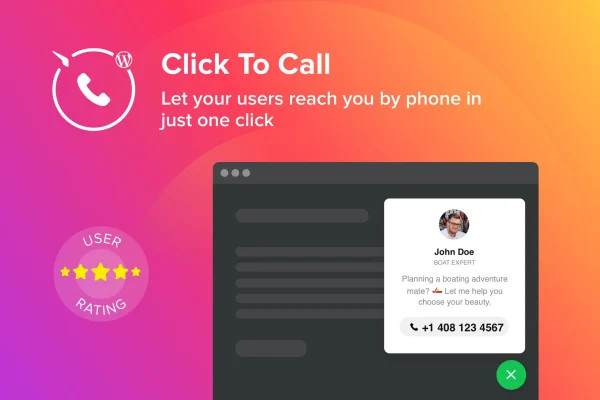
Elfsight Click To Call CC by Elfsight is a WordPress plugin that places a call button on your site. Mobile visitors can start a phone call with one tap, and desktop visitors see your number with a contact photo and a short message.
- Version
- 1.2.0
- Released
- May 2, 2023
- Type
- WordPress plugin
- Licence
- GPL
- Included in
- Every plan, or $3.99 on its own
What’s new in Elfsight Click To Call CC 1.2.0
Version 1.2.0 · May 2, 2023
Latest
What it does
Many visitors would rather talk to a person than fill out a form, but finding and dialing a phone number takes effort, especially on a small screen. This plugin puts a call button on your pages so people can reach you directly. On a phone, tapping the button starts the call right away. On a desktop computer, where calling from the browser is less practical, the button shows your phone number alongside a contact image and a brief line of text.
You decide where and when the button appears. Page targeting lets you show it only on the pages where a call makes sense, such as a services or contact page. Visibility can also follow user roles, so you can show or hide the button for different groups of visitors, and trigger settings control when it displays. The button is responsive and retina ready, and it is built with lightweight HTML, CSS and JS files.
Best for
- Local service businesses that take bookings by phone
- Support teams that want customers to call directly
- Agencies building contact-focused sites for clients
Features
One-tap calling on mobile
On smartphones, visitors tap the button and their phone starts a call to your number, with no copying or dialing needed.
Desktop contact display
On desktop computers, the button shows your phone number together with a contact photo and a short piece of text.
Page targeting
Choose the specific pages where the call button appears, so it shows up only where a phone call fits your site's flow.
User role visibility
Allow or restrict the button based on user roles, giving different groups of visitors a different experience.
Display triggers
Set triggers that control when and how the button is shown, so it appears at the right moment instead of all the time.
Responsive, retina-ready design
The button adapts to smartphones, tablets and desktops and stays sharp on high-resolution screens.
Lightweight code
The plugin is made from lightweight HTML, CSS and JS files, keeping the added code on your pages small.
Questions about Elfsight Click To Call CC
What happens when someone clicks the button on a computer?
Since desktop browsers usually cannot place calls, the button shows your phone number along with a contact photo and a short text instead. Visitors can then dial the number from their own phone.
Can I show the call button only on certain pages?
Yes. Page targeting lets you pick the specific pages where the button appears, so you can keep it on pages like contact or services and leave it off others.
Can I hide the button from logged-in users or certain roles?
Yes. The plugin includes user role visibility controls, so you can allow or restrict the button for particular user roles and tailor who sees it.
Will the button look right on phones and tablets?
The button uses a responsive, retina-ready design, so it adjusts to smartphones, tablets and desktops and stays crisp on high-resolution screens.
Is Elfsight Click To Call CC free?
The code of Elfsight Click To Call CC is licensed under the GPL, so anyone may use, change and share it. GPL Feast is a paid service: a plan or a single purchase gives you the download and automatic updates. The developer's own support, licence key and online services are not included.
Which version of Elfsight Click To Call CC is this?
Version 1.2.0, released May 2, 2023. New versions appear here when the developer publishes them, and members get them as automatic updates.
How do I update Elfsight Click To Call CC?
Install the free GPL Feast Updater on your site and connect it with your API key. It installs new versions of Elfsight Click To Call CC automatically and keeps a backup, so you can roll back.
You might also like






