
Plugin
Updated
EventoZilla - Event Calendar WordPress Plugin
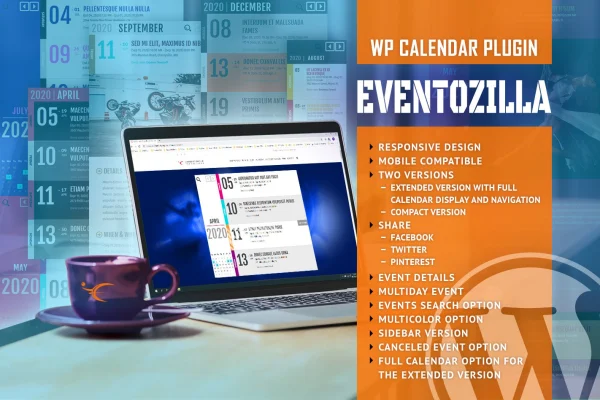
EventoZilla - Event Calendar WordPress Plugin adds an event calendar to your site where visitors can browse upcoming events and follow a link to register. You enter event details such as dates, address, dress code and organizer, then display them in one of two calendar layouts.
- Version
- 1.5.6.1
- Released
- Jan 21, 2026
- Type
- WordPress plugin
- Licence
- GPL
- Included in
- Every plan, or $3.99 on its own
What’s new in EventoZilla - Event Calendar WordPress Plugin 1.5.6.1
Version 1.5.6.1 · Jan 21, 2026
Latest
What it does
Many sites that run events end up posting dates in blog posts or static pages, which makes it hard for visitors to see what is coming up. This plugin gives those events a proper calendar. Each entry holds a title, start and end dates, an address, a description, a dress code and organizer information, so attendees can find what they need in one place. Multi-day events are supported, with start and end times for conferences, festivals or workshops that run across several days.
You can choose between two calendar versions. The extended version offers full tile calendar navigation with search, while the compact version uses simpler month navigation for tighter layouts. For registration, you set a custom URL on an event and a booking button appears, with text you can change to suit your wording or language. Visitors can share events on social media, and the calendar adapts to desktops, tablets and phones on iOS and Android.
Best for
- Conference and workshop organizers
- Community groups and nonprofits listing local events
- Agencies building event calendars for client sites
Features
Booking button with custom link
Add a registration URL to any event and the calendar shows a book now button that sends visitors straight to your sign-up page.
Editable button text
Change the wording on the booking button to match your site's tone or language, such as register, reserve a seat or sign up.
Extended calendar version
Use a full tile calendar with navigation and search, giving visitors a broad view of your schedule and a way to look up specific events.
Compact calendar version
Pick a simpler layout with month navigation that suits smaller spaces or sites that prefer a lighter calendar display.
Detailed event entries
Record titles, start and end dates, addresses, descriptions, dress codes and organizer information so attendees see all the practical details for each event.
Multi-day events
Set precise start and end times for events spanning several days, which helps conferences, festivals and workshops present clear schedules.
Social sharing
Let visitors share individual events on social media platforms so friends and colleagues can hear about them.
Responsive mobile layout
The calendar adjusts to different screen sizes and orientations, so people can browse events on desktops, tablets and iOS or Android phones.
EventoZilla - Event Calendar WordPress Plugin older versions
- 1.5.4Nov 4, 2023
Members and buyers of this product can download older versions.
Questions about EventoZilla - Event Calendar WordPress Plugin
Can visitors register for events through the calendar?
The calendar links out to registration. You set a custom URL for an event, and a book now button appears on it. Clicking the button takes visitors to whatever sign-up or ticketing page you entered, and you can change the button text.
What is the difference between the two calendar versions?
The extended version shows a full tile calendar with navigation and search, which suits sites with many events. The compact version uses simpler month navigation, which works well when you want a smaller calendar that fits into a tighter layout.
Does it handle events that last more than one day?
Yes. You can set start and end dates with precise times, so events such as conferences, festivals or multi-day workshops display their full schedule clearly in the calendar.
What details can I add to each event?
Each event can include a title, start and end dates, an address, a detailed description, a dress code and organizer information. Together these give attendees the practical details they need before deciding to attend.
Is EventoZilla - Event Calendar WordPress Plugin free?
The code of EventoZilla - Event Calendar WordPress Plugin is licensed under the GPL, so anyone may use, change and share it. GPL Feast is a paid service: a plan or a single purchase gives you the download and automatic updates. The developer's own support, licence key and online services are not included.
Which version of EventoZilla - Event Calendar WordPress Plugin is this?
Version 1.5.6.1, released Jan 21, 2026. New versions appear here when the developer publishes them, and members get them as automatic updates.
How do I update EventoZilla - Event Calendar WordPress Plugin?
Install the free GPL Feast Updater on your site and connect it with your API key. It installs new versions of EventoZilla - Event Calendar WordPress Plugin automatically and keeps a backup, so you can roll back.
You might also like






