Plugin
Updated
Events Shortcodes For The Events Calendar
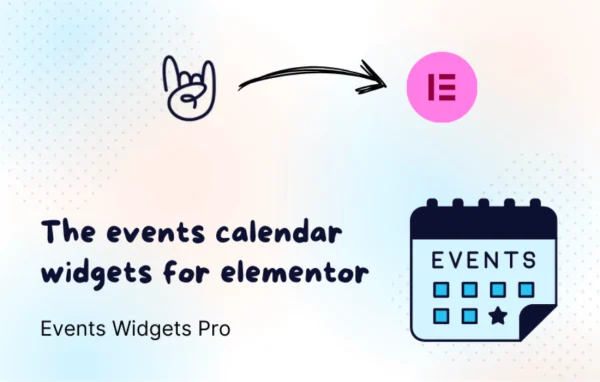
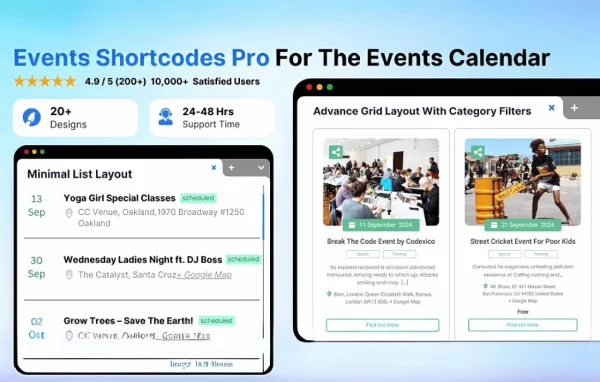
Events Shortcodes Pro by Cool Plugins is a WordPress plugin that adds shortcodes and ready-made templates to The Events Calendar. It lets you display your events as lists, grids, calendars, sliders and countdowns, and place them in posts, pages or widgets without writing code.
- Version
- 4.5.4
- Released
- Sep 16, 2026
- Developer
- Cool Plugins
- Type
- WordPress plugin
- Requires
- The Events Calendar
- Licence
- GPL
- Included in
- Every plan, or $3.99 on its own
What’s new in Events Shortcodes For The Events Calendar 4.5.4
Version 4.5.4 · Sep 16, 2026
Latest
- ImprovedGet Started onboarding flow and Bricks Events Widget panel.
- FixedFatal error compatibility issue with PHP 7.4.
What it does
The Events Calendar handles event data well, but its default views may not match the look of every site or fit every spot where you want events to appear. This plugin works on top of The Events Calendar, which it requires, and gives you a set of shortcodes that pull your existing event data into different layouts. You pick a template, drop the shortcode where you want it, and the events show up in that style.
You control which details appear, including date and time formats, categories, venues and custom fields, and you can adjust colors, fonts and layouts to suit your branding. Filters by date, category, venue or organizer help you show only the events that matter on a given page. The templates are responsive, and the plugin handles recurring events and upcoming event countdowns. It suits community groups, venues, workshop hosts and businesses running conferences.
Best for
- Sites already running The Events Calendar
- Community groups, venues and festival organizers
- Agencies building event pages for clients
Features
Shortcodes for event display
Place events in posts, pages, widgets or custom post types with simple shortcodes, so your schedule can appear wherever it is useful on your site.
Multiple layout templates
Choose from list, grid, calendar and slider templates to present events in the format that fits each page and your overall site design.
Filtering by event details
Narrow the events shown by date, category, venue or organizer, which helps you build focused listings such as one venue's upcoming shows.
Control over displayed data
Decide which event details appear, including date formats, categories, venues and custom fields, so each listing shows only the information you want.
Style customization
Adjust date and time formats, colors, fonts and layouts so event displays match your branding without editing any code.
Recurring events and countdowns
Display recurring events and add countdowns to upcoming events, giving visitors a clear sense of when the next date is coming up.
Responsive templates
The templates adapt to different screen sizes, so event listings remain readable on desktops, tablets and smartphones.
Events Shortcodes For The Events Calendar older versions
- 4.5.1Sep 41 improvement
- 4.5.0Aug 202 new, 1 improvement, 1 removal
- 4.4.0Jul 281 new, 1 improvement
- 4.3.2Jul 12
- 4.3.0Jul 2
- 4.2.1May 13
- 4.2.0Apr 17
- 4.1.4Mar 10
- 4.1.3Mar 4
- 4.1.2Mar 3
Members and buyers of this product can download older versions.
25 older versions in all. If you need one that is not listed, ask support.
Questions about Events Shortcodes For The Events Calendar
Does this work without The Events Calendar?
No. The plugin is built as an add-on for The Events Calendar and uses the event data you manage there. You need The Events Calendar active on your site, and this plugin then supplies the shortcodes and templates for displaying those events.
What kinds of event layouts can I create?
You can show events as lists, grids, calendars and sliders, and you can add countdowns for upcoming events. Each layout is placed with a shortcode, so you can use different styles on different pages or posts.
Can I show only certain events on a page?
Yes. You can filter events by date, category, venue or organizer. That makes it practical to build pages such as a single venue's schedule, a category of workshops or a list of only upcoming dates.
Do I need coding skills to match the displays to my site?
No coding is needed. You can customize date and time formats, colors, fonts and layouts, and choose which event details appear, including categories, venues and custom fields, so the listings fit your site's style.
Is Events Shortcodes For The Events Calendar free?
The code of Events Shortcodes For The Events Calendar is licensed under the GPL, so anyone may use, change and share it. GPL Feast is a paid service: a plan or a single purchase gives you the download and automatic updates. The developer's own support, licence key and online services are not included.
Which version of Events Shortcodes For The Events Calendar is this?
Version 4.5.4, released Sep 16, 2026. New versions appear here when the developer publishes them, and members get them as automatic updates.
How do I update Events Shortcodes For The Events Calendar?
Install the free GPL Feast Updater on your site and connect it with your API key. It installs new versions of Events Shortcodes For The Events Calendar automatically and keeps a backup, so you can roll back.
What does Events Shortcodes For The Events Calendar need?
Events Shortcodes For The Events Calendar needs The Events Calendar installed and active.
More from Cool Plugins