Plugin
Updated
Events Widgets Pro
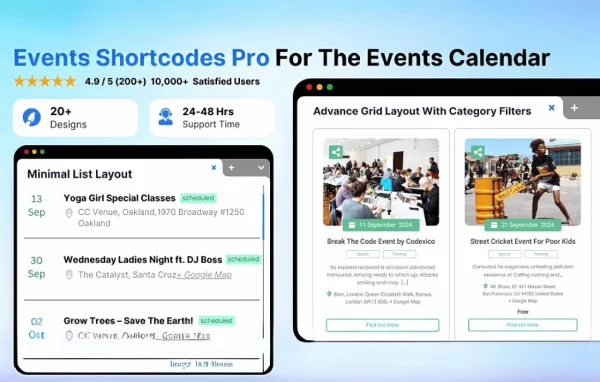
Events Widgets Pro is a WordPress plugin that connects Elementor with The Events Calendar. It gives you widgets for showing upcoming events, an interactive calendar and countdown timers, all placed and styled inside the Elementor editor.
- Version
- 3.1.7
- Released
- May 13, 2026
- Developer
- Cool Plugins
- Type
- WordPress plugin
- Requires
- The Events Calendar and Elementor
- Licence
- GPL
- Included in
- Every plan, or $4.79 on its own
What’s new in Events Widgets Pro 3.1.7
Version 3.1.7 · May 13, 2026
Latest
- NewLink target option for the Website URL widget.
- ImprovedUpdated and improved license handling.
What it does
The Events Calendar handles event data well, but placing that data into custom Elementor layouts can take extra work or code. This plugin fills that gap with a set of event widgets you drag into any Elementor page. It suits community groups listing meetups, businesses promoting workshops and venues announcing live shows. Both The Events Calendar and Elementor are required, since the widgets pull events from one and are built with the other.
Once active, the widgets appear in Elementor alongside the rest of your elements. You can add an upcoming events list, a calendar visitors can browse by date, or a countdown timer leading up to a specific event. Style controls let you match colors and layout to your site's branding, and event details reflect what is stored in The Events Calendar without manual refreshes. Layouts are responsive, and the plugin supports RTL languages and accessibility standards.
Best for
- Community websites listing meetups and local gatherings
- Businesses promoting workshops, classes or training sessions
- Venues and entertainment sites announcing live shows
Features
Upcoming events list widget
Display a list of upcoming events from The Events Calendar on any Elementor page, placed with the drag and drop editor and no coding needed.
Interactive event calendar
Add a calendar widget that lets visitors move through dates and see which events are scheduled, right on the page where you place it.
Event countdown timers
Place a countdown timer that counts down to an event, useful for drawing attention to registrations or ticket sales before a start date.
Style controls for branding
Adjust the look of each event widget with style options so the lists, calendar and timers match your site's colors and design.
Live event information
Widgets show current event details from The Events Calendar, so changes to your events appear without manually refreshing or rebuilding the page.
Responsive layouts
Event widgets use mobile-friendly layouts that adapt to phones, tablets and desktops, keeping your event listings readable on every screen size.
RTL and accessibility support
The plugin supports right-to-left languages and follows accessibility standards, which helps multilingual sites and visitors using assistive technology.
Website URL link target
The Website URL widget includes a link target option, letting you choose how event website links open for visitors.
Events Widgets Pro older versions
- 3.0.1Dec 7, 20251 improvement
Members and buyers of this product can download older versions.
Questions about Events Widgets Pro
Which plugins do I need to use this?
You need both The Events Calendar and Elementor. The Events Calendar stores and manages your events, and Elementor provides the page builder where the event widgets are added and styled.
Do I need to know how to code to set up the widgets?
No. The widgets are inserted and styled within Elementor's drag and drop interface, so you can build event lists, calendars and countdown timers using the editor's visual controls.
Will the event widgets work on mobile devices?
Yes. The widgets use fully responsive, mobile-friendly layouts, so event lists, the calendar and countdown timers adjust to different screen sizes.
Can I use it on a site in a right-to-left language?
Yes. The plugin supports RTL languages, and it also follows accessibility standards to give all visitors an inclusive experience when browsing your events.
Is Events Widgets Pro free?
The code of Events Widgets Pro is licensed under the GPL, so anyone may use, change and share it. GPL Feast is a paid service: a plan or a single purchase gives you the download and automatic updates. The developer's own support, licence key and online services are not included.
Which version of Events Widgets Pro is this?
Version 3.1.7, released May 13, 2026. New versions appear here when the developer publishes them, and members get them as automatic updates.
How do I update Events Widgets Pro?
Install the free GPL Feast Updater on your site and connect it with your API key. It installs new versions of Events Widgets Pro automatically and keeps a backup, so you can roll back.
What does Events Widgets Pro need?
Events Widgets Pro needs The Events Calendar and Elementor installed and active.
More from Cool Plugins