
Plugin
Updated
Express Shop Pro
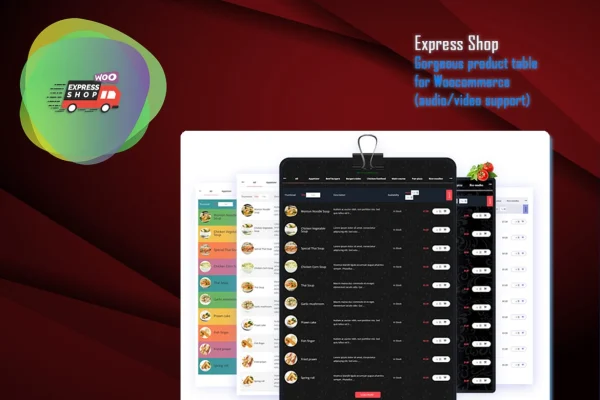
Express Shop for WooCommerce is a WordPress plugin that shows your store's products in a single responsive product table on one page. Customers can search, filter, sort and add several items to the cart without moving between pages. It requires WooCommerce.
- Version
- 9.6.4
- Released
- Aug 26, 2026
- Type
- WordPress plugin
- Requires
- WooCommerce
- Licence
- GPL
- Included in
- Every plan, or $3.99 on its own
What’s new in Express Shop Pro 9.6.4
Version 9.6.4 · Aug 26, 2026
Latest
What it does
A standard WooCommerce shop spreads products across category pages and single product pages, which slows things down when a customer wants many items at once. Express Shop Pro gathers your products into one table so shoppers can scan everything in a single view. This layout fits restaurants posting an online menu, grocery shops, wholesalers taking bulk orders and stores selling digital media, where buyers often know what they want and need to pick it quickly.
The table runs on WooCommerce, so your product management and checkout stay where they are. Live search and AJAX filtering and sorting update the list without page reloads, and AJAX add to cart buttons let customers add items in place. You can include audio and video columns for product samples, demos or menu clips, and present the catalog in tabs. The plugin is described as compatible with any WordPress theme, and the table is responsive across desktops, tablets and phones.
Best for
- Restaurants offering an online menu through WooCommerce
- Wholesale stores where customers order many items at once
- Shops selling music, audio or video products
Features
One page store layout
Displays your WooCommerce products together on a single page, so customers can browse the whole catalog without clicking through separate category or product pages.
Responsive product table
Products appear in a table layout that adapts to desktops, tablets and mobile phones, which suits tablet ordering for restaurant menus.
Live product search
Shoppers type into a search field and see matching products right away, helping them find specific items in a large catalog.
AJAX filtering and sorting
Customers can filter and sort the product table in real time, with results updating on the page without a reload.
AJAX add to cart
Add to cart buttons work in place, so buyers can add multiple products to their cart quickly without page reloads between items.
Audio and video columns
Add audio and video columns to the table to present product samples, demos or menu clips alongside the rest of the product details.
Tabbed product catalog
Organize products into tabs within the catalog, giving customers a tidy way to move between groups of items on the same page.
Questions about Express Shop Pro
Does this work with my current WordPress theme?
The plugin is described as compatible with any WordPress theme. It places your WooCommerce products into its own product table, so it is intended to sit inside your existing design without replacing your theme.
Can customers add several products without leaving the page?
Yes. The add to cart buttons use AJAX, so items are added to the cart instantly without a page reload. Combined with the one page table, this makes bulk ordering faster for wholesale buyers and repeat customers.
Can I use it as a restaurant menu?
Yes, restaurants and food menus are one of the main uses. You can list dishes in a responsive, tablet friendly table, let customers filter and search the menu, and take orders through WooCommerce checkout.
Can I show audio or video for my products?
The table supports audio and video columns, which you can use for music samples, product demos or menu clips. This is handy for digital media stores where buyers want to preview before purchasing.
Is Express Shop Pro free?
The code of Express Shop Pro is licensed under the GPL, so anyone may use, change and share it. GPL Feast is a paid service: a plan or a single purchase gives you the download and automatic updates. The developer's own support, licence key and online services are not included.
Which version of Express Shop Pro is this?
Version 9.6.4, released Aug 26, 2026. New versions appear here when the developer publishes them, and members get them as automatic updates.
How do I update Express Shop Pro?
Install the free GPL Feast Updater on your site and connect it with your API key. It installs new versions of Express Shop Pro automatically and keeps a backup, so you can roll back.
What does Express Shop Pro need?
Express Shop Pro needs WooCommerce installed and active.
You might also like






