
Plugin
Updated
FileBird Pro
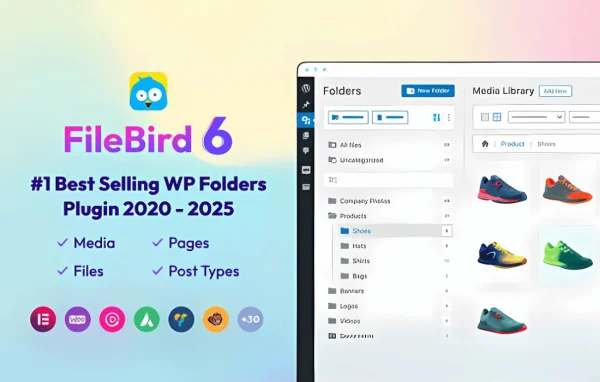
FileBird Pro by Ninja Team is a WordPress plugin that adds virtual folders to your media library. You can sort images, videos, audio and documents into folders and subfolders with drag and drop, so files are easier to find as your library grows.
- Version
- 6.5.9
- Released
- Oct 13, 2026
- Developer
- Ninja Team
- Type
- WordPress plugin
- Licence
- GPL
- Included in
- Every plan, or $3.99 on its own
What’s new in FileBird Pro 6.5.9
Version 6.5.9 · Oct 13, 2026
Latest
- NewBackup management
- ImprovedAccessibility of the folder tree and settings page
- ImprovedSecurity (thanks to George Theodoridis)
- FixedConflict with WP Duplicate Page
- FixedFolder download producing a corrupted zip on folders with many files (Pro version)
What it does
Over time, the WordPress media library fills up with images, videos, PDFs and other files, and the default view gives you few ways to sort them. Finding one picture among hundreds can mean a lot of scrolling. This plugin adds virtual folders inside the media library, so you can group files the way you would on a desktop computer. The folders are virtual, which means they organize how files appear in the library without changing where WordPress stores them.
You create, rename and arrange folders through a drag-and-drop interface, and you can nest subfolders as deep as you need with no limit on the number of folders. Search and filter options help you locate folders or individual items quickly. It works with sites that use multilingual plugins, and user role permissions let you decide who can create or edit folders. Moving media and posts into folders also works on touch devices, and a gallery module is available for Divi Builder.
Best for
- Bloggers with large, growing image libraries
- Business sites storing many documents and media files
- Agencies and teams sharing one WordPress site
Features
Drag-and-drop folder management
Create, rename and organize folders, then drag media files into them directly inside the WordPress media library, without leaving the screen you already use.
Unlimited nested folders
Build as many folders and subfolders as your content needs, so you can group files by project, client, post type or any structure you prefer.
All media types supported
Sort images, videos, audio files, PDFs and other documents into the same folder system, keeping every kind of upload in one organized place.
Folder search and filtering
Use search and filter options to find a specific folder or media item quickly, which helps a lot once the library holds many files.
User role permissions
Choose which user roles can create or edit folders, giving site owners control over the folder structure when several people work on the same site.
Multilingual site support
Works alongside popular multilingual plugins, so you can keep media organized on sites that publish content in more than one language.
Touch device support
Move media and posts into folders on touch devices, so organizing files works on tablets as well as on a desktop browser.
Gallery module for Divi Builder
Includes a FileBird Gallery module for Divi Builder, letting you build image galleries on Divi pages from the folders you have set up.
FileBird Pro older versions
- 6.5.8Aug 222 new, 1 improvement, 3 fixes
- 6.5.7Jul 271 new, 3 improvements, 3 fixes
- 6.5.5Jun 201 fix
- 6.5.4May 23
- 6.5.3May 11
- 6.5.2Dec 5, 2025
- 6.5.1Oct 22, 2025
- 6.5.0Oct 17, 2025
- 6.4.9Aug 5, 2025
- 6.4.8Apr 19, 2025
Members and buyers of this product can download older versions.
60 older versions in all. If you need one that is not listed, ask support.
Questions about FileBird Pro
Does organizing files into folders change their URLs?
The folders are virtual and exist inside the media library view. They help you group and find files, while the files themselves stay where WordPress normally stores them, so organizing them into folders does not move the actual files.
Can I organize files other than images?
Yes. The plugin handles all media types in the library, including videos, audio files, PDFs and other documents. You can mix these in any folder or keep each type in its own folder, depending on how you like to work.
Can I limit who is allowed to change the folder structure?
Yes. User role permissions let you control which roles can create or edit folders. This is useful on team sites where you want editors or contributors to use the folders without rearranging the structure everyone relies on.
Will it work on a multilingual site?
The plugin is described as working with popular multilingual plugins, so you can manage your media library in folders on sites that serve content in multiple languages.
Is FileBird Pro free?
The code of FileBird Pro is licensed under the GPL, so anyone may use, change and share it. GPL Feast is a paid service: a plan or a single purchase gives you the download and automatic updates. The developer's own support, licence key and online services are not included.
Which version of FileBird Pro is this?
Version 6.5.9, released Oct 13, 2026. New versions appear here when the developer publishes them, and members get them as automatic updates.
How do I update FileBird Pro?
Install the free GPL Feast Updater on your site and connect it with your API key. It installs new versions of FileBird Pro automatically and keeps a backup, so you can roll back.
You might also like






