
Plugin
Updated
Fire Call
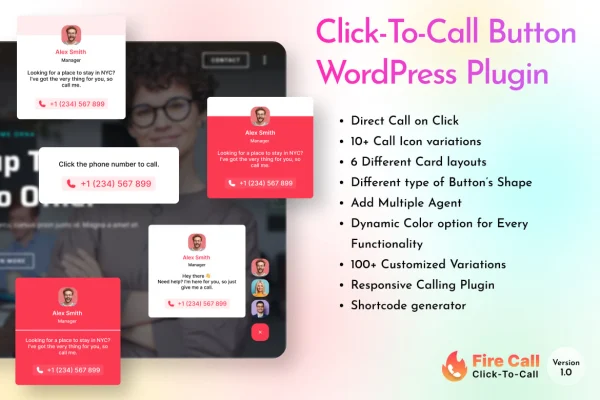
Fire Call is a WordPress plugin that places a floating click-to-call button on your site. Visitors tap it and can phone your business directly. You can add your name, title and a short message without writing any code.
- Version
- 2.0.0
- Released
- May 2, 2023
- Type
- WordPress plugin
- Licence
- GPL
- Included in
- Every plan, or $3.99 on its own
What’s new in Fire Call 2.0
Version 2.0 · Nov 10, 2022
Latest
- NewKeep Interface Design Under Your Control (You can choose either a Phone Number or a Custom URL)
- NewYou Can Display The Button On Devices As Per You Want (Desktop OR Mobile OR Both)
- NewYou Can Display Button Anywhere You Like To Display it (Any Page of the Website)
- ImprovedYou Can Change Button Type Plus Call To Action Text (Icon OR Icon + Text OR Text)
What it does
Many visitors who want to talk to a business will not hunt for a phone number in a footer or contact page. This plugin keeps a call option on screen as people browse, so reaching you takes a single tap. It suits businesses that handle consultations, bookings or questions by phone and want that path to be obvious on every page. The button is meant to fit in with your existing theme.
When a visitor clicks the floating button, a popup opens with your details and a prompt to call. From the settings you can change the button text, add your name and designation, and write your own call-to-action lines. The short description also mentions styling and placement options and analytics for tracking calls. The button is responsive and retina ready, and the HTML, CSS and JS files leave room for developers who want to make further changes.
Best for
- Local service businesses that take customer calls
- Consultants and agents who book appointments by phone
- Freelancers adding call buttons to client sites
Features
Floating call button
A call button stays visible as visitors scroll and move between pages, so the option to phone your business is always within reach.
Popup call interface
Clicking the button opens a popup that shows your contact details along with a prompt encouraging the visitor to place the call.
Personal details and messages
Add your name and designation, change the button text, and write your own call-to-action lines so the popup matches your business.
No coding needed
All of the customization is handled through the plugin settings, so site owners can set up and adjust the button without touching code.
Styles and placement
Customizable button styles and placement options let you choose how the call button looks and where it sits on your pages.
Call tracking analytics
Built-in analytics help you keep an eye on calls started from the button, giving a sense of how often visitors use it.
Responsive and retina ready
The button is built to display clearly and work properly on smartphones, tablets, desktops and high-resolution retina screens.
Editable HTML, CSS and JS
The plugin includes HTML, CSS and JS files, which gives developers a starting point for deeper tweaks to fit specific site needs.
Questions about Fire Call
Will the call button work with my current theme?
The plugin is described as compatible with WordPress themes in general. The button floats over your existing design, and you can adjust its style and placement so it sits comfortably alongside your theme's layout.
Can I show my name and job title in the popup?
Yes. You can add your name and designation, along with custom call-to-action lines and button text. These appear in the popup that opens when a visitor clicks the floating button, and none of it requires coding.
Does the button look right on phones?
The button is responsive and retina ready, so it is designed to look sharp and work properly on smartphones, tablets and high-resolution displays as well as on desktop screens.
Can I see how many people use the button to call?
Fire Call includes analytics for tracking calls made through the button. This gives you a way to check how often visitors are using it to reach your business by phone.
Is Fire Call free?
The code of Fire Call is licensed under the GPL, so anyone may use, change and share it. GPL Feast is a paid service: a plan or a single purchase gives you the download and automatic updates. The developer's own support, licence key and online services are not included.
Which version of Fire Call is this?
Version 2.0.0, released May 2, 2023. New versions appear here when the developer publishes them, and members get them as automatic updates.
How do I update Fire Call?
Install the free GPL Feast Updater on your site and connect it with your API key. It installs new versions of Fire Call automatically and keeps a backup, so you can roll back.
You might also like






