
Plugin
Updated
Fixed TOC
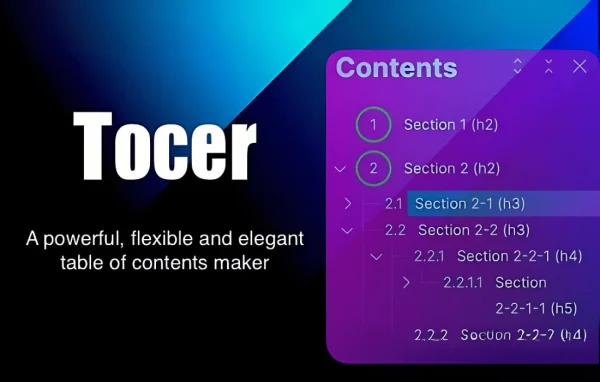
Tocer (Fixed TOC) by wphigh is a WordPress plugin that adds a table of contents to your posts and pages. It builds the list from your headings and keeps it fixed on screen as readers scroll, so they can jump between sections of long content.
- Version
- 4.2.3
- Released
- Aug 26, 2025
- Developer
- wphigh
- Type
- WordPress plugin
- Licence
- GPL
- Included in
- Every plan, or $4.79 on its own
What’s new in Fixed TOC 4.2.3
Version 4.2.3 · Aug 26, 2025
Latest
What it does
Long articles are hard to move around in. Readers who want one section often scroll past everything else to find it, and many give up. This plugin solves that by generating a table of contents from the headings already in your article, with support for multiple heading levels. You write your content as usual, and the list of sections appears automatically, so there is no manual linking or editing to keep in sync.
The table of contents stays fixed and visible while visitors scroll, and it can be collapsed so it does not crowd the page. Nested sections can also be collapsed, letting readers expand only the parts they care about. A scrollspy feature highlights the section currently in view. You can adjust the design and positioning to fit your theme, and the layout is responsive for mobile and desktop. It works with any WordPress theme and needs no coding.
Best for
- Blogs that publish long, detailed articles
- Documentation and knowledge base sites
- Tutorial and educational content creators
Features
Automatic generation from headings
The table of contents is built from your article's headings, so you do not have to create or update section links by hand.
Fixed and collapsible panel
The table of contents stays visible as readers scroll, and it can be collapsed when they want more room for the content.
Multiple heading levels
Support for several heading levels gives readers a detailed outline of complex articles with clear parent and child sections.
Collapsible sections
Nested sections in the list can be collapsed, keeping the table of contents tidy while readers expand only the parts that interest them.
Scrollspy highlighting
The section currently in view is highlighted in the table of contents, so readers always know where they are on the page.
Custom design and positioning
You can adjust the look to match your theme and branding, and choose where the table of contents sits in your layout.
Responsive on all devices
The layout adapts to mobile and desktop screens, so visitors on phones get the same section navigation as those on larger displays.
Works with any theme
The plugin fits into any WordPress theme and requires no coding skills to set up and configure.
Fixed TOC older versions
- 4.1.0Dec 6, 2024
- 3.1.28Nov 14, 2023
- 3.1.27Apr 18, 2023
Members and buyers of this product can download older versions.
Questions about Fixed TOC
Do I have to build the table of contents manually?
No. The plugin generates the table of contents automatically from the headings in your article. It supports multiple heading levels, so a well-structured post with subheadings will produce a nested outline without any manual linking.
Will the table of contents stay on screen while visitors read?
Yes. It stays fixed and visible as readers scroll through the page. It is also collapsible, so readers can tuck it away when they want more space, and a scrollspy feature highlights the section they are currently viewing.
Can I make it match my site's design?
Yes. The design can be customized to fit your theme and branding, and positioning options let you place the table of contents where it suits your layout best. It works with any WordPress theme and needs no coding.
Does it work on mobile devices?
The plugin uses a responsive layout that works on mobile and desktop, so visitors on phones and tablets can use the table of contents to move between sections just like desktop readers.
Is Fixed TOC free?
The code of Fixed TOC is licensed under the GPL, so anyone may use, change and share it. GPL Feast is a paid service: a plan or a single purchase gives you the download and automatic updates. The developer's own support, licence key and online services are not included.
Which version of Fixed TOC is this?
Version 4.2.3, released Aug 26, 2025. New versions appear here when the developer publishes them, and members get them as automatic updates.
How do I update Fixed TOC?
Install the free GPL Feast Updater on your site and connect it with your API key. It installs new versions of Fixed TOC automatically and keeps a backup, so you can roll back.
You might also like






