
Plugin
Updated
FleekDash
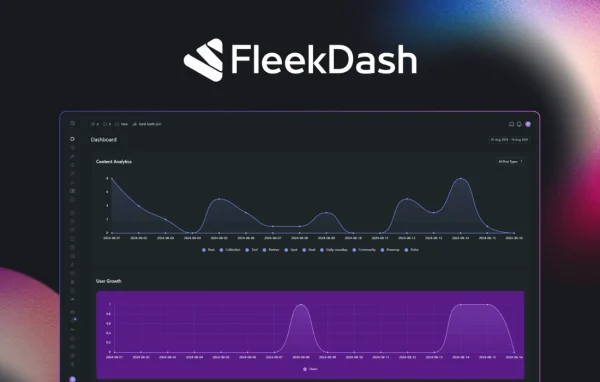
FleekDash by FunnelKit is a WordPress dashboard plugin that gathers your site stats, pending tasks and most used links into one tidy screen. It gives site owners and administrators quick access to analytics, shortcuts and common admin controls without digging through menus.
- Version
- 2.6.3.3
- Released
- Aug 6, 2026
- Developer
- FunnelKit
- Type
- WordPress plugin
- Licence
- GPL
- Included in
- Every plan, or $5.59 a year on its own
What’s new in FleekDash 2.6.3.3
Version 2.6.3.3 · Aug 6, 2026
Latest
- FixedFixed an error that occurred during admin load in some shared hosts, preventing access due to a missing component. Users previously experienced a white screen when trying to access the admin area.
What it does
The default WordPress backend spreads useful information across many menus and pages. Checking traffic, reviewing pending updates and jumping to the settings you use every day can mean a lot of clicking. This plugin pulls those pieces into a single central hub, so the things you check most often sit together on one screen with a clean, minimal layout that keeps distractions down.
Once in place, the dashboard shows an analytics overview with metrics such as traffic, user engagement and SEO stats. A task panel tracks pending updates, plugin checks and publishing schedules, and you can add shortcut links to the admin pages and tools you rely on. Role-based controls let you adjust views and permissions for different users, and the responsive layout works on desktops, tablets and phones.
Best for
- WordPress site owners who want one tidy admin hub
- Administrators managing updates, backups and publishing schedules
- Teams needing different dashboard views per user role
Features
Central dashboard hub
Brings your site stats, tasks and frequently used links together in one interface, so daily checks happen from a single screen instead of several menus.
Analytics overview
Displays website metrics such as traffic, user engagement and SEO stats right inside the dashboard, so you can review them without leaving the admin area.
Custom shortcut links
Add and organize links to the admin pages and tools you use most, giving you faster navigation around your WordPress backend.
Task management panel
Keeps track of pending updates, plugin checks and publishing schedules in one panel, making routine site maintenance easier to follow.
Quick admin controls
Handle updates, backups and settings from the main dashboard screen without navigating away to separate pages.
Role-based access
Tailor dashboard views and permissions by user role, so each person on your team sees the tools and information that suit their job.
Responsive layout
The dashboard adapts to desktops, tablets and mobile devices, so you can check on and manage your site from whichever screen you have.
Minimal design
A clean, clutter-free interface keeps attention on the stats and tools you need, which helps reduce the clutter of a busy admin area.
FleekDash older versions
- 2.6.2.4Jul 133 improvements, 1 fix
- 2.6.2.3Jul 43 improvements, 2 fixes
- 2.6.2.2Jul 32 improvements, 1 fix
- 2.6.1.1Jun 14
- 2.5.13May 28
- 2.5.5Apr 8
- 2.2.9Feb 11
Members and buyers of this product can download older versions.
Questions about FleekDash
What kind of stats can I see on the dashboard?
The analytics overview shows website metrics such as traffic, user engagement and SEO stats. They appear directly on the dashboard, so you can review how your site is doing without opening separate pages or leaving the admin area.
Can I control what different users see?
Yes. The plugin includes role-based access controls that let you tailor dashboard views and permissions according to user roles. This helps you give editors, administrators and other team members a view that fits their responsibilities.
Does it help with site maintenance tasks?
It does. A task management panel keeps track of pending updates, plugin checks and publishing schedules, and quick admin controls let you manage updates, backups and settings from the main dashboard screen.
Can I use the dashboard on my phone?
The layout is responsive and built for desktops, tablets and mobile devices. That means you can check stats, review tasks and use your shortcut links when you are away from your computer.
Is FleekDash free?
The code of FleekDash is licensed under the GPL, so anyone may use, change and share it. GPL Feast is a paid service: a plan or a single purchase gives you the download and automatic updates. The developer's own support, licence key and online services are not included.
Which version of FleekDash is this?
Version 2.6.3.3, released Aug 6, 2026. New versions appear here when the developer publishes them, and members get them as automatic updates.
How do I update FleekDash?
Install the free GPL Feast Updater on your site and connect it with your API key. It installs new versions of FleekDash automatically and keeps a backup, so you can roll back.
You might also like






