
Plugin
Updated
FullPage Switch
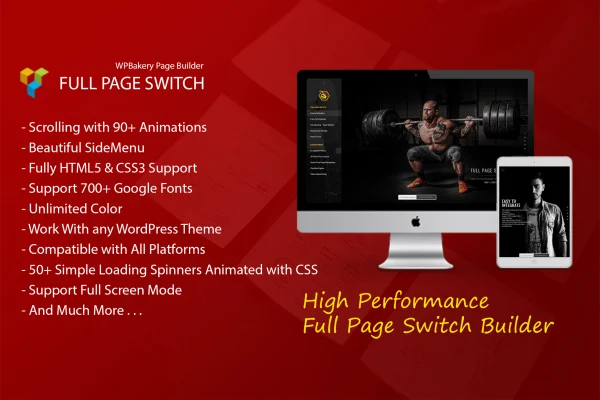
FullPage Switch is a WordPress plugin that works as an addon for WPBakery Page Builder. It turns a page into full screen sections that visitors move through one at a time, with animated transitions and an optional side menu for navigation.
- Version
- 1.1.1
- Released
- May 2, 2023
- Type
- WordPress plugin
- Licence
- GPL
- Included in
- Every plan, or $3.99 on its own
What’s new in FullPage Switch 1.1.1
Version 1.1.1 · May 2, 2023
Latest
What it does
A standard long page scrolls as one continuous column, which can make presentations, portfolios and landing pages feel loose. FullPage Switch breaks the page into full screen sections and moves between them with an animated transition each time the visitor scrolls. You build the content inside WPBakery Page Builder as usual, then choose from 97 transition animations to control how each section enters. The result suits one-page websites, product presentations and landing pages where each section should get the full screen.
Navigation is handled by a side menu with its own background settings, so visitors can jump between sections directly. Styling options include more than 700 Google Fonts, unlimited color choices, retina logo and image support, and more than 50 CSS3 loading spinners. Layout controls cover custom content width, Bootstrap container compatibility and separate content padding for mobile, tablet and desktop. The plugin is responsive, built on HTML5 and CSS3, works with any WordPress theme, and includes sample data you can import in one click to start from a working example.
Best for
- One-page websites built with WPBakery Page Builder
- Portfolios and presentations shown section by section
- Landing pages that use full screen animated sections
Features
97 transition animations
Pick from 97 distinct transition effects that play as visitors scroll from one full screen section to the next.
Side menu navigation
Add a side menu that lets visitors jump between sections, with customizable backgrounds so it matches the rest of your design.
Google Fonts and colors
Choose from more than 700 Google Fonts and set unlimited color options to keep the sections in line with your brand palette.
Animated loading spinners
Show one of more than 50 simple CSS3 animated spinners as a preloader while the page loads.
Width and container control
Set a custom content width or use Bootstrap container compatibility to control how content sits inside each section.
Padding per device
Adjust content padding separately for mobile, tablet and desktop so spacing reads well on each screen size.
Retina logo and images
Use retina versions of your logo and images so they stay sharp on high resolution displays.
One-click sample data
Import the full sample data in one click to get a working layout you can edit instead of starting from a blank page.
Questions about FullPage Switch
Do I need WPBakery Page Builder to use this?
Yes. FullPage Switch is an addon for WPBakery Page Builder, so you build your sections inside that builder and the plugin adds the full page scrolling, transitions and side menu on top.
Will it work with my current theme?
The plugin is described as working with any WordPress theme. It also includes custom content width and Bootstrap container compatibility, which helps you fit the sections to your existing layout.
How does it look on phones and tablets?
FullPage Switch is responsive across desktops, tablets and smartphones. You can set separate content padding for mobile, tablet and desktop, and retina image support keeps logos and pictures sharp on high resolution screens.
Can I start from a ready-made example?
Yes. A one-click import loads the full sample data, giving you a complete working layout with sections, transitions and menu in place that you can then edit with your own content.
Is FullPage Switch free?
The code of FullPage Switch is licensed under the GPL, so anyone may use, change and share it. GPL Feast is a paid service: a plan or a single purchase gives you the download and automatic updates. The developer's own support, licence key and online services are not included.
Which version of FullPage Switch is this?
Version 1.1.1, released May 2, 2023. New versions appear here when the developer publishes them, and members get them as automatic updates.
How do I update FullPage Switch?
Install the free GPL Feast Updater on your site and connect it with your API key. It installs new versions of FullPage Switch automatically and keeps a backup, so you can roll back.
You might also like






