
Plugin
Updated
FX Badge for WooCommerce
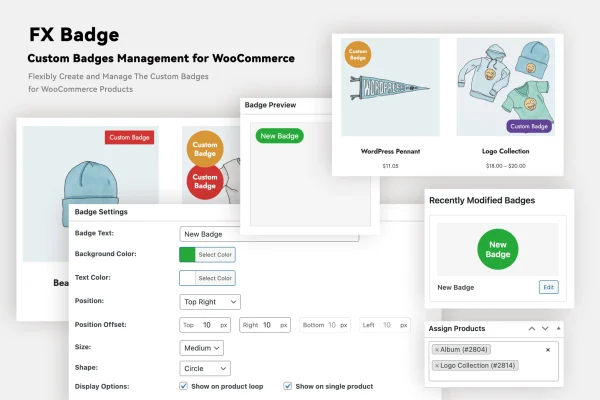
FX Badge for WooCommerce is a plugin that adds custom badges to the products in your WooCommerce store. You design labels for discounts, new arrivals, limited editions or bestsellers, then place them on product images so shoppers notice them while browsing.
- Version
- 1.0.0
- Released
- Sep 3, 2025
- Type
- WordPress plugin
- Requires
- WooCommerce
- Licence
- GPL
- Included in
- Every plan, or $3.99 on its own
What’s new in FX Badge for WooCommerce 1.0.0
Version 1.0.0 · Sep 3, 2025
Latest
What it does
Product listings in a WooCommerce shop can look alike, which makes it hard to point out a sale item or a new arrival at a glance. This plugin gives you a badge builder with drag and drop editing, a set of templates and shapes, and settings for colors, fonts, sizes and animations. You can build badges that match your brand without writing code, then position them anywhere on product images.
Badges can also be applied automatically. Dynamic rules let you show a badge based on product attributes such as price, category or stock status, so you do not have to tag each product by hand. Badges are responsive and display on desktops and phones, and the plugin supports multi-language stores. It requires WooCommerce and fits shops that run regular promotions or want clearer labels on their catalog.
Best for
- WooCommerce stores running frequent sales and promotions
- Shops highlighting new arrivals, bestsellers or limited editions
- Multi-language WooCommerce stores serving several regions
Features
Drag and drop badge builder
Create and adjust badges in a visual builder using drag and drop, so you can design labels quickly without touching any code.
Templates and shapes
Start from multiple badge templates and shapes, then adapt them to create designs that fit the style of your store.
Flexible positioning
Place badges anywhere on product images, choosing a spot that keeps them visible without getting in the way of your layout.
Dynamic badge rules
Display badges automatically based on product attributes such as price, category or stock status, which saves you from labeling products one by one.
Style controls
Set colors, fonts, sizes and animations for each badge so it lines up with your brand and the promotion you are running.
Responsive display
Badges adapt to different screen sizes, so they display properly for shoppers browsing on desktops, tablets or smartphones.
Multi-language support
Use badges in multi-language WooCommerce stores, which helps shops that serve customers in more than one language or region.
Questions about FX Badge for WooCommerce
Can badges appear on products automatically?
Yes. You can set dynamic rules that display a badge based on product attributes like price, category or stock status. Once a rule is in place, matching products show the badge without you adding it to each one manually.
Do I need coding skills to design badges?
No. Badges are built in a drag and drop builder, and you choose from templates and shapes, then adjust colors, fonts, sizes and animations through the settings. No code is needed to create or customize them.
Where on the product can I place a badge?
Badges go on product images, and you can position them anywhere on the image. This lets you pick a corner or area that stays visible while leaving the rest of the product photo clear.
Does it work on mobile devices and in other languages?
Badges use a responsive design, so they display on desktops and smartphones alike. The plugin also supports multi-language stores, making it usable in WooCommerce shops that serve customers in different languages.
Is FX Badge for WooCommerce free?
The code of FX Badge for WooCommerce is licensed under the GPL, so anyone may use, change and share it. GPL Feast is a paid service: a plan or a single purchase gives you the download and automatic updates. The developer's own support, licence key and online services are not included.
Which version of FX Badge for WooCommerce is this?
Version 1.0.0, released Sep 3, 2025. New versions appear here when the developer publishes them, and members get them as automatic updates.
How do I update FX Badge for WooCommerce?
Install the free GPL Feast Updater on your site and connect it with your API key. It installs new versions of FX Badge for WooCommerce automatically and keeps a backup, so you can roll back.
What does FX Badge for WooCommerce need?
FX Badge for WooCommerce needs WooCommerce installed and active.
You might also like






