
Plugin
Updated
Hero - Shoutcast and Icecast Radio Player With History
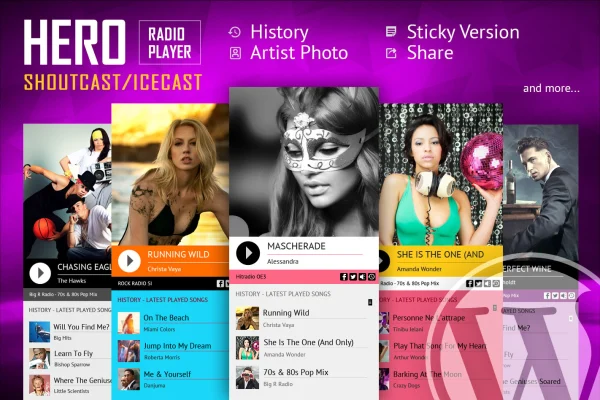
Hero - Shoutcast and Icecast Radio Player With History is a WordPress plugin that puts a live radio player on your site. It plays ShoutCast and IceCast streams, also connects to RadioJar and AzuraCast, and shows listeners the song that is currently playing along with an artist image.
- Version
- 4.4.2
- Released
- Oct 22, 2023
- Type
- WordPress plugin
- Licence
- GPL
- Included in
- Every plan, or $3.99 on its own
What’s new in Hero - Shoutcast and Icecast Radio Player With History 4.4.2
Version 4.4.2 · Oct 22, 2023
Latest
What it does
If you run an internet radio station or want live radio on your website, you need a player that connects to your stream and tells listeners what they are hearing. This plugin handles both jobs. You enter your radio stream URL, and the player takes care of playback for MP3 and AAC channels. It also fetches the current song title and an artist photo automatically, so the player stays informative without manual updates.
The player is responsive and adapts to desktops, tablets and phones, including iOS and Android devices. If your site uses a fixed layout, you can turn the responsive behavior off so the player fits your design. Several skins are available, such as black and white options, which help the player match your theme. It suits radio broadcasters, niche audio projects and anyone embedding a live stream on a WordPress site.
Best for
- Internet radio stations running ShoutCast or IceCast
- Broadcasters using RadioJar or AzuraCast hosting
- Websites embedding a live radio stream
Features
ShoutCast and IceCast support
Stream MP3 and AAC radio channels from ShoutCast and IceCast servers directly through the player on your WordPress site.
RadioJar and AzuraCast connections
Beyond ShoutCast and IceCast, the player can connect to RadioJar and AzuraCast streaming services, giving you more options for where your station is hosted.
Current song and artist display
The player automatically fetches the title of the song that is playing and shows a matching artist image, so listeners always see what is on air.
Responsive mobile layout
The layout adjusts to different screen sizes, so the player works on desktops, tablets and smartphones running iOS or Android.
Option to disable responsiveness
For sites built on fixed layouts, you can switch off the responsive behavior so the player keeps a set size within your design.
Multiple player skins
Choose from several skins, including black and white versions, to match the player's look to your site's colors and style.
Setup with a stream URL
Add your radio stream URL and the player is ready to go, which keeps configuration simple for new and experienced site owners.
Questions about Hero - Shoutcast and Icecast Radio Player With History
Which streaming servers does this player work with?
It supports ShoutCast and IceCast streams, and it can also connect to RadioJar and AzuraCast. It plays MP3 and AAC radio channels, which covers the formats most internet stations broadcast in.
Does it show what song is playing?
Yes. The player automatically fetches the title of the current song and displays an artist image alongside it, so listeners can see what is playing without you updating anything by hand.
Will the player look right on phones?
The player is responsive and adapts to screen sizes on desktops, tablets and smartphones, including iOS and Android. If your site uses a fixed layout, you can disable the responsive behavior instead.
Can I change how the player looks?
You can pick from multiple skins, such as black and white versions, to help the player blend with your site's design and branding.
Is Hero - Shoutcast and Icecast Radio Player With History free?
The code of Hero - Shoutcast and Icecast Radio Player With History is licensed under the GPL, so anyone may use, change and share it. GPL Feast is a paid service: a plan or a single purchase gives you the download and automatic updates. The developer's own support, licence key and online services are not included.
Which version of Hero - Shoutcast and Icecast Radio Player With History is this?
Version 4.4.2, released Oct 22, 2023. New versions appear here when the developer publishes them, and members get them as automatic updates.
How do I update Hero - Shoutcast and Icecast Radio Player With History?
Install the free GPL Feast Updater on your site and connect it with your API key. It installs new versions of Hero - Shoutcast and Icecast Radio Player With History automatically and keeps a backup, so you can roll back.
You might also like






