
Plugin
Updated
Horizon by Bonfire
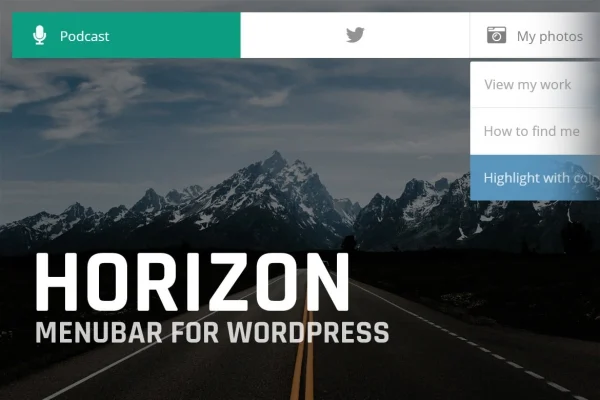
Horizon by Bonfire is a WordPress plugin that adds a minimal horizontal menubar to your site. You can place it at the top or bottom of the screen, use it as your main navigation or as a second menu, and adjust its colors and styles to match your theme.
- Version
- 3.2
- Released
- May 2, 2023
- Type
- WordPress plugin
- Licence
- GPL
- Included in
- Every plan, or $3.99 on its own
What’s new in Horizon by Bonfire 3.2
Version 3.2 · May 2, 2023
Latest
What it does
Many themes ship with a header menu that is hard to restyle or move. This plugin gives you a separate horizontal bar that sits at the top or bottom of the screen, so you can add navigation where it suits your layout without rebuilding your theme. It works with standard WordPress menus, and you can assign it to act as your primary navigation or as a secondary bar for extra links such as contact pages, categories or account areas.
Styling is handled through color and style settings, so the bar can follow your brand palette. A per post and per page override lets you show a different menu on specific content, which is handy for landing pages, campaign pages or sections that need their own links. The graphics are retina ready for sharp display on high resolution screens, and the layout is responsive across desktops, tablets and phones. Documentation is included to help with setup.
Best for
- Blogs and portfolios wanting a clean extra navigation bar
- Business websites needing top or bottom menu placement
- Online stores adding secondary links for shoppers
Features
Minimal horizontal menubar
A clean, slim horizontal navigation bar with a modern look that fits alongside most site designs without crowding the page.
Top or bottom placement
Choose whether the menubar appears at the top or the bottom of the screen, depending on what works best for your layout.
Custom colors and styles
Adjust the colors and styling of the bar so it matches your theme and brand identity instead of looking like an add-on.
Primary or secondary navigation
Use the bar as your main site menu, or keep your theme menu and add the bar as a secondary set of links.
Per page menu override
Set a different menu on individual posts or pages, so specific sections or landing pages can show navigation tailored to their content.
Retina ready graphics
Visual elements are prepared for high resolution screens, so the menubar stays crisp and sharp on modern displays.
Responsive layout
The menubar adapts to different screen sizes, keeping navigation usable on desktops, tablets and smartphones.
Questions about Horizon by Bonfire
Can I use this alongside my theme's existing menu?
Yes. The menubar can serve as your primary navigation, or you can keep your theme's header menu and use the bar as a secondary menu for additional links, placed at the top or bottom of the screen.
Can different pages show different menus?
Yes. There is a post and page specific override, so you can assign a different menu to individual posts or pages. This is useful for landing pages or content sections that need their own set of navigation links.
Will the menubar match my site's design?
You can customize the colors and styles of the bar to fit your theme and brand. Its design is minimal, so it tends to sit comfortably on business sites, blogs, portfolios and store pages.
Does it work on phones and tablets?
The menubar is responsive and adjusts to desktops, tablets and smartphones. Its graphics are also retina ready, so it looks sharp on high resolution screens.
Is Horizon by Bonfire free?
The code of Horizon by Bonfire is licensed under the GPL, so anyone may use, change and share it. GPL Feast is a paid service: a plan or a single purchase gives you the download and automatic updates. The developer's own support, licence key and online services are not included.
Which version of Horizon by Bonfire is this?
Version 3.2, released May 2, 2023. New versions appear here when the developer publishes them, and members get them as automatic updates.
How do I update Horizon by Bonfire?
Install the free GPL Feast Updater on your site and connect it with your API key. It installs new versions of Horizon by Bonfire automatically and keeps a backup, so you can roll back.
You might also like






