
Plugin
Updated
Image Caption Hover Pro
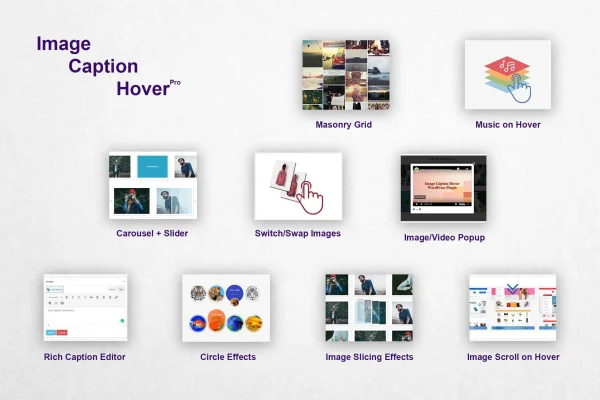
Image Caption Hover Pro is a WordPress plugin that adds interactive captions to your images. Captions appear with an animated transition when visitors hover, and you can pick from over 200 hover styles, arrange images in grids, sliders or carousels, and even play audio on hover.
- Version
- 20.1
- Released
- Jun 26, 2026
- Type
- WordPress plugin
- Licence
- GPL
- Included in
- Every plan, or $3.99 on its own
What’s new in Image Caption Hover Pro 20.1
Version 20.1 · Jun 26, 2026
Latest
- NewLive Preview of Hover Effects
- NewGutenberg Support
What it does
Plain images on a page often leave visitors guessing about what they are looking at or where to click next. This plugin places a styled caption overlay on each image that appears when someone hovers over it, so you can add a title, a short description or a link without cluttering the layout. It works for portfolio pieces, product photos, blog images and anything else where a little context helps.
You choose a hover style from a library of more than 200 animations, then style the caption text with your own fonts, colors and sizes. Images can sit in a responsive masonry grid, a slider or a carousel, and a lightbox gives visitors an enlarged view. Extras like audio on hover, image switching and scrolling, 8 border styles and touch support for phones and tablets round out the toolset.
Best for
- Photographers and designers building portfolio sites
- Online stores wanting interactive product image captions
- Bloggers who want styled, linked captions on images
Features
Over 200 hover styles
Pick from a library of more than 200 animation effects that control how captions appear when a visitor moves the cursor over an image.
Audio playback on hover
Attach custom music or a sound effect to an image so it plays whenever a visitor hovers over it, adding sound to the visual effect.
Grid, slider and carousel layouts
Display your captioned images in a responsive masonry grid, a slider or a carousel, depending on how you want them arranged on the page.
Rich caption editor and links
Style caption text with custom fonts, colors and sizes to match your branding, and add clickable links that send visitors to another page.
Custom alt and title attributes
Set your own alt and title attributes for each image, which helps with accessibility and gives search engines descriptive text for your images.
Scroll and switch on hover
Make an image scroll or swap to a different image when hovered, a handy way to reveal a second view of a product or project.
Lightbox popups and borders
Open images in a lightbox popup for a larger, distraction-free view, and frame them using any of 8 different border styles.
Import and export settings
Export your image settings and import them on another site, so you can reuse the same setup across projects without rebuilding it.
Image Caption Hover Pro older versions
- 20.0Jan 271 improvement, 1 fix
Members and buyers of this product can download older versions.
Questions about Image Caption Hover Pro
Will the hover captions work on phones and tablets?
Yes. The plugin is built to be touch-ready, so hover behaviors work on smartphones and tablets, and it is compatible with modern browsers including Safari on iOS. The grid, slider and carousel layouts are responsive and adjust to different screen sizes.
Can I control how the caption text looks?
You can. The rich caption editor lets you set custom fonts, colors and sizes for caption text so it fits your branding. You can also add clickable links inside captions and choose from over 200 hover animations for how the caption appears.
How does the audio on hover feature work?
You assign custom music or a sound effect to an image, and it plays when a visitor hovers over that image. It is an optional effect you can use on specific images when you want sound to accompany the visual animation.
Can I reuse my image settings on another website?
Yes. The import and export option lets you save your image settings from one site and bring them into another. This keeps your caption styles consistent across sites and saves you from setting everything up again by hand.
Is Image Caption Hover Pro free?
The code of Image Caption Hover Pro is licensed under the GPL, so anyone may use, change and share it. GPL Feast is a paid service: a plan or a single purchase gives you the download and automatic updates. The developer's own support, licence key and online services are not included.
Which version of Image Caption Hover Pro is this?
Version 20.1, released Jun 26, 2026. New versions appear here when the developer publishes them, and members get them as automatic updates.
How do I update Image Caption Hover Pro?
Install the free GPL Feast Updater on your site and connect it with your API key. It installs new versions of Image Caption Hover Pro automatically and keeps a backup, so you can roll back.
You might also like






