
Plugin
Updated
Image Hotspot
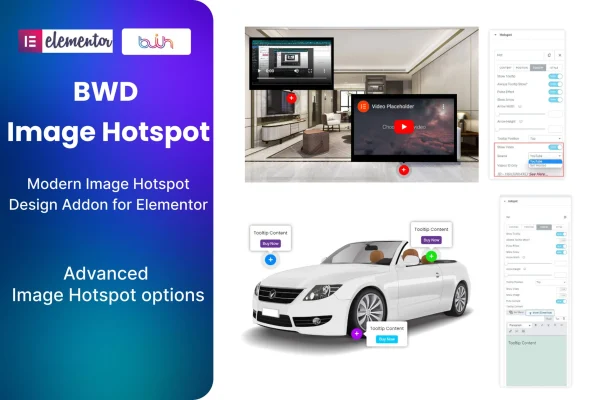
Image Hotspot is a WordPress plugin that adds an image hotspot element to the Elementor page builder. You place clickable markers on an image, and each one can open a tooltip, a video, an image or a product button.
- Version
- 1.4
- Released
- Jul 7, 2026
- Type
- WordPress plugin
- Requires
- Elementor
- Licence
- GPL
- Included in
- Every plan, or $3.99 on its own
What’s new in Image Hotspot 1.4
Version 1.4 · Jul 7, 2026
Latest
What it does
A single product photo or diagram often has more to say than a caption can hold. This plugin lets you pin small clickable markers to specific spots on an image so visitors can explore details where they appear. You drop the element into an Elementor layout, choose your image, position the hotspots and set what each one shows. No coding is needed, and you can adjust icons, tooltips and behavior to match your site's look.
The plugin requires Elementor and works with WordPress themes that use it. Hotspots are responsive and retina ready, so they display clearly on desktops, tablets and phones, and the code is W3C validated and documented. A .pot file is included for translation, which helps on sites in languages other than English. It suits product features on an online store, labeled diagrams for lessons, annotated portfolio pieces and any page where an image benefits from extra context.
Best for
- Online stores highlighting product features on photos
- Educational sites using labeled diagrams and images
- Designers and agencies building Elementor sites for clients
Features
Clickable hotspots on images
Place interactive markers anywhere on an image so visitors can click or hover to reveal extra information tied to that exact spot.
Multimedia hotspot content
Each hotspot can hold rich tooltips, videos, images or custom product buttons, letting you attach different kinds of content to one picture.
Custom icons and tooltips
Adjust the appearance and behavior of every hotspot, including its icon and tooltip, so the result fits your branding and content.
Built into Elementor
The hotspot element works inside the Elementor editor, so you build and arrange hotspots in the same visual workflow as the rest of your page.
Responsive and retina ready
Hotspots adapt to desktops, tablets and smartphones and display crisply on high resolution screens.
Translation ready
A .pot file is included, so you can translate the plugin's text for websites that run in other languages.
Validated, documented code
The code is W3C validated and documented, and it is built to work across major modern browsers.
Questions about Image Hotspot
Do I need Elementor to use this plugin?
Yes. The plugin works as an addon for the Elementor page builder, so Elementor must be active on your site. It is meant to work with any WordPress theme that uses Elementor.
What can I put inside a hotspot?
Hotspots can display rich tooltips, videos, images and custom product buttons. That makes them useful for explaining product details, adding media to a diagram or pointing visitors toward a product from within an image.
Will the hotspots work on phones and tablets?
Yes. The hotspots are responsive and retina ready, so they adjust to smaller screens and stay sharp on high resolution displays, from desktops down to smartphones.
Can I use it on a site that isn't in English?
Yes. The plugin is translation ready and ships with a .pot file, which you can use to translate its text into the language your site uses.
Is Image Hotspot free?
The code of Image Hotspot is licensed under the GPL, so anyone may use, change and share it. GPL Feast is a paid service: a plan or a single purchase gives you the download and automatic updates. The developer's own support, licence key and online services are not included.
Which version of Image Hotspot is this?
Version 1.4, released Jul 7, 2026. New versions appear here when the developer publishes them, and members get them as automatic updates.
How do I update Image Hotspot?
Install the free GPL Feast Updater on your site and connect it with your API key. It installs new versions of Image Hotspot automatically and keeps a backup, so you can roll back.
What does Image Hotspot need?
Image Hotspot needs Elementor installed and active.
You might also like






