
Plugin
Updated
Latest Posts Pro
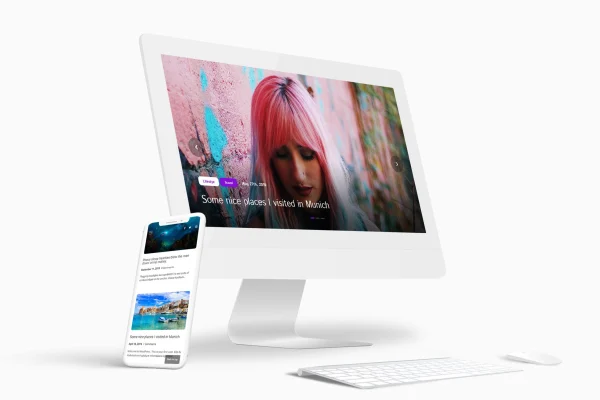
This WordPress plugin adds a latest posts block to the block editor. You can place it on any post or page and display your newest articles as a grid, a list or a touch-enabled slider, with settings for ordering, columns, spacing and pagination.
- Version
- 1.0
- Released
- Mar 12, 2024
- Type
- WordPress plugin
- Licence
- GPL
- Included in
- Every plan, or $3.99 on its own
What’s new in Latest Posts Pro 1.0
Version 1.0 · Mar 12, 2024
Latest
What it does
Many sites want a section that shows recent articles without hand-editing it every time something new goes live. Latest Posts Pro handles that with a block you add through the WordPress block editor. It pulls in your posts automatically, so the block keeps itself current as you publish. You pick the layout that fits the page: a grid for a magazine feel, a list for a simple archive look, or a slider when space is tight.
Once the block is on the page, you adjust it from its settings with no coding. Show or hide post dates and read more buttons, set a custom height for featured images, choose how many columns appear and how much gap sits between them. Posts can be sorted newest first, oldest first, or alphabetically from A to Z or Z to A. Pagination lets you set how many posts appear per page, and the layouts are responsive and retina ready.
Best for
- Personal and professional blogs
- News portals and magazine-style sites
- Content-rich sites built with the block editor
Features
Grid, list and slider layouts
Display your latest posts in a grid, a list or a carousel slider, depending on the page design and the amount of space you have.
Touch-enabled carousel
Turn a post grid into a slider that visitors can swipe through on touch devices, which keeps a long set of posts compact on the page.
Toggle dates and buttons
Choose whether each post shows its date and a read more button, so the block matches how much detail you want visible.
Custom featured image height
Set a fixed height for featured images so thumbnails line up evenly, even when the original images have different proportions.
Flexible post ordering
Sort posts from newest to oldest, oldest to newest, or alphabetically in A to Z or Z to A order.
Columns and gap settings
Control how many posts appear per row and adjust the spacing between them to fit the grid structure of your site.
Pagination controls
Set how many posts show per page so visitors can page through larger collections of content without one very long block.
Responsive, retina-ready display
Post layouts adapt to different screen sizes and render sharply on high-resolution displays.
Questions about Latest Posts Pro
Does this work with the WordPress block editor?
Yes. The plugin adds a block to the WordPress block editor, and you can insert it into any post or page. All display settings, such as layout, ordering and columns, are handled from the block itself, so no coding is needed.
Can I show posts in a slider instead of a grid?
Yes. You can switch between grid, list and carousel slider views. The slider is touch-enabled, so visitors on phones and tablets can swipe through posts, and it helps save space when you want to feature several articles in a small area.
How can I control the order of the posts?
The block offers four sorting options: newest to oldest, oldest to newest, alphabetical from A to Z, and alphabetical from Z to A. Pick the one that suits the section, such as recent news first or an alphabetical index of guides.
Will the posts look right on mobile devices?
The layouts are responsive and retina ready, so they adjust to different screen sizes and stay sharp on high-resolution screens. You can also fine-tune columns, spacing and featured image height to keep the block tidy.
Is Latest Posts Pro free?
The code of Latest Posts Pro is licensed under the GPL, so anyone may use, change and share it. GPL Feast is a paid service: a plan or a single purchase gives you the download and automatic updates. The developer's own support, licence key and online services are not included.
Which version of Latest Posts Pro is this?
Version 1.0, released Mar 12, 2024. New versions appear here when the developer publishes them, and members get them as automatic updates.
How do I update Latest Posts Pro?
Install the free GPL Feast Updater on your site and connect it with your API key. It installs new versions of Latest Posts Pro automatically and keeps a backup, so you can roll back.
You might also like






